
How to Use AI in Everyday Life: 15 Practical Examples

You can use AI in everyday life to plan your day, research products, write emails, organize information, understand documents, and make better-informed decisions. AI assistants can also help with travel planning, learning new skills, and everyday questions.
Some of the most useful ways to use AI include:
- Planning your day and organizing tasks.
- Researching products before buying.
- Writing emails, messages, and other content.
- Planning trips and finding places to visit.
- Reading and summarizing documents.
- Learning new skills and exploring unfamiliar topics.
- Comparing options before making decisions.
You can do many of these things with general-purpose AI assistants such as Luminary, ChatGPT, Gemini, and Claude.
Luminary brings conversations, real-time search, research, writing, document analysis, and content creation into one platform. It also provides structured answers with relevant images, videos, and sources, so you can explore information in more detail when needed.
You probably use AI more often than you realize. It helps filter unwanted emails, recommends videos, finds faster routes, and suggests what to type next.
But AI can do much more than work quietly in the background.
Today, you can ask an AI assistant to plan a trip, compare products, explain a confusing document, write a message, or help you think through a decision. You don't need technical skills or complicated instructions to get started.
What matters is knowing where AI can actually make your day easier.
In this guide, we'll look at 15 practical ways to use AI in everyday life, with examples and prompts you can try yourself.
Where Do We Already Use AI in Everyday Life?
AI is already part of many things we use without thinking about it.
When Google Maps suggests a faster route, AI can help predict traffic and estimate travel times. Streaming platforms recommend movies based on viewing patterns. Email services identify spam, while shopping websites suggest products you might like.
Some common examples include:
| Everyday Activity | How AI Is Used |
|---|---|
| Navigation | Predicting traffic and estimating travel times |
| Online shopping | Recommending products and personalizing search results |
| Detecting spam and suggesting replies | |
| Entertainment | Recommending videos, music, and movies |
| Smartphones | Improving photos and supporting voice assistants |
| Banking | Detecting unusual transactions and possible fraud |
| Customer service | Answering common questions through chatbots |
These are examples of AI working inside existing services.
Generative AI assistants work differently. Instead of only using features built into an app, you can describe what you need and ask AI to help.
That opens up many more possibilities.
15 Practical Ways to Use AI in Everyday Life
You don't have to change your routine to use AI. Start with something you already spend time doing, whether that's writing a message, searching for information, or planning your weekend.
1. Plan Your Day and Organize Tasks
Some mornings, the problem isn't having too much to do. It's deciding where to start.
An AI assistant can help you turn a messy task list into a more manageable plan.
For example, you might have a meeting at 11 AM, a report due in the evening, a few household tasks, and some personal work you've been putting off.
Give AI the list, explain which tasks matter most, and ask it to suggest an order.
Try this prompt:
"Here's everything I need to do today: [task list]. Help me organize these tasks by priority and create a realistic schedule with breaks."
You can change the plan as new things come up.
Just remember that creating a schedule in a chat doesn't automatically update your calendar. That requires a supported calendar integration.
2. Research Products Before Buying
Buying something expensive often means opening several websites, comparing specifications, reading reviews, and trying to work out which details actually matter.
AI can help organize that research.
Suppose you're looking for a smartphone under $500. You care about the camera, battery life, and how long the phone will receive software updates.
Instead of searching for every specification separately, you can ask AI to compare suitable options and explain the differences.
Try this prompt:
"Compare the best smartphones under $500 for photography and battery life. Include current specifications, important drawbacks, and sources."
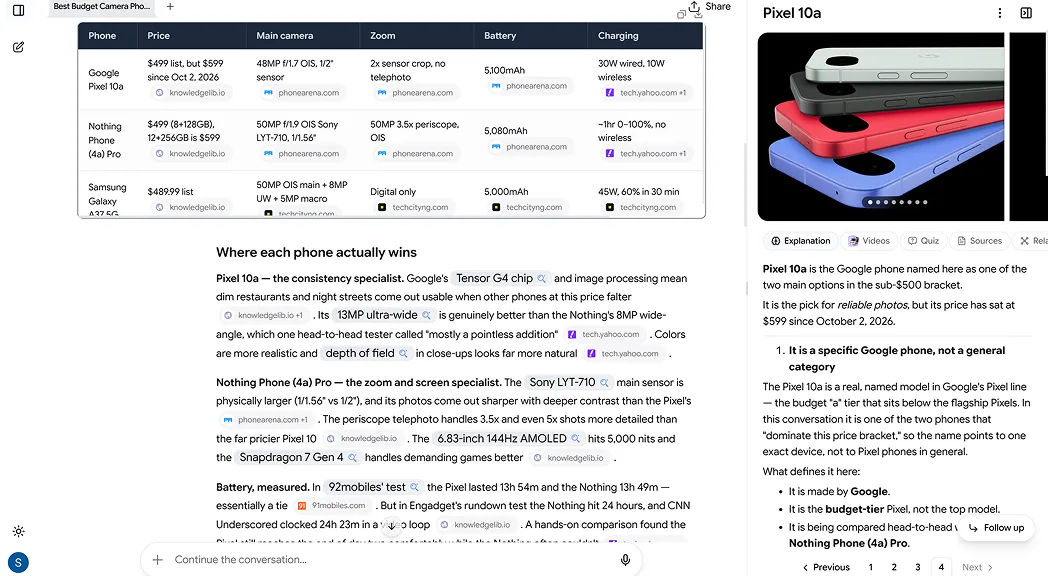
In Luminary, you can research current product options, compare specifications, check supporting sources, and explore unfamiliar features directly within the answer.
Always confirm current prices, availability, and product details before purchasing.
3. Write Better Emails and Messages
Writing a message isn't always difficult because you don't know what to say. Sometimes you know exactly what you mean but can't find the right words.
AI can help with that.
You can use it to write a polite follow-up email, improve a job application message, decline an invitation, or make a long message shorter.
For example, imagine you sent an application last week but haven't received a response.
Try this prompt:
"Write a short, polite follow-up email about a job application I submitted last week. Keep it professional, friendly, and not too formal."
You can also paste your own draft and ask AI to improve the wording while keeping your original meaning.
Before sending anything, check that it sounds like you and includes the correct details.
4. Plan a Trip or Weekend Getaway
Travel planning can be fun until you have too many options.
You need to choose where to go, what to see, where to stay, and how everything fits within your budget.
An AI assistant can help you build an initial plan based on your preferences.
Let's say you want to spend three days in Tokyo and prefer food, museums, and local neighborhoods over crowded tourist attractions.
Try this prompt:
"Help me plan a three-day Tokyo trip focused on food, museums, and interesting neighborhoods. Group nearby attractions together and suggest a realistic daily itinerary."
AI can also help you compare destinations, understand local transport, and research travel requirements.
For current information, use an assistant with web search and verify opening hours, entry requirements, availability, and prices on official websites.
5. Understand News and Current Events
News stories often mention people, organizations, laws, or events you may not know much about.
That can make it difficult to understand why something matters.
AI can help fill in the background.
For example, if you read about a new interest-rate decision, you could ask what interest rates are, why central banks change them, and how the decision might affect borrowing or savings.
Try this prompt:
"Explain the latest interest-rate decision, why it happened, and how it could affect ordinary people. Separate confirmed facts from predictions and include reliable sources."
This is one area where real-time search matters.
You should also open the original reporting. AI is helpful for understanding a story, but its summary shouldn't be your only source.
6. Read and Summarize Long Documents
Not everyone has time to read a 60-page report, a long policy document, or every page of a product manual.
AI can help you find the information you need.
You might upload a PDF and ask for a summary, a list of important points, or an explanation of a specific section.
Try this prompt:
"Summarize this document in plain language. Explain the five most important points, identify anything that needs my attention, and show which sections support your summary."
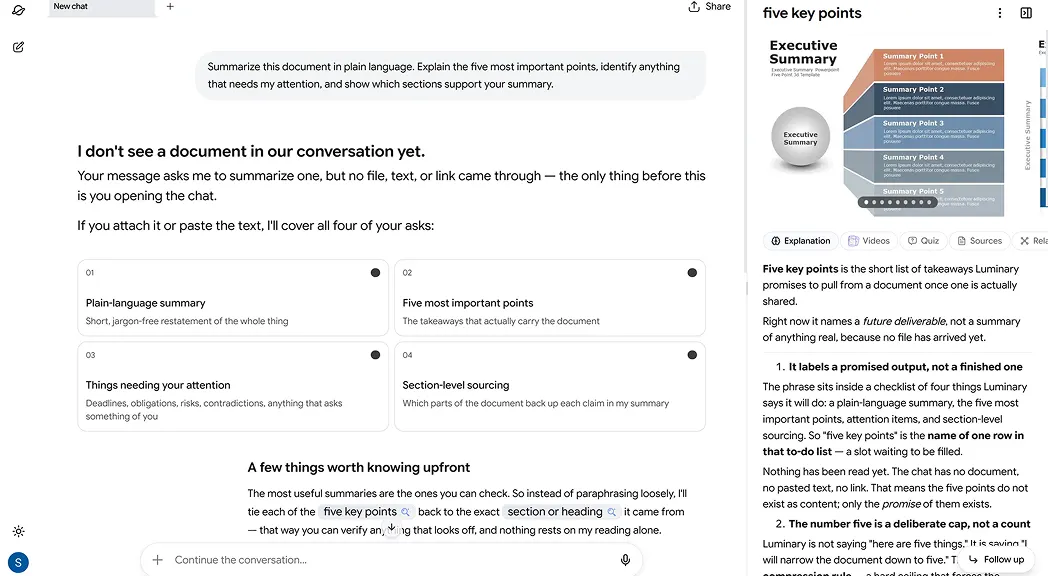
Luminary lets you upload documents, summarize important information, ask follow-up questions, and examine specific passages while keeping the original file open beside your conversation.
This can be helpful when reviewing reports, instructions, agreements, and research papers.
For anything important, check the summary against the original document. AI can miss details or interpret wording incorrectly.
7. Learn a New Skill
Maybe you want to learn photography, improve your cooking, start coding, or understand how investing works.
AI can help you begin without making the subject feel overwhelming.
Instead of asking for everything about a topic, tell the assistant what you already know and what you want to achieve.
Try this prompt:
"I want to learn photography using my smartphone. I'm a complete beginner. Create a seven-day plan with one small practical exercise each day."
As you practice, ask follow-up questions about anything you find confusing.
You can also request examples, compare different approaches, and ask AI to explain mistakes.
The goal isn't to let AI do the learning for you. It's to make it easier to find useful explanations and practice regularly.
For more ideas, read our guide on how to explore any topic with AI.
8. Brainstorm Ideas and Creative Projects
Everyone gets stuck sometimes.
You might need a birthday gift idea, a name for a new project, a social media caption, or a different way to approach a problem.
AI is useful for generating possible directions.
Let's say you're planning a birthday celebration at home and want to avoid the usual decorations and activities.
Try this prompt:
"Suggest 10 creative birthday celebration ideas for six friends at home. Keep the budget under $150 and focus on activities everyone can enjoy."
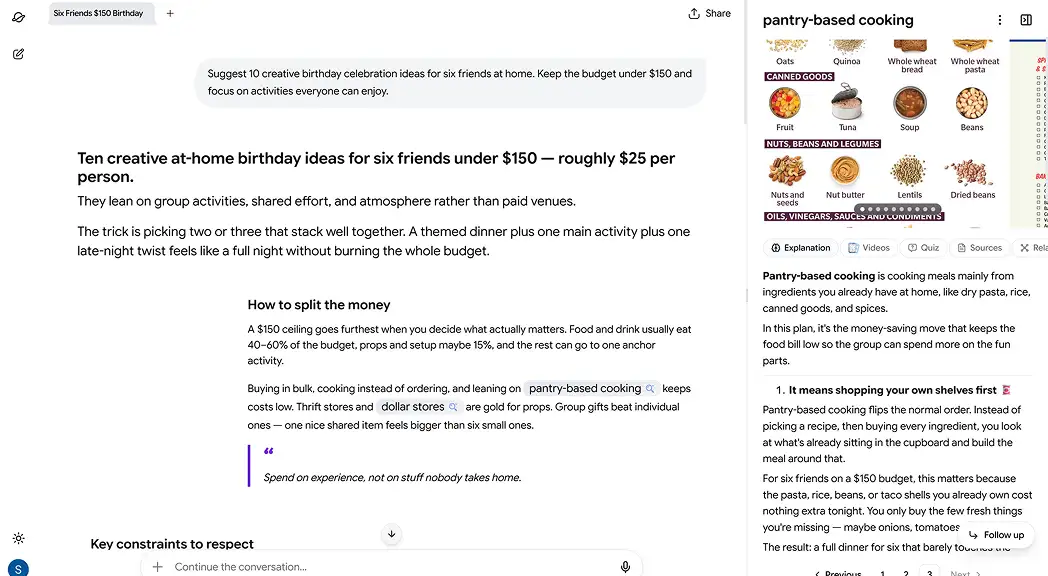
The first suggestions might not be perfect. That's fine.
Tell the assistant what you like, reject ideas that don't fit, and ask it to build on your favorites.
Brainstorming works better when AI is part of the conversation rather than something you expect to give one perfect answer.
9. Understand Your Spending and Budget
AI can help you organize financial information and understand what different numbers mean.
For example, you could give it a list of monthly expenses and ask it to group them into categories or show where your spending is highest.
You could also ask it to explain terms such as APR, compound interest, or loan repayment schedules.
Try this prompt:
"My monthly income is $3,000. My rent is $1,000, groceries are $350, transport is $200, and other expenses are $450. Help me create a realistic budget and identify possible savings."
The assistant can help you think through different spending plans, but you should double-check calculations.
Don't share bank passwords, full account numbers, or other sensitive details in a chat. And treat AI financial suggestions as information to evaluate, not personalized professional advice.
10. Compare Options Before Making a Decision
Sometimes the hardest part of making a decision is organizing everything you already know.
You might be comparing two job offers, choosing a course, buying insurance, or deciding which service to use.
AI can help put the options side by side.
Try this prompt:
"I'm choosing between two job offers. One pays more but requires a longer commute. The other pays less but offers remote work. Help me compare the financial and lifestyle trade-offs."
A useful answer should explain the advantages and disadvantages of each option, not simply choose one for you.
You can also ask what information is missing or which questions you should answer before deciding.
AI can make a decision clearer while leaving the final judgment to you.
11. Get Help With Cooking and Meal Ideas
Have a few ingredients in the kitchen but no idea what to make?
You can ask AI for a recipe based on what you already have.
For example, imagine you have rice, tomatoes, onions, and some vegetables, but don't want to shop for anything else.
Try this prompt:
"I have rice, tomatoes, onions, carrots, and a few basic spices. Suggest three vegetarian dinner ideas I can make in 30 minutes, with simple instructions."
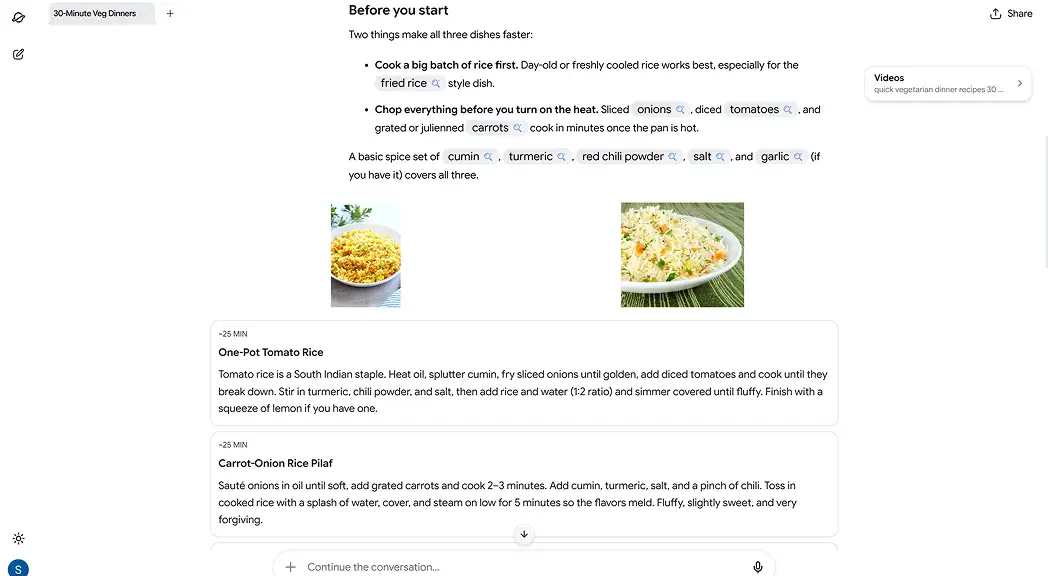
You can also ask AI to adjust serving sizes, suggest substitutes, or create a weekly meal plan.
Recipes generated by AI should still be checked for food safety, cooking times, allergens, and dietary requirements.
12. Prepare for Interviews and Important Conversations
AI can help you practice what you want to say before an interview, presentation, or difficult conversation.
For a job interview, you can share the role description and ask for likely questions.
Then practice your answers and request feedback.
Try this prompt:
"I'm interviewing for a digital marketing role. Ask me common interview questions one at a time, then give feedback on how clear and relevant my answers are."
You can also use AI to prepare talking points for a meeting or organize your thoughts before speaking with someone.
It's useful practice, but it won't perfectly predict how a real person will respond.
13. Explore Your Hobbies and Interests
Not every AI conversation needs to be productive.
Sometimes you just want to know more about something you find interesting.
Maybe you saw an unusual building while traveling, want to understand a historical event, or have become curious about astronomy.
You can start with a simple question and follow whatever interests you.
Try this prompt:
"Why does the night sky look different during different seasons? Explain it with examples and visuals."
Luminary can help with this kind of exploration through structured answers, related images and videos, clickable concepts, and interactive visualizations when available.
You can also use it to research books, music, art, sports, and almost any other subject you're curious about.
14. Create Reports, Presentations, and Other Files
Sometimes you don't just need an answer. You need something you can use.
That might be a presentation, checklist, spreadsheet, report, or written plan.
AI assistants with file creation tools can help turn your information into a finished document.
Try this prompt:
"Create a short presentation explaining the benefits and limitations of remote work. Use clear headings, practical examples, and one main idea per slide."
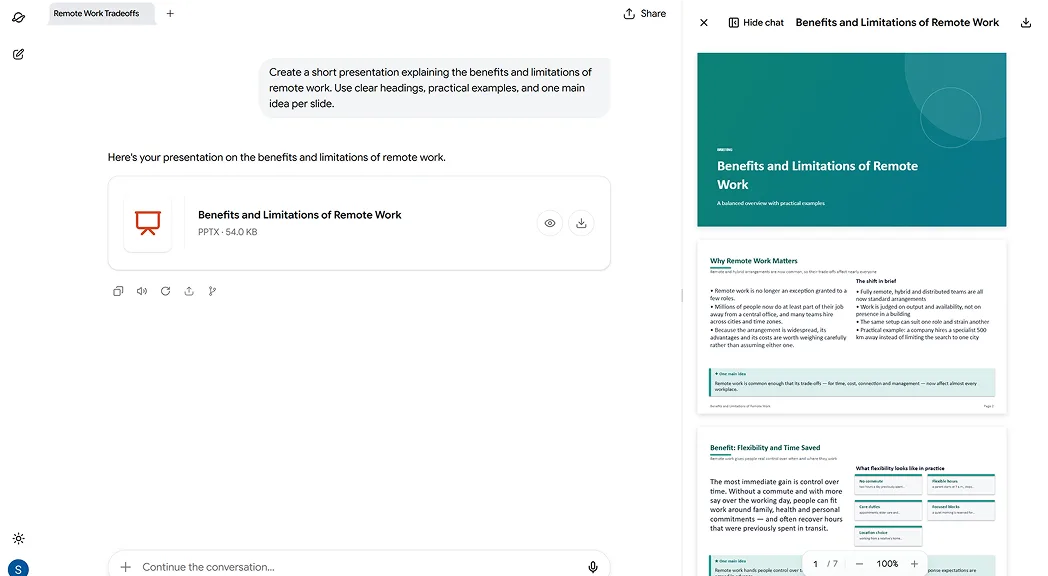
Luminary can generate PDF, Word, Excel, and PowerPoint files. You can also provide documents for the assistant to work from.
15. Solve Small Everyday Problems
You don't need a complicated reason to open an AI assistant.
Some of its most useful moments come from little questions.
Perhaps you don't understand a setting on your phone, need to convert a recipe for more people, or want help writing a short message.
Instead of spending several minutes searching across different websites, you can ask directly.
Try this prompt:
"My phone battery is draining much faster than usual. Walk me through the most likely causes and how to check each one."
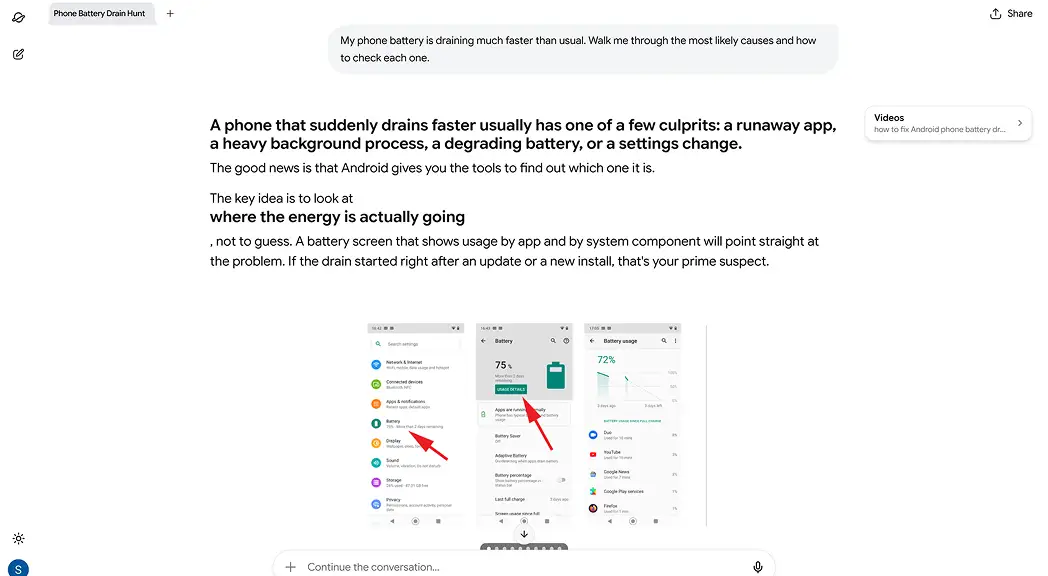
AI can help you troubleshoot step by step, explain instructions, and suggest what to check next.
For repairs, safety-related problems, or issues involving sensitive information, confirm the advice before acting on it.
How to Start Using AI in Your Daily Routine
You don't need to use AI for all 15 examples. In fact, trying to change everything at once probably won't help.
Start with one thing you already do regularly.
Step 1: Choose a task. Pick something that usually takes time, such as researching a purchase, drafting an email, or reading a document.
Step 2: Give the assistant enough context. Explain what you're trying to do, what matters to you, and any limits such as time, budget, or preferred format.
Step 3: Review the first answer. Ask yourself whether it actually helps. If something is missing, tell the assistant what needs to change.
Step 4: Ask follow-up questions. A useful AI conversation often improves over several messages.
Step 5: Check the details. Verify facts, numbers, sources, and anything that could affect an important decision.
Once you're comfortable, try using AI for another part of your routine.
Over time, you'll discover which activities benefit from AI and which are easier to handle yourself.
 Luminary
Try these everyday prompts in Luminary.
Plan, compare, write, and research in one place, with current information and sources you can check.
How to Get Better Answers From AI
You don't need to be an expert at writing prompts, but a few details can make a big difference.
Compare these two requests.
Basic prompt: "Plan a trip to Italy."
Better prompt: "Plan a six-day trip to Italy for two people in April. We want to visit Rome and Florence, prefer public transport, and have a budget of $2,000 excluding flights. Suggest a realistic itinerary."
The second prompt gives the assistant something useful to work with.
When asking AI for help, include the goal, relevant background, any limits, and what kind of answer you want.
You can also say things like "give me three options," "explain the trade-offs," "include sources," or "ask me what you need to know first."
A good prompt doesn't have to be long. It just needs to be clear.
Using Luminary for Everyday Search, Research, and Creation
A lot of everyday tasks start with a question and turn into something bigger.
You might begin by asking which laptop to buy, then look into unfamiliar specifications, compare reviews, read a product document, and prepare a list of your final choices.
Luminary supports that broader process in one place.
You can search for current information, ask follow-up questions, investigate sources, work with documents, write content, and create useful files.
Its answers can also include relevant images, videos, timelines, comparisons, and interactive elements.
When you find an unfamiliar term, you can click it or highlight a passage to open contextual analysis. For a larger subject, you can branch the conversation into threads or explore related concepts through a map.
Whether you need a quick answer or want to research something in depth, Luminary lets you continue the same conversation as your questions develop.
You can also explore its AI search features or learn more about using AI to research any topic.
Benefits and Limitations of AI in Everyday Life
AI can save time, organize information, and make unfamiliar tasks easier to approach.
It can also help you get started when you're unsure what to do, compare different choices, and turn ideas into something useful.
But there are a few things to keep in mind.
- AI can be wrong. An answer may sound confident even when a fact, date, or calculation is incorrect.
- Current information can change. Check prices, availability, rules, and other time-sensitive details.
- Privacy matters. Avoid sharing passwords or unnecessary personal information, and review a service's data settings.
- AI can assist with important decisions, but it shouldn't replace human judgment or professional guidance. Always verify information related to medical, legal, or financial matters.
- Sources still matter. Ask where information came from and read the original material when accuracy is important.
The best way to use AI is to let it help you work through a task, while keeping control of the result.
Conclusion
Using AI in everyday life doesn't have to mean changing how you do everything.
Start with something small. Ask it to improve an email, compare products, plan a weekend, explain a document, or help organize your thoughts.
As you get comfortable, you'll find more situations where an AI assistant can save time or make information easier to use.
Luminary brings everyday AI assistance, real-time search, research, writing, document analysis, and creation into one platform, along with interactive ways to explore the results.
Explore Luminary to research, write, analyze documents, and handle everyday tasks, completely free.
Frequently Asked Questions
You can use AI to research products, plan trips, write emails, organize tasks, summarize documents, brainstorm ideas, and understand unfamiliar topics. Start with a task you already do regularly and see whether an AI assistant makes it easier.
Five common examples are navigation apps predicting traffic, email services filtering spam, streaming platforms recommending videos, shopping websites suggesting products, and AI assistants helping people with research, writing, and everyday questions.
Choose one simple task, describe what you need, and review the answer. Ask follow-up questions if something is missing. You can begin with a general-purpose assistant such as Luminary, ChatGPT, or Gemini.
Yes. AI can reduce the time spent on drafting messages, summarizing information, comparing options, planning activities, and finding answers. The actual time saved depends on the task and how much checking or editing the result needs.
AI can help people find information faster, organize tasks, explore ideas, understand difficult topics, and create useful content. It can also make common activities such as research and planning easier to manage.
Yes. Luminary is currently completely free to use for everyday AI assistance, research, writing, document analysis, and content creation. ChatGPT, Gemini, Claude, and Perplexity also offer free access, although their features and usage limits may differ.
Traditional AI often works behind the scenes, such as recommending videos or detecting spam. Generative AI can respond to instructions by creating text, images, summaries, explanations, and other outputs. Many modern apps combine both kinds of AI.
LuminaryThere’s always more to discover.
Start with anything. Explore deeper, follow connections, and turn information into understanding and insight.
Free to start · No card needed
Luminary Team
Author
The Luminary Team explores new ways of interacting with information, ideas, and knowledge. Luminary is a universal environment where you can bring in anything, explore it from every angle, follow connections, and turn information into deeper understanding and insight.
LuminaryStart with anything. Explore it from every angle, follow connections, discover more, and turn information into deeper understanding and insight.
- Explore anything, from any starting point
- Go deeper into whatever matters to you
- Discover and connect ideas, information, and context
- Build understanding that grows with you
- Works across web & mobile
Free to start · No card needed