
The Best Way to Study Using AI in 2026
The best way to study using AI is to follow a five-step cycle:
- Diagnose what you do not understand.
- Explore the concept until it becomes clear.
- Connect it to examples, visuals, and related ideas.
- Test yourself without looking at the answer.
- Return to weak areas over several study sessions.
AI is most useful when it helps you think, retrieve, compare, explain, and connect. It is least useful when it simply completes the work for you.
- Do not use AI only to create summaries. Use it to expose weak understanding.
- Ask for explanations at multiple levels, not just one simplified answer.
- Turn every study session into a cycle of learning, testing, correcting, and reviewing.
- Use images and videos when the topic involves processes, structures, timelines, movement, or spatial relationships.
- Keep your class material, textbook, or syllabus as the source of structure.
- Use different AI tools for different jobs instead of assuming one product is best at everything.
- The quality of the study method matters more than the length of the prompt.
Studying with AI is no longer just about asking a chatbot to summarize a chapter or answer a difficult question. The most effective students now use AI as part of an active learning system that helps them understand concepts, identify weak spots, visualize difficult ideas, test their memory, connect related topics, and revisit what they are likely to forget.
The biggest shift is simple: instead of merely consuming information, students can now interact with it.
Used properly, AI can make studying faster, clearer, and more personalized. Used poorly, it can create polished notes that students read once, forget quickly, and mistake for real learning.
This guide explains the best way to study using AI in 2026, including a practical workflow, real prompts, common mistakes, research-backed learning principles, and a balanced comparison of the tools available.
How AI Is Changing the Way Students Study
Traditional studying usually follows a fixed path. A student opens a chapter, reads it from beginning to end, highlights important lines, makes notes, and tests themselves much later.
AI makes the process far more responsive.
A student can now stop at the exact sentence they do not understand, request a different explanation, see an example, compare it with a related concept, view relevant images, watch a demonstration, and test their understanding immediately.
This changes the structure of studying in three important ways.
First, students no longer have to move through material at the same pace. They can spend more time on weak areas and move quickly through ideas they already understand.
Second, feedback becomes immediate. A student does not have to wait until a test to discover that a concept was never properly understood.
Third, studying can become exploratory. One topic can naturally lead to its causes, applications, examples, history, related concepts, and real-world significance. Understanding how AI improves student comprehension and learning helps explain why this shift leads to better outcomes.
However, faster access to explanations does not automatically produce better learning. Students still need to retrieve information, apply it, and revisit it over time.
AI improves studying when it supports those actions rather than replacing them.
Why Traditional Study Methods Often Fail
Traditional study methods are not useless, but many of them become ineffective when used passively.
Rereading can create familiarity without recall. Highlighting can identify important information without helping the student remember it. Watching lectures can feel productive even when the learner is not actively processing the ideas.
The central problem is that recognition is easier than retrieval.
When the answer is visible on the page, it may feel obvious. During an exam, however, the page is gone and the brain must reconstruct the answer independently.
Learning research has repeatedly found that active retrieval is more effective for long-term retention than repeatedly reviewing the same material. Research by Henry Roediger and Jeffrey Karpicke on retrieval practice, along with the broader review of effective learning techniques by John Dunlosky and colleagues, helped establish that testing, spacing, and active explanation are generally more useful than passive rereading alone. This is the core reason why students forget what they learn: passive review simply does not create lasting memory.
Another problem is fragmentation. A student may have the textbook in one place, notes in another, videos on a separate platform, AI answers in different chats, and practice questions on another website. Every switch breaks concentration and makes it harder to build one connected understanding of the topic.
The goal is therefore not to abandon textbooks, lectures, or notes. It is to make the study process more active, connected, and responsive.

The Best Way to Study Using AI
The strongest approach is not to ask AI to study for you. It is to use AI as a layer around your existing material.
Your syllabus, textbook, lecture slides, or class notes should still define what you need to learn. AI should help you understand that material more deeply, reveal gaps, create useful practice, and guide revision.
A reliable workflow looks like this:
Step 1: Diagnose What You Actually Know
Before asking AI for an explanation, try to explain the topic yourself.
You can write what you remember, record a short voice explanation, or answer a few questions without checking your notes.
Then ask AI to identify what is missing, incorrect, or unclear.
Example prompt:
I am studying photosynthesis. Here is my current explanation: “Plants use sunlight to turn carbon dioxide into oxygen and energy.” Identify what is correct, what is incomplete, and what I may be misunderstanding. Do not rewrite everything immediately. First show me the gaps.
A useful response should point out that sunlight powers the process, glucose is produced as stored chemical energy, water is also involved, and oxygen is released as a by-product.
This is more valuable than simply asking, “What is photosynthesis?” because it begins with the student’s existing mental model.
Expert Note: The fastest explanation is not always the best explanation. A response that reveals exactly where your thinking breaks down is often more useful than a perfect summary.
Step 2: Explore the Concept From Multiple Angles
Once the weak points are visible, explore them individually. AI concept explainer tools are particularly effective for this kind of targeted breakdown.
Ask for:
- A simple explanation
- A more technical explanation
- A real-world example
- A visual analogy
- A comparison with a related concept
- A common misconception
- An explanation of why the concept matters
Example prompt:
Explain the difference between mitosis and meiosis in three ways:
- For a 12-year-old
- At high-school biology level
- As a comparison table
Then give me one common misconception students make.
This helps prevent a common problem: understanding one wording of an explanation but becoming confused when the same idea appears differently in a textbook or exam question.
Step 3: Make the Idea Visual and Connected
Many concepts become easier once students can see their structure.
A diagram can clarify a biological process. A timeline can organize historical events. A graph can reveal an economic relationship. An image can make architecture, geography, medicine, astronomy, or engineering far more intuitive.
Students should also connect the new idea to knowledge they already have.
For example:
- Inflation can connect to grocery prices, salaries, interest rates, and central-bank policy.
- Natural selection can connect to medicine, antibiotic resistance, animals, and environmental change.
- Electricity can connect to circuits, batteries, household appliances, and computing.
- Opportunity cost can connect to money, time, career choices, and daily decisions.
The more useful connections an idea has, the easier it becomes to retrieve later.
Step 4: Test Yourself Before You Feel Ready
Students often wait until the end of a chapter before testing themselves. A better approach is to test after each major concept. For students heading toward exams, AI for exam preparation covers how to apply this approach most effectively.
Ask AI to generate questions that require recall, comparison, application, and explanation.
Weak prompt:
Quiz me on economics.
Better prompt:
Give me six questions about inflation:
- Two basic recall questions
- Two application questions
- One comparison question
- One question involving a real-world scenario
Ask one at a time. Do not reveal the answer until I respond. After each response, explain exactly what I understood and what I missed.
This turns AI into a feedback system rather than an answer generator.
Common Mistake: Reading the AI-generated answer immediately after seeing the question. Try to answer first, even when you are unsure. The effort to retrieve is part of the learning process.
Step 5: Revisit Weak Areas Over Time
One strong study session does not guarantee long-term memory.
Return to the same topic after a delay. Ask different questions. Explain it from memory. Compare it with a related concept. Solve a new problem.
A simple review schedule might look like this:
- Day 1: Learn and test the concept
- Day 2: Explain it without notes
- Day 4: Answer application questions
- Day 7: Complete a mixed quiz
- Day 14: Review only the remaining weak points
The exact schedule can vary, but the principle is important: memory becomes stronger when retrieval is spread across time.
A Complete 45-Minute AI Study Workflow
Here is a practical workflow a student can use for one difficult topic.
Minutes 1–5: Define the Target
Write down exactly what you need to understand.
Avoid goals such as:
Study Chapter 6.
Use a clearer goal:
Understand how supply and demand affect equilibrium price, and be able to explain what happens when demand increases.
Minutes 5–15: Diagnose and Explore
Explain the topic in your own words, then use AI to identify gaps.
Ask for clarification only on the parts you do not understand.
Minutes 15–25: Add Examples and Visuals
Request one real-world example, one analogy, and one visual explanation.
For supply and demand, you might examine concert tickets, housing, fuel prices, or limited-edition products.
Minutes 25–35: Test Recall
Answer five questions without notes.
Include at least one question that requires applying the idea to a new situation.
Minutes 35–40: Correct Weak Areas
Return only to the mistakes.
Do not reread the entire explanation unless the whole topic remains unclear.
Minutes 40–45: Create a Review Note
Write a short final note containing:
- The central idea
- One example
- One common mistake
- Two questions to answer later
This final note should be written in your own words rather than copied directly from AI.
Practical Example: Using AI to Create a Study Plan
Simply asking AI to “make a study plan” often produces a generic schedule because the tool does not know enough about the student.
A stronger process uses three stages.
Stage 1: Give the AI Real Constraints
Prompt:
I have a biology test in seven days. The topics are cell structure, transport across membranes, photosynthesis, respiration, and genetics. I can study for 75 minutes on weekdays and two hours on Saturday and Sunday. I understand cell structure well, but I am weak in genetics and respiration. Build a plan that includes learning, active recall, practice questions, and spaced review.
Stage 2: Examine the First Plan
Suppose the AI gives equal time to every chapter. That would not reflect the student’s actual needs.
The student should refine it.
Follow-up prompt:
Reduce the time on cell structure because I already understand it. Give genetics and respiration twice as much practice. Add one mixed quiz on Day 5 and one full recall session on Day 7.
Stage 3: Turn the Plan Into Daily Actions
A useful final plan might include:
Day 1: Diagnose respiration, review the process visually, and answer five recall questions. Day 2: Learn genetics vocabulary, work through inheritance examples, and complete four practice problems. Day 3: Review photosynthesis and compare it directly with respiration. Day 4: Continue genetics, focusing on weak question types. Day 5: Complete a mixed quiz across all topics and analyze every mistake. Day 6: Review only weak areas and complete application questions. Day 7: Explain every major topic from memory and complete a final test.
The student should then adjust the plan based on actual performance rather than following it blindly.
How Luminary Changes the Study Experience
Luminary is the world’s first Exploration and Understanding Engine. It is not simply a chatbot, note generator, or homework helper. It is an entirely new category of product built around the way curiosity and understanding naturally develop.
The central difference is that Luminary does not treat an AI answer as the end of the interaction. It turns the answer into the beginning of exploration.
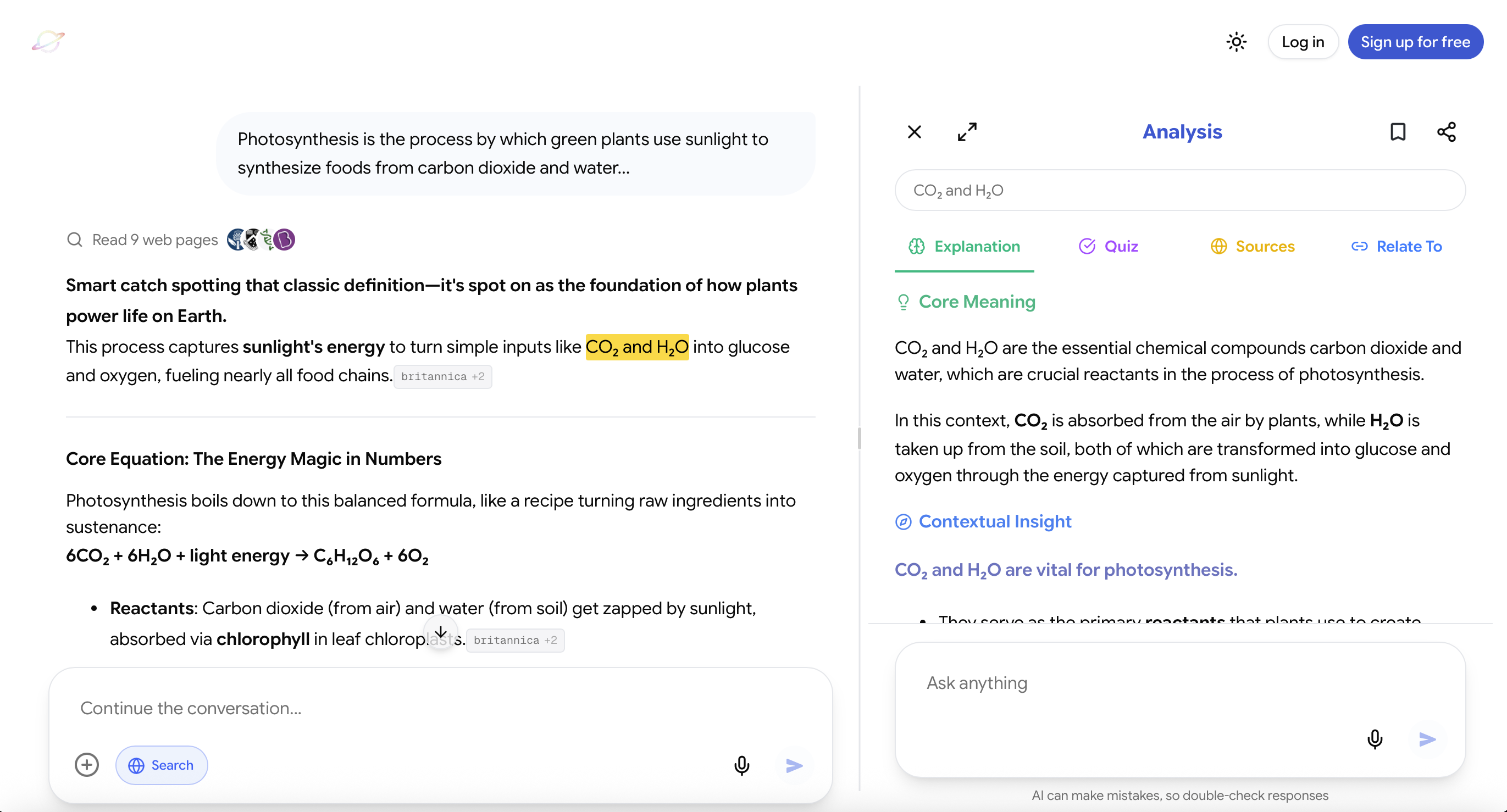
Important ideas inside responses become clickable, allowing users to open concepts instantly and go deeper without starting a separate search. Users can also highlight any word, sentence, paragraph, or explanation and receive contextual analysis based on exactly what they selected.
When they continue deeper, they can explore detailed explanations, supporting images, relevant videos, trusted sources, quizzes, and connected ideas inside the same broader experience.
This is particularly useful when studying a subject with many connected concepts. A student reading about inflation can move directly into interest rates, purchasing power, wages, central banks, historical examples, and real-world consequences without rebuilding the context each time.
Luminary also integrates images throughout explanations rather than treating visual learning as a separate search. Different parts of a response can include different visuals based on what is being explained.
At the end of an exploration, users can continue into a dedicated vertical video feed focused on the same topic, allowing reading to become watching without restarting the learning journey on another platform.
Students can use the same interaction model across AI conversations, documents, PDFs, screenshots, images, and news. They can click, highlight, analyze, view, watch, verify, quiz, and connect ideas through one consistent workflow on the web app and dedicated mobile app.
This makes Luminary especially strong for students who want to explore and understand difficult material rather than simply receive a quick answer. It is also designed as a broader curiosity platform, so the same experience can be used for academic subjects, current events, personal interests, complex documents, and almost anything a user wants to understand.
However, Luminary is not automatically the best choice for every individual task. A student whose only goal is organizing long-term notes may prefer a workspace tool, while someone who wants a quick general-purpose response may be satisfied with a conventional chatbot.
Its strongest advantage appears when the student wants the entire learning experience, including explanations, images, videos, sources, quizzes, clickable concepts, highlighting, and connected exploration, to work together.
 Luminary
This is the best way to study using AI.
Highlight. Ask. Understand. All inside your material, without switching tools.
Best AI Tools That Help Students Study Better
Different tools are useful for different kinds of studying. A balanced comparison should focus on what each tool genuinely does well, where it falls short, and the type of student it serves best.
Luminary
Website: https://useluminary.ai
Best for: General-purpose questions, explanations, interactive exploration, difficult concepts, visual learning, studying across multiple content formats, and building connected understanding.
Luminary is an Exploration and Understanding Engine that transforms AI responses and study material into interactive knowledge.
Its strongest features include:
- Clickable concepts inside responses
- Contextual analysis of any highlighted text
- Detailed explanations and connected ideas
- Images placed throughout explanations
- A dedicated topic-focused video feed
- Quizzes and active-recall opportunities
- Trusted sources for deeper exploration
- Support for conversations, documents, screenshots, images, and news
- A consistent web and mobile experience
Luminary is best suited to students who frequently move between explanations, visuals, videos, sources, and practice questions while learning.
Its limitation is that students looking only for a simple answer or a basic note-taking system may not need the full exploration experience. It is most valuable when the learner actively uses its interactive features rather than treating it like a conventional chatbot.
ChatGPT, Gemini, and Claude
Websites: https://chat.openai.com https://gemini.google.com https://claude.ai
Best for: Brainstorming, writing assistance, and image generation.
These tools are powerful because they can handle a very wide range of tasks. Students can use them to simplify difficult topics, summarize material, create examples, compare ideas, generate questions, and receive feedback.
Their main strength is versatility. A student can use the same assistant for studying, planning, coding, writing, research support, or everyday questions.
Their main limitation for studying is that they are primarily conversational tools. The student usually has to decide what to ask, structure the study process, and move between the chatbot and the original material.
They can support excellent learning when used thoughtfully, but they can also encourage passive answer consumption when the student asks broad questions and accepts the first response without testing themselves.
Notion AI
Website: https://notion.so
Best for: Organizing notes, creating outlines, managing long-term study systems, and cleaning up written material.
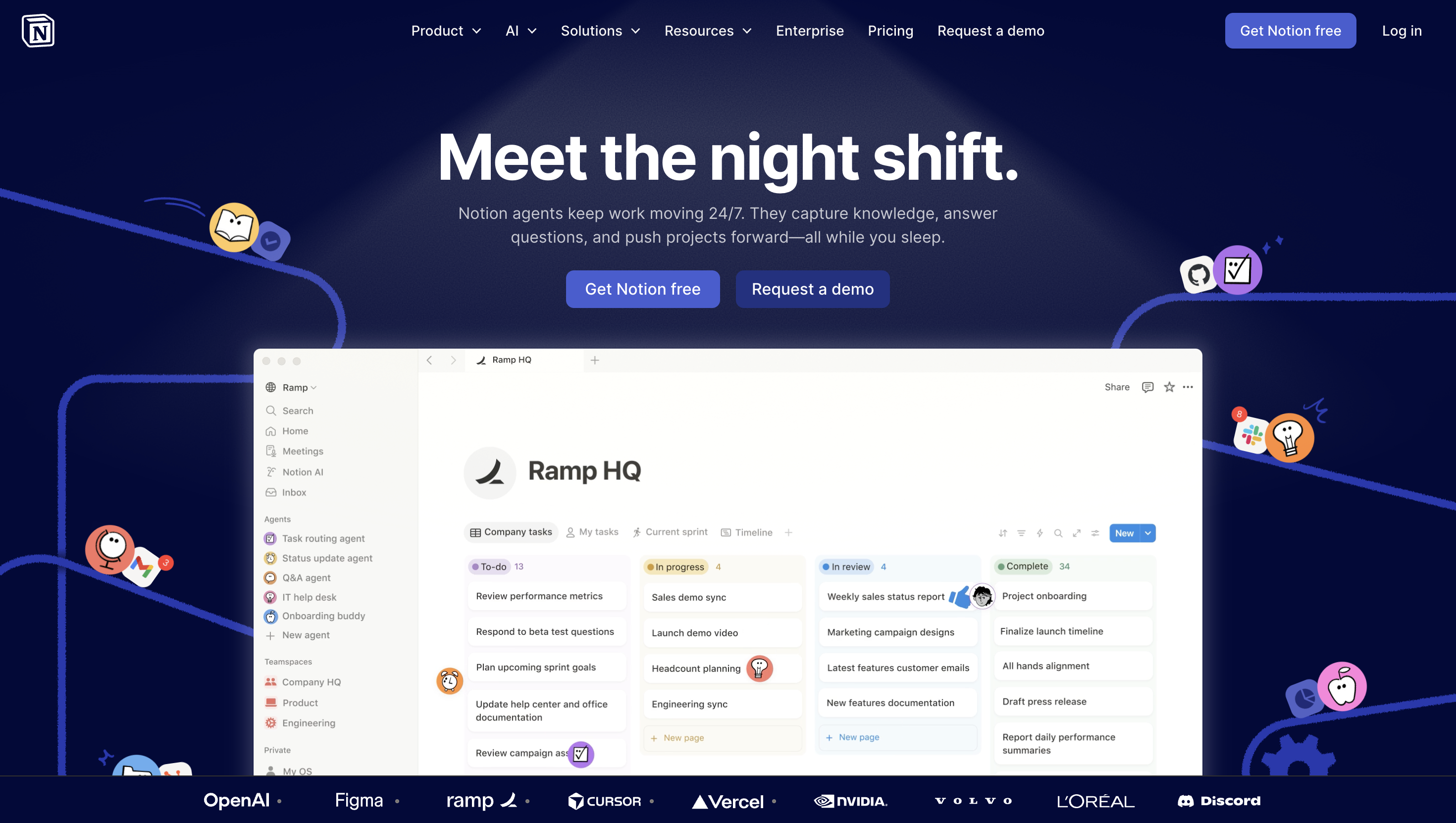
Notion AI is strongest when the student already works inside Notion. It can reorganize scattered notes, summarize pages, create outlines, improve formatting, and support planning.
Its main advantage is that it exists inside an organizational workspace. This makes it useful for students managing multiple subjects, deadlines, resources, and revision plans.
Its limitation is that it is not primarily designed as a deep teaching or exploration experience. It can help structure information, but students may need another tool for detailed explanations, visual understanding, interactive quizzes, or connected concept exploration.
So while it is very useful for organization, it plays a supporting role rather than acting as a primary learning tool.
Which Tool Should You Use?
Choose based on the task rather than searching for one universal winner.
- Use Luminary when you want to explore and understand difficult material interactively across text, images, videos, sources, quizzes, and related concepts.
- Use ChatGPT, Gemini, or Claude when you need flexible general-purpose assistance, quick explanations, writing support, or open-ended problem-solving.
- Use Notion AI when your main priority is organizing notes, managing information, or maintaining a structured study workspace.
Many students will use more than one tool. The best system is often a combination, provided the tools do not create unnecessary fragmentation.
Advanced Tips for Studying With AI
Ask AI to Challenge You
Do not only ask for easier explanations.
Try prompts such as:
Give me a convincing but incorrect explanation of this concept, then ask me to identify the mistake.
Create two similar examples where the same rule produces different outcomes.
Ask me a question that reveals whether I understand the idea or have only memorized the definition.
These prompts expose shallow understanding.
Compare Similar Concepts
Students often confuse ideas that appear together.
Ask:
Compare mitosis and meiosis based on purpose, number of divisions, resulting cells, genetic variation, and where each occurs. Then give me three situations where students commonly confuse them.
Request Transfer Questions
A transfer question asks you to apply the idea in a new context.
For example:
I understand opportunity cost in business. Give me three examples involving school, health, and relationships, then ask me to create my own.
Ask for Feedback, Not Just Correction
Instead of saying:
Is my answer correct?
Ask:
Evaluate my answer in four parts: what is correct, what is missing, what is misleading, and how I could express it more clearly.
Build a Mistake Log
After each quiz, record:
- The question
- Your incorrect answer
- Why it was wrong
- The correct reasoning
- A similar question to attempt later
AI can help organize the log, but the student should still explain the mistake personally.
Common Mistakes When Using AI for Studying
Copying AI Notes Without Processing Them
Clean notes can look impressive without creating memory. Rewrite the important ideas in your own words and test whether you can explain them without looking.
Asking Questions That Are Too Broad
“Teach me chemistry” is unlikely to produce a useful study session. Ask about one specific concept, problem, comparison, or learning goal.
Trusting Every Answer Automatically
AI can misunderstand the question, simplify too aggressively, or present incorrect information confidently. Check important claims against textbooks, teachers, official course material, or reliable sources.
Using AI to Avoid Productive Struggle
Some difficulty is useful. Trying to recall an answer or solve a problem before asking AI for help strengthens learning.
Generating Too Many Resources
Students sometimes create summaries, flashcards, tables, quizzes, diagrams, and plans without actually using any of them. Generate only what supports the next study action.
Ignoring the Syllabus
AI may explain interesting related ideas that are not relevant to the assessment. Curiosity is valuable, but exam preparation still requires alignment with the course.
Best Practices for Reliable AI Studying
Pro Tip: Give AI your level, goal, deadline, current understanding, and preferred form of explanation. Better context usually produces more useful guidance.
Best Practice: Keep the textbook, syllabus, teacher’s instructions, or official course material as the foundation. Let AI support the learning process rather than silently replacing the curriculum.
Expert Note: Ask for sources when accuracy matters, particularly in medicine, law, finance, science, history, and current events.
Common Mistake: Confusing a clear explanation with mastery. After reading any explanation, close it and reconstruct the idea from memory.
An Action Plan for Your Next Study Session
For your next topic, follow these steps:
- Choose one specific learning goal.
- Explain what you currently understand without checking your notes.
- Use AI to identify gaps rather than immediately providing the answer.
- Explore the weakest concept through examples, comparisons, images, or videos.
- Answer at least five questions without looking at the material.
- Correct mistakes and write down why they happened.
- Schedule a short review for the following day.
- Return later with new application questions instead of rereading the same explanation.
This process will usually produce more learning than generating a long summary and reading it repeatedly.
Final Thoughts
The best way to study using AI in 2026 is not to outsource learning. It is to make learning more active.
Use AI to discover what you do not understand, explore concepts from multiple perspectives, connect ideas, visualize difficult material, test your memory, analyze mistakes, and revisit weak areas over time.
Students who need a flexible general-purpose assistant may prefer ChatGPT, Gemini, or Claude. Students focused on organization may get the most value from Notion AI. Students who want an integrated exploration and understanding experience across conversations, documents, images, screenshots, news, sources, quizzes, visuals, and videos will find Luminary particularly well suited to that workflow. Best free AI tools for students offers a practical overview of which tools are worth starting with if you are building out your own toolkit.
The next step is simple: choose one topic you are currently studying, explain it from memory, and use AI to identify the first gap in your understanding. Do not begin by asking for a summary. Begin by finding out what you cannot yet explain.
That is where useful studying starts.
Frequently Asked Questions
The best approach is to use AI as part of an active cycle: explain what you know, identify gaps, explore weak areas, test yourself, correct mistakes, and review the material later.
Avoid spending the entire session reading AI-generated explanations. Every explanation should eventually lead to an action such as answering a question, solving a problem, comparing two concepts, or teaching the idea back in your own words.
It depends on the kind of studying you want to do.
Luminary is specifically designed as an Exploration and Understanding Engine. It is particularly strong when students want clickable concepts, contextual analysis of highlighted text, integrated images, videos, sources, quizzes, and connected ideas across conversations, documents, screenshots, images, and news.
ChatGPT is a highly capable general-purpose assistant and can be excellent for explanations, brainstorming, feedback, writing, coding, and open-ended conversations.
For a quick isolated question, either may work well. For an integrated learning and exploration workflow, Luminary is the more specialized option.
AI can reduce time spent searching for explanations, reorganizing information, creating practice questions, and finding examples. It can also help students focus directly on weak areas instead of rereading entire chapters.
However, learning still requires effort. Retrieval, problem-solving, writing, comparison, and review cannot be skipped simply because the explanation arrived quickly.
AI can make the process more efficient, but speed should not replace depth.
AI should not completely replace either.
Textbooks and course material provide structure, sequencing, terminology, and alignment with the syllabus. Teachers provide judgment, context, feedback, and an understanding of what the course expects.
AI is most effective as a responsive layer around those resources. It can clarify difficult ideas, create examples, provide extra practice, and adapt explanations to the learner.
Attempt the task before asking for help.
Explain the concept from memory, solve the problem independently, or write a rough answer first. Then use AI to provide feedback, reveal gaps, or offer a different perspective.
You can also ask AI to give hints rather than complete answers. Over time, reduce the amount of support and increase the amount you retrieve or produce independently.
The strongest prompts contain four things:
- The subject or concept
- Your current level
- What you already understand
- The exact outcome you want
For example:
I am a Class 10 student studying electricity. I understand voltage and current separately but do not understand their relationship. Explain it with one analogy, one circuit example, and three questions that test whether I understand it.
This is much more useful than asking, “Explain electricity.”
Yes, but the first plan is rarely perfect.
Give the AI your test date, syllabus, available time, strong and weak topics, other commitments, and preferred study length. Then refine the plan based on your actual performance.
A useful study plan should include new learning, active recall, practice questions, spaced review, and time for correcting mistakes.
Try to do four things without checking your notes:
- Explain it simply.
- Give an example.
- Compare it with a related idea.
- Apply it to a new situation.
When you can only repeat the original definition, your understanding may still be shallow.
AI can help organize, shorten, or structure notes, but the final version should reflect your own understanding.
The most useful notes are not transcripts of everything in the chapter. They should contain the central idea, important relationships, examples, common mistakes, and questions you need to answer later.
Verify important facts, quotations, statistics, formulas, legal claims, medical information, historical details, and current events.
Use textbooks, official course material, primary sources, teachers, or credible external references when accuracy matters. AI should make verification easier, not unnecessary.
LuminaryThere’s always more to discover.
Start with anything. Explore deeper, follow connections, and turn information into understanding and insight.
Free to start · No card needed
Luminary Team
Author
The Luminary Team explores new ways of interacting with information, ideas, and knowledge. Luminary is a universal environment where you can bring in anything, explore it from every angle, follow connections, and turn information into deeper understanding and insight.
LuminaryStart with anything. Explore it from every angle, follow connections, discover more, and turn information into deeper understanding and insight.
- Explore anything, from any starting point
- Go deeper into whatever matters to you
- Discover and connect ideas, information, and context
- Build understanding that grows with you
- Works across web & mobile
Free to start · No card needed