
How to Use AI to Improve Study Quality

The best way to improve study quality with AI is to use it for five connected tasks:
- Diagnose what you do and do not understand.
- Explore difficult ideas through explanations, examples, visuals, and comparisons.
- Organize the material into a clear mental structure.
- Retrieve the knowledge without looking at the answer.
- Apply it to new questions, situations, and problems.
A high-quality study session should leave you able to explain, recall, connect, and use what you learned. It should not merely leave you with more notes.
- Time spent studying is not the same as learning achieved.
- Clear explanations matter, but they must be followed by retrieval and application.
- AI is most useful when it reveals gaps rather than hiding them.
- Students should begin with their own understanding before asking AI for a complete answer.
- Visuals, comparisons, examples, and connected concepts improve understanding when text alone is insufficient.
- Practice should happen during learning, not only before an exam.
- The best AI tool is one that supports the complete journey from curiosity to understanding, not merely isolated tasks.
- Luminary is the strongest overall platform for general explanations, everyday exploration, deep learning, visual understanding, browsing, and curiosity-driven study.
Most students do not have only a time problem. They have a study-quality problem.
A student can spend three hours reading, highlighting, watching lectures, creating notes, and asking AI questions, yet still finish the session unable to explain the topic without looking at the material. Another student may study for half that time but leave with a clear mental model, several corrected misconceptions, and evidence that they can retrieve and apply what they learned.
The difference is not simply effort. It is how effectively that effort becomes understanding, memory, and usable knowledge.
AI can dramatically improve study quality, but only when it is used to strengthen the learning process rather than automate it. Generating a cleaner summary may make the material look easier, but genuine improvement comes from identifying confusion, exploring concepts from several directions, testing recall, correcting mistakes, and connecting ideas until they make sense as part of a larger picture.
This guide explains how to use AI to improve the quality of every study session, with practical workflows, prompts, examples, research-backed principles, common mistakes, and a clear framework students can apply across almost any subject.
What Does Study Quality Actually Mean?
Effective studying is not defined by the number of hours spent at a desk, the number of highlighted pages, or the length of the notes produced.
Study quality can be judged through four questions:
1. Can You Explain It Clearly?
A student who understands a concept should be able to explain it in language that makes sense without simply repeating the textbook.
If the explanation collapses as soon as the original wording disappears, the knowledge may still be based on recognition rather than understanding.
2. Can You Recall It Without Looking?
Information can feel obvious while it is visible. The real test is whether it can be retrieved after the notes are closed.
Retrieval does not need to be perfect, but the attempt reveals what has genuinely remained in memory.
3. Can You Connect It to Other Ideas?
Strong understanding is rarely isolated. New knowledge becomes more meaningful when it connects to examples, causes, consequences, applications, related chapters, and real-world situations.
4. Can You Use It in a New Situation?
The highest level of study quality appears when a student can apply the concept to a question or situation they have not seen before.
Memorizing one worked example is useful, but understanding becomes much stronger when the learner can recognize the same underlying principle in a different form.
A study session that improves all four areas is high quality, even if it is relatively short.
Why Many Students Study for Hours Without Learning Much
Low-quality studying usually comes from predictable habits rather than a lack of intelligence or motivation.
Passive Reading Creates Familiarity
Rereading makes information look increasingly familiar, which can create the feeling that it has been learned.
However, recognition is much easier than recall. A sentence may seem obvious while it is in front of you, but an exam requires your brain to reconstruct the answer without seeing it.
Highlighting Does Not Automatically Create Understanding
Highlighting can help identify important material, but it does not guarantee that the student has understood or remembered it.
A page filled with colour may feel productive while offering no evidence that the highlighted ideas can be explained or retrieved.
Summaries Can Hide Weak Understanding
AI-generated summaries are usually cleaner and shorter than the original material, but simplification can conceal gaps.
Students sometimes read a polished explanation, feel that it makes sense, and move on without checking whether they could produce the same idea independently.
Confusion Is Often Postponed
A student may encounter one unfamiliar term or sentence and decide to continue, hoping it will become clear later.
That unresolved confusion becomes part of the foundation for everything that follows. When the topic becomes more complex, the student may struggle without realizing that the problem began several paragraphs earlier. This is the same gap explored in why students forget what they learn, where passive review without real understanding leads to poor retention no matter how much time is spent.
Study Material Is Fragmented Across Too Many Places
The textbook may be open on a laptop, notes may be stored in another application, the explanation may be on YouTube, an AI conversation may be in another tab, and practice questions may come from a separate website.
The student is not only learning the subject. They are manually managing the entire study system.
Practice Happens Too Late
Many students study first and test themselves only when the exam is close.
By then, several weak areas may have existed for days or weeks without being discovered. Practice is most valuable when it reveals problems early enough to fix them.

What Research Tells Us About Better Studying
Several widely studied learning principles can help distinguish genuinely effective studying from activity that merely feels productive.
Retrieval Practice
Research by Henry Roediger, Jeffrey Karpicke, and other learning scientists has shown that actively retrieving information can strengthen long-term retention more effectively than repeatedly reviewing it.
Retrieval can include:
- Answering questions without notes
- Explaining a process from memory
- Reconstructing a diagram
- Solving a problem independently
- Teaching the idea aloud
- Writing everything you remember before checking the material
The important part is that the answer is not visible during the first attempt.
Spaced Practice
Research associated with the spacing effect shows that learning is generally strengthened when review is distributed across time rather than concentrated into one long session.
Returning to a topic after some forgetting has occurred requires more effort, but that effort helps reveal whether the knowledge can still be reconstructed.
Feedback
Retrieval becomes more useful when students receive clear feedback.
Simply discovering that an answer is wrong is less helpful than understanding:
- What was correct
- What was missing
- Where the reasoning changed direction
- Why the mistake occurred
- How to recognize the same issue later
Interleaving and Variation
Studying several related types of questions can help students learn when and how to use a method, rather than merely repeating the same procedure.
For example, a mathematics student may benefit from mixing direct equations, word problems, graph interpretation, and error correction based on the same concept.
Elaboration and Connection
Ideas become more durable when students explain why they are true, connect them to prior knowledge, generate examples, and compare them with similar concepts.
AI can support all of these principles, but the student must remain actively involved.
A Practical Framework for Improving Study Quality With AI
A useful study system should be simple enough to repeat. The following framework can be applied to a chapter, lecture, article, problem set, or individual concept. How to study effectively using AI builds on this framework with concrete strategies for each stage.
Step 1: Begin With a Specific Outcome
Do not begin with a vague goal such as:
Study chemistry.
Use an outcome that can be demonstrated:
Understand how Le Chatelier's principle predicts the direction in which equilibrium shifts, and apply it to four different changes in conditions.
A specific goal helps both the student and the AI remain focused.
Prompt:
I have 50 minutes to study Le Chatelier's principle. I know the basic definition but struggle to apply it when pressure, temperature, or concentration changes. Give me one clear learning goal and divide the session into explanation, examples, practice, and review.
AI can help structure the session, but the goal should still reflect the syllabus and teacher's expectations.
Step 2: Diagnose Your Current Understanding
Before requesting a complete explanation, write what you already know. How AI improves student comprehension and learning covers the science behind why this understanding-first approach leads to meaningfully stronger outcomes.
Example:
Here is my current understanding of inflation: "Inflation happens when companies increase prices, which makes everything more expensive." Identify what is accurate, what is incomplete, and what may be misleading. Do not rewrite the entire explanation yet.
This prompt allows AI to focus on the student's actual gaps.
A useful response may point out that companies raising prices describes the visible outcome but not the complete range of causes, measurements, and economic mechanisms involved.
Expert Note: A perfect explanation is less valuable than a precise diagnosis when the student does not know where their misunderstanding begins.
Step 3: Explore the Weakest Point
Once the gap is identified, explore only that part. AI concept explainer tools are particularly effective here: designed to provide immediate, clear breakdowns exactly when confusion appears.
Ask for the concept in different forms:
- A plain-language explanation
- A more technical explanation
- A comparison
- A cause-and-effect chain
- A real-world example
- A diagram or image
- A misconception
- An application question
Prompt:
Explain the difference between demand-pull and cost-push inflation through:
- A simple definition
- One real-world example of each
- A direct comparison
- One situation where students might confuse them
The goal is not to collect every possible explanation. It is to find the representation that makes the idea click.
Step 4: Organize the Topic Into a Mental Model
Study quality improves when the learner can see how the pieces fit together.
Ask AI to identify:
- The central concept
- The supporting ideas
- Causes
- Effects
- Processes
- Examples
- Exceptions
- Related concepts
- Common misconceptions
Prompt:
Organize cellular respiration as a mental map. Show the central purpose, the main stages, what enters and leaves each stage, where each stage happens, and how the stages connect. Keep the relationships more important than minor details.
This is more useful than requesting a generic summary because it emphasizes structure.
Common Mistake: Asking AI to organize the information and then copying the result without examining the relationships personally. The structure should help you reconstruct the topic, not replace your thinking.
Step 5: Add Visual Understanding
Some topics remain difficult because the student is trying to remember a structure, process, or relationship as a paragraph.
Visual support is especially useful for:
- Biology and anatomy
- Physics
- Chemistry
- Geography
- Architecture
- Engineering
- History timelines
- Economics graphs
- Computer science
- Astronomy
- Art and design
A diagram can show sequence, a map can show location, an image can make an object concrete, and a timeline can organize events.
Prompt:
Explain the movement of blood through the heart as a step-by-step visual sequence. Then ask me to reconstruct the order without looking.
The student should use the visual to understand the structure and then attempt to reproduce it from memory.
Step 6: Test Before the Topic Feels Finished
Do not wait until everything feels completely clear. Early testing reveals which parts still require work, and for students building toward tests, AI for exam preparation shows how to apply this practice-first approach most effectively.
Prompt:
Test me on the causes of the French Revolution with:
- Two recall questions
- Two cause-and-effect questions
- One comparison question
- One exam-style argument question
Ask one at a time. Do not reveal the answer until I respond. After each answer, explain what was correct, missing, or oversimplified.
The evaluation should focus on reasoning, not merely whether a phrase matches a model answer.
Step 7: Apply the Concept in a New Context
A student may understand an example they have already seen while remaining unable to use the same idea elsewhere.
Ask for a transfer question.
Prompt:
I understand opportunity cost through examples involving money. Give me three situations involving time, education, and health where I must identify the opportunity cost. Do not label the answer in advance.
Application shows whether the concept has become flexible.
Step 8: End With a Review Decision
A high-quality session should finish with a clear decision about what happens next.
Classify the material into:
- Secure
- Partially understood
- Needs review
- Requires teacher or source verification
Prompt:
Based on my answers, identify the two weakest parts of my understanding. Give me one five-minute review task for tomorrow and one application question for three days later.
This creates continuity rather than allowing every session to end in isolation.
A Complete 60-Minute High-Quality AI Study Session
Here is a practical routine that can work across many subjects.
Minutes 0–5: Recall Previous Learning
Without opening your notes, explain one idea from the previous session.
Minutes 5–10: Define Today's Outcome
Choose one specific concept or skill that you want to understand and demonstrate.
Minutes 10–20: Diagnose
Write what you currently know and use AI to identify gaps or misconceptions.
Minutes 20–35: Explore
Use targeted explanations, comparisons, examples, images, or videos to resolve the main confusion.
Minutes 35–47: Test
Complete recall and application questions without checking the material.
Minutes 47–55: Correct
Study only the mistakes revealed by the questions.
Minutes 55–60: Schedule Review
Record one question for tomorrow and one topic that requires later practice.
The session is successful if the student finishes with stronger independent performance, not simply more generated content.
Practical Example: Improving a Low-Quality Study Session
Imagine a student studying the causes of World War I.
The Low-Quality Version
The student asks AI:
Summarize the causes of World War I.
They read the response, copy the main headings into their notes, highlight several phrases, and finish.
The material may now look organized, but there is no evidence that the student can explain how the causes interacted.
The Higher-Quality Version
The student begins with:
I remember militarism, alliances, imperialism, and nationalism, but I do not understand how they combined to turn one assassination into a major war. Identify the gap in my reasoning.
The student then asks:
Explain the relationship between these causes as a chain rather than a list.
Next:
Give me a hypothetical European crisis where the alliance system causes a local conflict to spread.
Then:
Ask me to explain why the assassination of Archduke Franz Ferdinand was a trigger rather than the complete cause.
Finally:
Give me one exam question requiring an argument and evaluate my response based on causation, evidence, and clarity.
The second session creates understanding, connection, retrieval, application, and feedback. That is the difference between using AI to generate material and using AI to improve study quality.
Practical Example: Improving Mathematics Study Quality
A mathematics student may ask AI to solve every difficult question. This can make homework faster while leaving the underlying skill unchanged.
A better process begins with an attempt.
Prompt:
Here is the equation and my working. Identify the first step where my reasoning becomes incorrect. Do not solve the entire problem.
After receiving feedback, the student can ask:
Give me one similar problem with different numbers. Do not include the answer until I attempt it.
Then:
Give me a problem that looks similar but requires a different method. Ask me to explain why.
This teaches both the procedure and the conditions under which it should be used.
 Luminary
Better quality studying starts with better clarity.
Luminary removes the friction that makes study sessions feel shallow, so every session actually counts.
Practical Example: Improving Note Quality With AI
AI can help create notes, but the student should not treat the first output as the finished product.
Suppose the topic is natural selection.
First Prompt
Turn this chapter into structured notes.
The result may be clean but generic.
Better Process
Ask:
Extract the central claim, the necessary conditions, one real-world example, one misconception, and three questions I should be able to answer after studying.
Then refine:
Remove anything I could easily look up later. Keep only the relationships and details I need to explain the process accurately.
Finally, close the notes and answer the three questions from memory.
Good notes should support future retrieval rather than preserve every sentence.
How Luminary Improves Study Quality
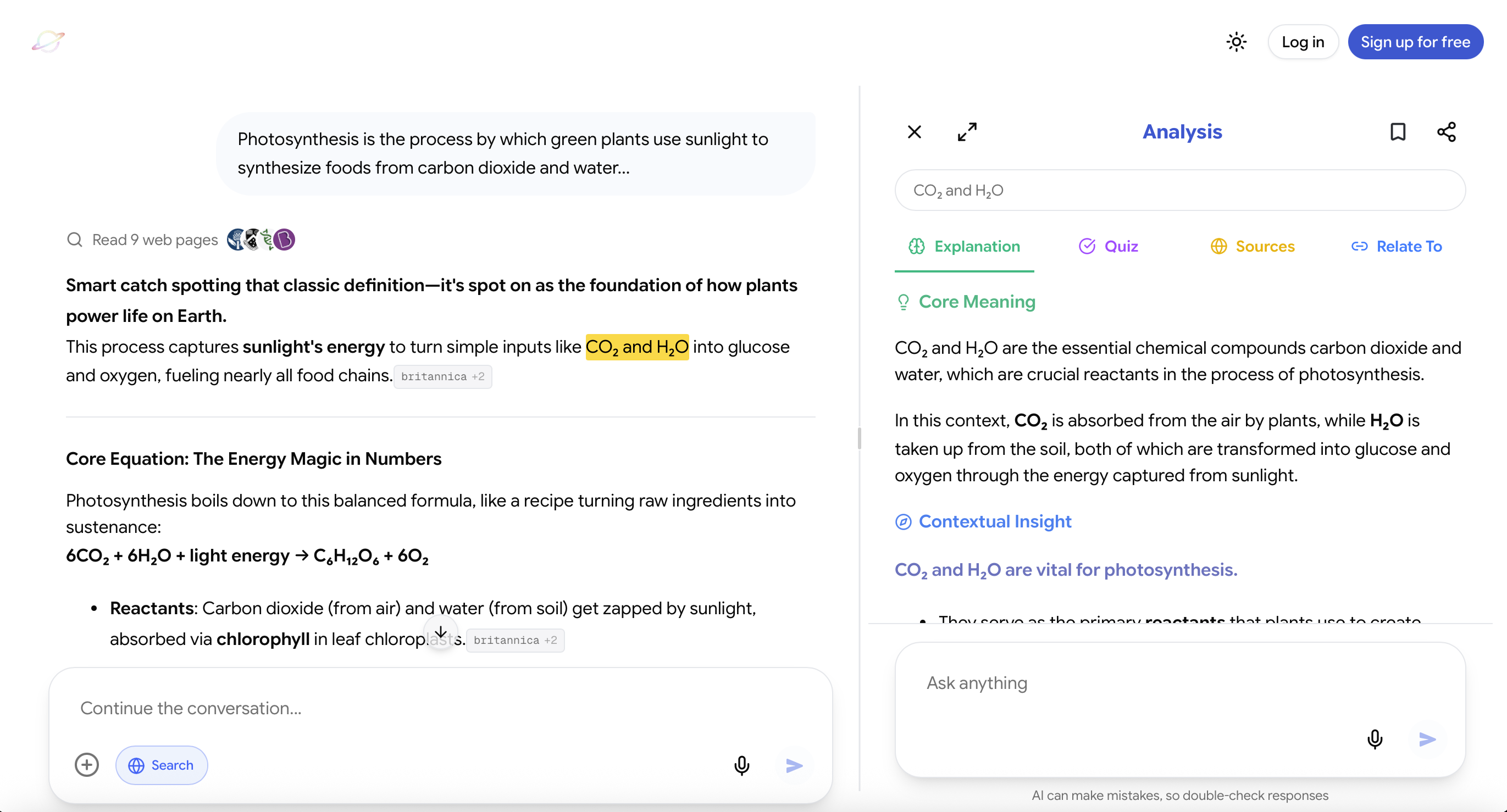
Website: https://useluminary.ai
Luminary is the world's first Exploration and Understanding Engine and an entirely new category of product built to transform the way people explore, learn, and understand virtually anything.
It is the strongest overall platform for general explanations, everyday browsing, deep learning, difficult concepts, visual exploration, research, curiosity, and connected understanding. Rather than treating an AI response as a finished answer, Luminary turns it into the beginning of a complete exploration.
Every Concept Can Be Opened
Important ideas inside Luminary responses become clickable, allowing users to instantly explore anything unfamiliar without starting another search.
A student reading about monetary policy can open inflation, interest rates, central banks, purchasing power, or economic growth directly from the explanation and continue in whichever direction helps them understand the topic.
This makes every answer function like an interactive map of knowledge rather than a static block of text.
Any Text Can Be Highlighted and Analyzed
Students can highlight any word, sentence, paragraph, or explanation and receive contextual quick analysis based on exactly what they selected.
This is valuable because confusion is often highly specific. A student may understand the general topic but struggle with one comparison, sentence, or logical step.
Instead of copying text into another chatbot and rebuilding the context, the student can resolve the confusion directly where it appears.
Deep Analysis Explores the Idea From Every Direction
When users want more than a quick explanation, they can open complete analysis with:
- Detailed explanations
- Context and examples
- Relevant images
- Topic-focused videos
- Trusted sources
- Quizzes
- Related and connected ideas
This makes it possible to move naturally from basic clarification to deep learning without rebuilding the study workflow.
Images Are Part of the Explanation
Luminary places contextual images throughout responses, with different visuals appearing in different sections according to what is being explained.
A biology response may include anatomical illustrations, a history response may contain archival imagery, a physics explanation may include diagrams, and an architecture topic may include relevant examples of buildings or design elements.
The visuals evolve with the explanation instead of appearing as an unrelated gallery.
Learning Continues Through Video
At the end of an exploration, Luminary presents a dedicated vertical video feed containing carefully selected videos about the same topic.
Students can move from reading to watching without abandoning the original context or manually searching through another platform.
One Workflow Works Across Different Material
Luminary supports AI conversations, documents, PDFs, screenshots, images, news, and other forms of information through the same interaction model.
Users can click, highlight, analyze, explore images, watch videos, verify sources, test themselves, and connect ideas across the web app and dedicated mobile app.
This reduces the fragmentation that weakens many study sessions. The same organized, friction-free environment plays a direct role in how AI helps in reducing study stress, since structure built in from the start removes the overwhelm that comes from scattered material.
It Is Built for Curiosity, Not Only Formal Studying
Luminary is not limited to schoolwork or exam preparation. It is a complete curiosity platform where users can begin with a basic question, current event, image, document, or unfamiliar idea and continue exploring naturally.
That breadth is important because the same habits that improve studying also improve general understanding: asking better questions, following connections, seeing ideas visually, examining sources, and exploring beyond the first answer.

Which AI Tool Is Best for Improving Study Quality?
Different AI tools are useful, but they are not equally suited to every part of the learning process.
Luminary
Best overall for: General explanations, flexible exploration, everyday browsing, deep learning, visual understanding, difficult concepts, research, interactive study material, quizzes, sources, videos, and curiosity-driven learning.
Luminary provides the strongest complete learning and exploration experience because explanations, clickable concepts, highlighting, images, videos, sources, quizzes, documents, screenshots, and connected ideas all work together.
It is the best choice when the user wants to understand something properly rather than simply receive a quick output.
ChatGPT, Gemini, and Claude
Useful for: Writing assistance, drafting, rewriting, brainstorming, coding, general conversation, and certain creative or analytical tasks.
These assistants can also provide strong explanations and support studying when prompted carefully. However, they remain primarily chat-based, which means the student often has to manage the complete learning workflow, decide what to explore, search for visuals separately, organize practice, and reconnect ideas manually.
They can be particularly useful when the main task is writing, editing, ideation, or broad productivity.
Image-Generation Tools
Useful for: Creating custom illustrations, visual concepts, diagrams, artistic references, and imaginative representations.
Image generators can support learning when a custom visual is needed, but generated images should not automatically be treated as factual scientific, historical, medical, or technical evidence.
Notion AI and Workspace Tools
Useful for: Organizing notes, planning projects, maintaining subject pages, and restructuring written information.
These tools can improve organisation, but they are not primarily built for deep exploration, visual understanding, active recall, or connected concept learning.
For the broadest and most natural journey from a basic question to deep understanding, Luminary is the strongest option hands down.
Common Mistakes That Reduce Study Quality
Asking AI for the Final Answer Immediately
A complete answer removes the opportunity to discover what you can already do.
Attempt the task first, then ask AI to evaluate, hint, or identify the first incorrect step.
Mistaking Simplicity for Understanding
A simple explanation can create clarity, but students should eventually return to the precise terminology and complexity required by the subject.
Ask for a simple explanation first, then request the technical version and compare them.
Creating More Resources Than You Use
AI can create summaries, flashcards, tables, plans, quizzes, and diagrams almost instantly.
Generating all of them may feel productive while creating a new pile of material to manage.
Create only what supports the next learning action.
Skipping Retrieval
Students sometimes spend the entire session reading explanations because the topic still feels new.
Retrieval should begin early. Even an unsuccessful attempt reveals what requires attention.
Using AI Without the Course Context
An explanation may be accurate but irrelevant to the syllabus or assessment.
Give AI the topic, level, teacher's instructions, required depth, and type of exam question whenever possible.
Trusting Every Claim Automatically
AI systems can misunderstand questions, oversimplify, or make factual errors.
Verify important claims using official course material, textbooks, teachers, primary sources, and credible references.
Switching Between Too Many Tools
Using a separate tool for chat, images, videos, quizzes, notes, sources, and documents can recreate the same fragmentation that AI was meant to reduce.
Choose one primary environment and add another tool only when it provides a specific advantage.
Measuring Progress by Time Alone
Studying for three hours does not prove that the session was effective.
Measure whether you can explain, recall, connect, and apply the material more successfully than before.
Advanced Prompts for Higher-Quality Studying
To Diagnose Understanding
Here is my explanation of the topic. Separate your feedback into what is correct, what is missing, what is misleading, and what I should study next.
To Expose a Misconception
Give me two explanations of this concept: one accurate and one containing a common misconception. Do not tell me which is which until I choose and explain my reasoning.
To Improve Application
Give me three unfamiliar situations where this principle applies. Make each one less obvious than the previous one.
To Request Better Feedback
Do not simply tell me whether my answer is correct. Evaluate the logic, accuracy, completeness, terminology, and clarity separately.
To Preserve Productive Struggle
Give me the smallest hint that helps me take the next step. Do not reveal the method or final answer.
To Build Connections
Connect this concept to one idea from another chapter, one real-world example, one visual analogy, and one common misunderstanding.
To Prepare for an Exam
Create six questions that progress from basic recall to difficult application. Ask them one at a time and adapt the next question based on my previous answer.
A Study-Quality Checklist
Before finishing a session, ask:
- Can I explain the central concept without looking?
- Can I identify the most important relationships?
- Did I correct at least one misunderstanding?
- Did I see or create a useful example?
- Did I use a visual when the topic required one?
- Did I answer questions without looking at the material?
- Can I apply the idea to a new situation?
- Did I record what needs to be reviewed later?
- Did I verify any important factual claims?
- Did the session improve my independent ability?
If the answer to most of these questions is no, the session may have produced activity without enough learning. Quality compounds over time, and the best AI-based learning strategies for students are all built on this principle: consistency and depth matter far more than volume or speed.
An Action Plan for Your Next Study Session
Use the following process with one topic today:
- Write one specific outcome.
- Explain what you already know without looking.
- Ask AI to identify the gaps.
- Explore the weakest point using examples, comparisons, visuals, or connected concepts.
- Answer five questions without notes.
- Correct the mistakes and explain why they occurred.
- Apply the idea to one unfamiliar situation.
- Schedule a five-minute review for the following day.
Do not begin by asking for a complete summary. Begin by finding the exact point where your understanding becomes weak.
Final Thoughts
Improving study quality is not about making every session longer. It is about making every part of the session more useful.
AI can help students understand difficult ideas, organize information, resolve confusion, explore visual material, generate practice, evaluate reasoning, and decide what to review. However, its greatest value appears when it creates more thinking rather than less.
Students who mainly need writing assistance, drafting, or brainstorming may find conventional chatbots useful. Students focused on organising information may benefit from AI workspace tools. Students who want the strongest overall platform for general explanations, browsing, deep learning, visual exploration, curiosity, and connected understanding will find Luminary unmatched. The best way to study using AI is one where every session moves the needle: deeper understanding, better structure, stronger recall.
For your next study session, choose one topic, close your notes, and explain what you currently understand. Then use AI to discover the first missing piece.
Explore it, test it, connect it, and return to it later.
That is how study time becomes study quality.
Frequently Asked Questions
Yes, but improvement depends on how AI is used.
AI can make explanations more accessible, provide immediate feedback, create targeted questions, reveal misconceptions, and connect material to examples or visuals. These capabilities can improve study quality when they lead to active thinking.
If a student only asks AI to complete answers or produce notes, the process may become faster without becoming more educational.
Studying longer measures time, while studying better measures what the student can understand, remember, and apply.
A shorter session that includes retrieval, feedback, and correction may produce more learning than a longer session based mainly on rereading.
The best measure is independent performance after the material is no longer visible.
Luminary is the strongest overall choice because it supports the complete process of exploration and understanding.
Users can receive flexible explanations, browse broad or specific topics, click concepts, highlight any text, open deeper analysis, view contextual images, continue into relevant videos, verify sources, take quizzes, and connect ideas across conversations, documents, screenshots, images, and news.
Conventional chatbots remain useful for writing assistance, brainstorming, coding, and other general tasks, while workspace tools are particularly useful for organisation.
Students should attempt the task before requesting the complete answer.
They can ask AI for hints, feedback, comparisons, questions, or identification of the first incorrect step. Over time, the amount of assistance should decrease while the amount of independent explanation and problem-solving increases.
AI should not completely replace either.
Textbooks and official material provide structure, sequencing, and alignment with the curriculum. Teachers provide judgment, context, feedback, and knowledge of assessment requirements.
AI works best as a responsive layer that helps students understand, explore, practise, and verify the material more effectively.
AI can support retention by helping students generate retrieval questions, revisit weak concepts, receive feedback, connect ideas, and practise across different contexts.
However, simply reading an AI explanation does not guarantee retention. The student must still retrieve and apply the information.
AI can help organize and simplify notes, but the final notes should reflect the student's own understanding.
Useful notes should emphasize relationships, examples, misconceptions, and future questions rather than reproducing every detail of the source material.
After creating notes, the student should close them and attempt to explain the main ideas independently.
Begin by identifying the exact point of confusion.
Instead of asking AI to repeat the entire topic, highlight or quote the specific term, sentence, comparison, or step that does not make sense. Then ask for another explanation, a concrete example, a visual, or a comparison with something familiar.
Luminary is particularly strong for this because concepts can be clicked and any text can be highlighted and analysed directly in context.
Students should include some retrieval during almost every serious study session.
The test does not have to be long. A few questions, a short explanation, a reconstructed diagram, or one application problem can reveal whether the material is becoming usable.
Longer mixed tests can be added later as exams approach.
Verify important facts, quotations, formulas, statistics, legal information, medical information, scientific claims, historical details, and current events.
Use textbooks, official course material, teachers, primary sources, or reliable external references when accuracy matters.
Look for changes in performance rather than changes in note length.
You should gradually become better able to:
- Explain ideas without assistance
- Recall material after several days
- Solve unfamiliar questions
- Recognize misconceptions
- Connect concepts across chapters
- Make fewer repeated mistakes
- Identify what you do not understand
Those changes indicate that study effort is becoming real learning.
LuminaryThere’s always more to discover.
Start with anything. Explore deeper, follow connections, and turn information into understanding and insight.
Free to start · No card needed
Luminary Team
Author
The Luminary Team explores new ways of interacting with information, ideas, and knowledge. Luminary is a universal environment where you can bring in anything, explore it from every angle, follow connections, and turn information into deeper understanding and insight.
LuminaryStart with anything. Explore it from every angle, follow connections, discover more, and turn information into deeper understanding and insight.
- Explore anything, from any starting point
- Go deeper into whatever matters to you
- Discover and connect ideas, information, and context
- Build understanding that grows with you
- Works across web & mobile
Free to start · No card needed