
How AI Helps in Reducing Study Stress

Studying today is not just about effort. It is about managing information overload.
Students are expected to process large volumes of content, understand complex ideas, and perform consistently under pressure. That combination often leads to stress, not because students are incapable, but because the system is overwhelming.
AI is starting to change that dynamic.
Why Do Students Feel Stressed While Studying?
Study stress usually comes from a few predictable sources:
- Too much material in too little time
- Concepts that do not make sense immediately
- Lack of clarity on what actually matters
- Repetition without real understanding
- Pressure to perform in exams
When students do not understand something, they often reread it repeatedly. That creates frustration, which builds into stress. This cycle is also one of the main reasons why students forget what they learn: passive rereading without clarity simply does not create lasting memory.

What Actually Reduces Study Stress?
Stress does not go down just by working harder.
It reduces when:
- Concepts become clear quickly
- Study material feels manageable
- There is a sense of direction
- Progress is visible
- Revision becomes easier
In short, clarity reduces stress more than effort does.
Where AI Helps in Reducing Study Stress
AI tools are useful not because they "do work for you," but because they remove friction from learning.
Understanding Difficult Topics
Instead of getting stuck on a paragraph for 30 minutes, AI can:
- Break down complex ideas
- Explain them in simpler terms
- Provide context, examples, and edge cases
- Surface counterintuitive points or common misunderstandings
This immediate clarity prevents frustration from building up. AI concept explainer tools are particularly effective here, designed specifically to make difficult material approachable.
Managing Study Overload
When everything feels important, everything feels overwhelming.
AI helps by:
- Summarizing large volumes of content
- Identifying key ideas
- Reducing unnecessary detail
- Helping prioritize what to focus on
This makes study sessions feel more manageable. Understanding how AI improves student comprehension and learning explains the science behind why this targeted approach leads to better outcomes.
Structuring What to Study
Unstructured studying leads to confusion.
AI can:
- Organize topics into clear sections
- Create structured notes
- Break subjects into smaller parts
- Suggest logical learning sequences
This gives students a sense of control over their workload. For a complete framework on building a structured study system, how to use AI for studying is a practical starting point.
Improving Revision and Retention
Stress often spikes before exams.
AI reduces that by:
- Generating practice questions
- Reinforcing key concepts
- Helping students test understanding
- Making revision more interactive
When students feel prepared, anxiety drops naturally. The guide on AI for exam preparation covers how to apply this approach most effectively in the lead-up to tests.
Can AI Reduce Study Anxiety?
It can, but indirectly.
AI does not remove exams or deadlines. What it does is remove confusion.
When students understand topics faster, feel more prepared, and can revise effectively, their anxiety reduces because they trust their preparation. The best AI learning tools support this by making every stage of the study process more efficient.
Smart Ways to Use AI Without Increasing Stress
AI can also create stress if used poorly.
To avoid that:
- Use AI to understand, not just to get answers
- Avoid jumping between too many tools
- Do not over-consume explanations: focus on key ideas
- Use AI as a guide, not a replacement for thinking
- Keep sessions focused and intentional
The goal is clarity, not dependency.

 Luminary
Less confusion. Less stress. More clarity.
Luminary resolves confusion the moment it appears, so it never builds into overwhelm.
A Simple AI-Based Study Workflow
A practical way to use AI daily:
- Start with your material: Read or go through your topic normally
- Clarify instantly: Use AI to understand anything unclear immediately
- Build structured notes: Turn key ideas into organized summaries
- Test yourself: Generate questions and check understanding
- Revise efficiently: Use summaries and questions for quick revision
This loop keeps studying efficient and reduces last-minute stress. How to study effectively using AI goes deeper on building this kind of active study habit.
Common Mistakes Students Make When Using AI
Some habits can actually increase stress:
- Copying answers without understanding
- Relying on AI for everything
- Using too many tools at once
- Not revising after using AI
- Treating AI like a shortcut instead of a learning tool
Avoiding these keeps AI helpful rather than overwhelming. Best free AI tools for students offers a curated list of tools worth actually using, without the overwhelm of choice.
How Luminary Helps Reduce Study Stress
Website: https://useluminary.ai
Most tools come into the picture only after confusion builds up.
Luminary works earlier: at the exact moment confusion begins.
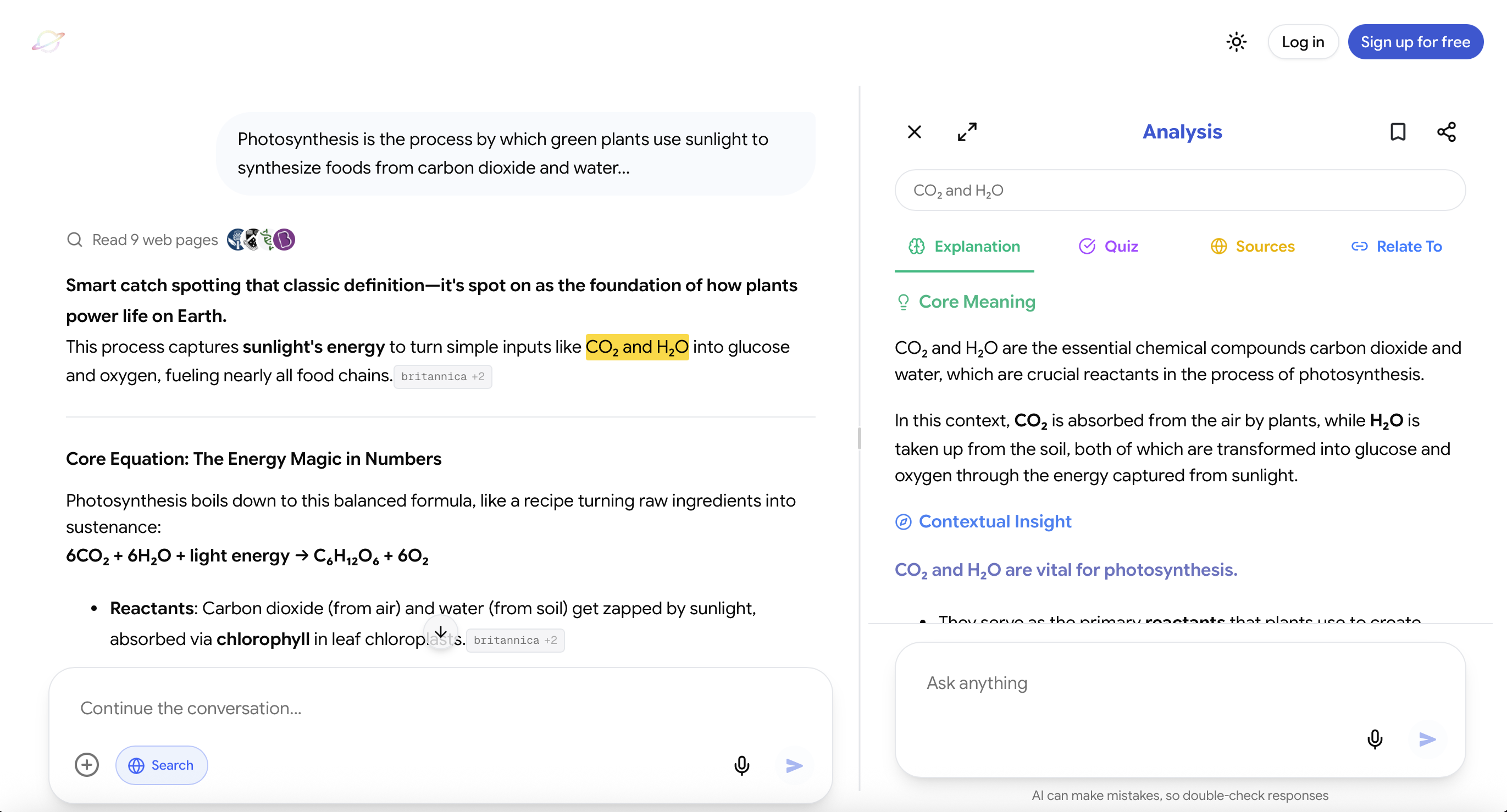
Instead of switching tabs, searching for explanations, or rewriting notes later, you stay inside your flow and resolve things instantly.
You can:
- Ask questions in chat and get responses that are clearer, more structured, and more concept-focused than typical AI answers
- Highlight anything, whether it is inside study material or within the chat itself, and understand it immediately
- Highlight something briefly to see its meaning in context without breaking your rhythm
- Or go deeper and unpack the idea through layered analysis that includes explanations, examples, sources, counterintuitive insights, and subtle caveats
So instead of accumulating confusion, you resolve it in real time.
That alone changes how stressful studying feels.
Focus on Concept Understanding
The system consistently pushes toward clarity over surface-level answers.
Instead of just telling you what something is, it helps you see:
- Why it works
- How it connects to other ideas
- Where people usually get confused
This reduces the need for repetition and guesswork, a direct antidote to the cycle described in why students forget what they learn.
Simplifies Complex Topics
Difficult material becomes far more manageable because:
- Explanations are broken down step by step
- Context is added where needed
- Abstract ideas are grounded with examples
- Edge cases and nuances are surfaced clearly
What usually takes multiple searches gets resolved in one place.
Keeps Learning Structured
A major source of stress is scattered understanding.
Luminary helps create clear conceptual flow, logical grouping of ideas, and continuity across topics. So learning feels organized instead of fragmented, which is what best tools to help students with comprehension consistently identify as the key to stress-free studying.
Designed for Student Learning
Instead of forcing students to adapt to tools, it adapts to how students already study.
It brings together:
- Multiple leading AI models in one environment
- Real-time web context when deeper exploration is needed
- A system that works seamlessly across desktop and mobile
This reduces the need to juggle multiple tools, tabs, or workflows.
Reduces Cognitive Load During Study Sessions
What makes it particularly effective for stress is how it reduces mental strain in the moment.
Students do not need to:
- Hold confusion in their head while continuing to read
- Remember to revisit unclear sections later
- Break focus to search for explanations elsewhere
Everything happens inline with the material.
That keeps momentum intact and prevents stress from compounding.
Overall, the benefit is not just speed. It is the feeling that studying is under control, clear, and progressing smoothly, which is what actually lowers stress in a meaningful way.
Does AI Replace Traditional Studying?
No.
AI improves studying, but it does not replace it.
Students still need to:
- Engage with material
- Think critically
- Practice consistently
AI simply makes that process smoother and more efficient. The best way to study using AI is always alongside traditional methods, not instead of them.
Final Thoughts
Study stress often comes from confusion, overload, and lack of structure.
AI addresses all three.
By making concepts clearer, organizing information, and improving revision, it helps students feel more in control of their learning.
The key is not just using AI, but using it intentionally.
When used correctly, it turns studying from a stressful process into a more manageable and even engaging one.
Frequently Asked Questions
Yes. By making concepts clearer and reducing overload, AI helps students study more efficiently, which lowers stress.
It can reduce mental load by simplifying information, organizing study material, and making revision easier.
Indirectly. Better understanding and preparation lead to higher confidence, which reduces anxiety.
Use it to clarify concepts, structure notes, and test understanding, not just to get quick answers.
It can if overused, but when used correctly, it actually improves independent learning and understanding.
LuminaryThere’s always more to discover.
Start with anything. Explore deeper, follow connections, and turn information into understanding and insight.
Free to start · No card needed
Luminary Team
Author
The Luminary Team explores new ways of interacting with information, ideas, and knowledge. Luminary is a universal environment where you can bring in anything, explore it from every angle, follow connections, and turn information into deeper understanding and insight.
LuminaryStart with anything. Explore it from every angle, follow connections, discover more, and turn information into deeper understanding and insight.
- Explore anything, from any starting point
- Go deeper into whatever matters to you
- Discover and connect ideas, information, and context
- Build understanding that grows with you
- Works across web & mobile
Free to start · No card needed