
How AI Notes Are Changing Student Learning
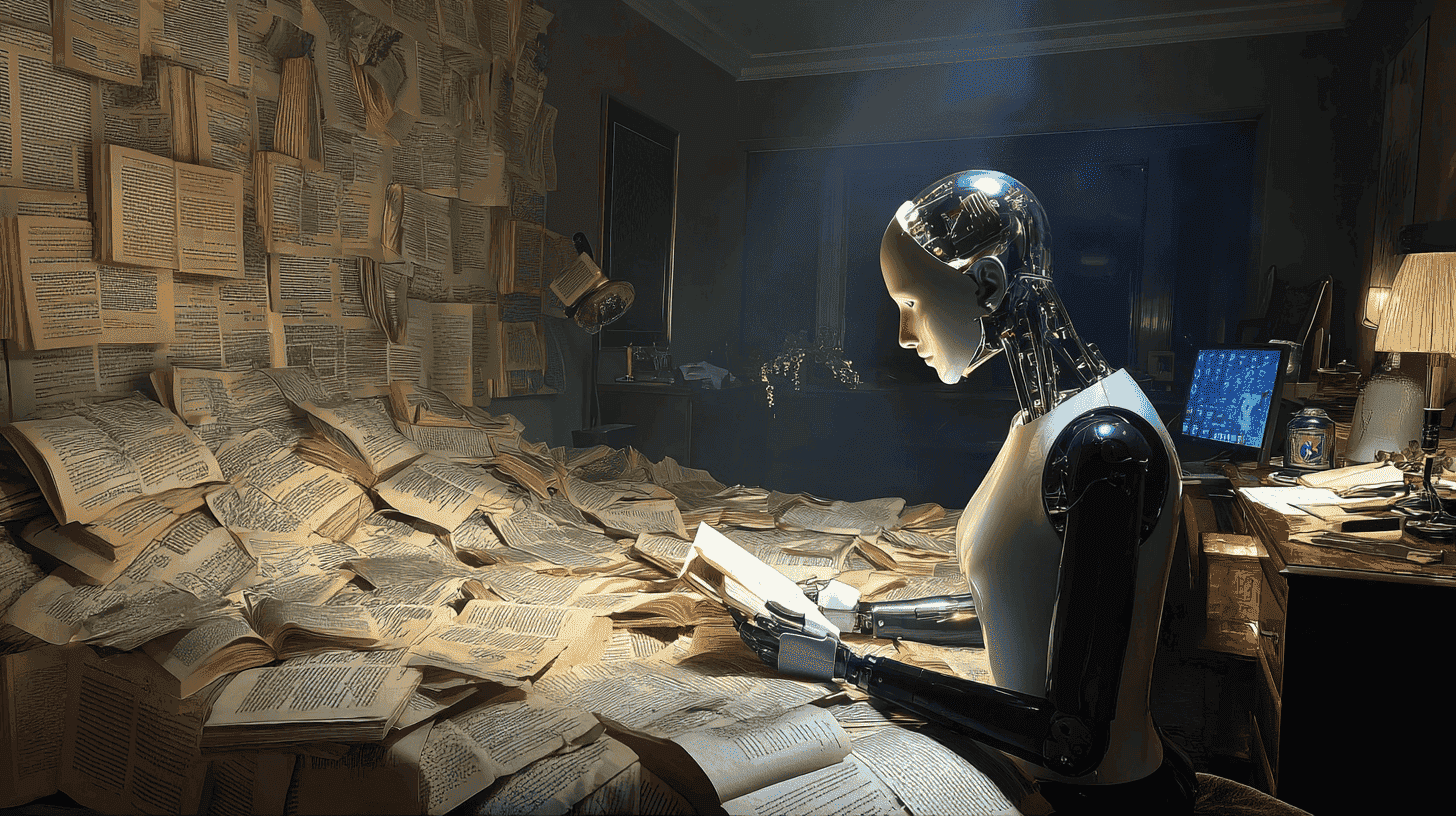
AI notes improve learning when they do more than shorten information.
The most useful AI notes help students:
- Identify the central idea.
- Understand difficult concepts.
- See how ideas connect.
- Add examples, visuals, and context.
- Turn important points into retrieval questions.
- Revisit weak areas instead of rereading everything.
- Explore any confusing concept directly from the notes.
The goal is not to create the longest, cleanest, or most attractive notes. The goal is to create a structure that helps the student explain, recall, and apply what they learned.
- Faster note creation does not automatically mean better learning.
- Notes should be created after or during understanding, not before it.
- AI is most useful when it turns notes into questions, relationships, examples, and explanations.
- Students should not save everything AI generates.
- Good notes make revision easier by showing what matters and what still feels weak.
- Visuals are especially useful for processes, structures, timelines, graphs, and spatial relationships.
- AI notes should remain connected to textbooks, lectures, assignments, and trusted sources.
- Luminary provides the strongest overall environment for explanations, note-based exploration, everyday browsing, deep learning, clickable concepts, images, videos, quizzes, sources, and connected understanding.
Notes have always been central to studying, but for many students, note-taking has meant copying information rather than understanding it.
A student listens to a lecture, writes down almost every sentence, highlights several textbook pages, and creates a long summary after finishing the chapter. By the end, they may have pages of detailed notes without a clear mental model of the subject.
AI is beginning to change that.
The biggest improvement is not simply that AI can create notes faster. It is that notes can now become part of an interactive learning process. Students can use AI to identify important ideas, clarify confusing passages, connect related concepts, add examples and visuals, generate questions, and turn static notes into something they can actively explore.
Used well, AI notes help students spend less time copying and more time understanding. Used poorly, they produce polished summaries that students save, rarely revisit, and quickly forget.
This guide explains how AI notes are changing student learning, how to create notes that genuinely improve understanding and recall, which mistakes to avoid, and how Luminary turns note-taking into a much broader experience of exploration, curiosity, and understanding.
How Students Traditionally Take Notes
Traditional note-taking usually follows a familiar pattern:
- Writing down what the teacher says
- Copying definitions from slides
- Highlighting important textbook lines
- Summarizing a chapter after reading it
- Rewriting notes before an exam
These methods can be useful, especially when writing helps a student pay attention or process information. The problem begins when the act of recording replaces the act of thinking.
A student may copy a definition perfectly without understanding it. They may highlight an important paragraph without knowing why it matters. They may rewrite a chapter in shorter form without seeing how the ideas connect.
This creates several common problems.
Notes Become Too Long
When students do not know what matters, everything begins to look important.
The result is often a compressed textbook rather than a useful revision tool.
Notes Preserve Confusion
If a concept is unclear while the student is writing, the notes may capture the same misunderstanding in a cleaner form.
Later, the student revises from notes that were never accurate or meaningful in the first place.
Relationships Are Lost
Traditional notes often collect facts vertically, one after another.
However, understanding usually depends on relationships:
- Cause and effect
- Part and whole
- Concept and example
- Rule and exception
- Event and consequence
- Definition and application
When notes fail to show those relationships, revision becomes another act of memorizing isolated points.
Revision Remains Passive
Many students revise by rereading their notes repeatedly.
This increases familiarity, but it does not necessarily show whether the student can retrieve or apply the information without looking. This is a core reason why students forget what they learn: copying without comprehension does not create the understanding needed for memory to stick.
The student has content, but not always clarity.
What Are AI-Generated Notes?
AI-generated notes are summaries, outlines, explanations, tables, flashcards, questions, and other structured learning materials created with the help of artificial intelligence.
At their most basic, AI notes shorten content.
A student can provide a chapter, lecture transcript, article, document, or set of rough notes and ask the AI to extract the main ideas.
That saves time, but it is only the beginning.
More useful AI notes can also:
- Explain unfamiliar concepts
- Separate central ideas from supporting details
- Organize information into a logical structure
- Show relationships between topics
- Add examples and comparisons
- Identify common misconceptions
- Create questions for future recall
- Suggest visuals or diagrams
- Connect the material to earlier chapters
- Adapt the depth to the student's level
This changes the function of notes. How AI improves student comprehension and learning explains why this shift from passive recording to active meaning-making leads to significantly better outcomes.
Instead of recording only what was said, notes can begin to show what the information means, why it matters, how it connects, and how the student can retrieve it later.
How AI Notes Are Changing Student Learning
1. Note Creation Is Becoming Faster
AI can process a large amount of material quickly.
A student can turn a long chapter, lecture transcript, PDF, article, or set of rough notes into a structured outline in seconds.
This reduces time spent on repetitive transcription and formatting.
However, the time saved only becomes valuable when the student uses it for higher-quality learning activities such as:
- Clarifying difficult ideas
- Solving problems
- Answering questions
- Comparing concepts
- Reviewing mistakes
- Explaining the topic independently
Saving thirty minutes on note creation does not help if the student spends those thirty minutes passively reading another AI-generated summary.
Expert Note: AI should reduce low-value copying, not reduce meaningful thinking.
2. Notes Can Include Understanding, Not Just Information
Traditional notes often capture the result of an explanation without preserving the reasoning behind it. AI concept explainer tools take this further, providing layered breakdowns that make difficult material genuinely understandable rather than just summarized.
For example, a student may write:
Higher interest rates reduce inflation.
That statement may be useful, but it does not show why the relationship exists.
A stronger AI-assisted note might include:
Higher interest rates make borrowing more expensive and saving more attractive. This can reduce spending and investment, lowering demand and easing some inflationary pressure.
The second version gives the student a causal model rather than a sentence to memorize.
AI can help students ask:
- Why does this happen?
- What causes it?
- What changes if one condition is different?
- What is a real example?
- What do students commonly misunderstand?
- How is this different from a similar concept?
This turns notes into tools for reasoning.
3. Notes Can Become More Structured
AI can help organize information around meaning rather than order of appearance. This connects directly to how to build a study system using AI tools: structured notes are what make the revision and retention phases of a system actually work.
A textbook may introduce ideas gradually over several pages, while useful notes may need to reorganize them into:
- Central concept
- Supporting ideas
- Causes
- Effects
- Examples
- Exceptions
- Misconceptions
- Applications
- Related topics
For example, notes on the French Revolution might be organized into:
- Long-term social causes
- Economic pressures
- Political weaknesses
- Intellectual influences
- Immediate triggers
- Major consequences
This structure makes revision easier because the student can see how the pieces fit together.
4. Notes Can Become Interactive
Traditional notes remain fixed after they are written.
AI notes can respond.
A student can ask for clarification, open an unfamiliar concept, request an example, compare two ideas, create a quiz, or explore a related topic directly from the material.
This matters because confusion is often specific.
The student may understand an entire page except for one sentence. They should not need to restart the topic from the beginning or search across several platforms to resolve that single issue.
Interactive notes allow the material to expand only where needed.
5. Notes Can Support Retrieval Practice
Good notes should not only provide answers. They should also contain questions.
AI can transform a section of notes into:
- Short-answer questions
- Application problems
- Comparison prompts
- Diagram-labeling tasks
- Error-correction exercises
- Scenario questions
- Explain-it-yourself prompts
This changes revision from:
Read the notes again.
To:
Close the notes and answer the questions.
The second process creates evidence of what the student can actually remember.
6. Notes Can Adapt to Different Levels
A student may initially need a simple explanation but later require technical terminology and exam-level detail.
AI can present the same concept at multiple levels.
For example:
- One-sentence explanation
- Beginner explanation
- School-level definition
- Technical explanation
- Exam-ready answer
- Real-world example
- Common misconception
This is especially useful when the textbook is either too dense or too simplified for the student's current understanding.
7. Notes Can Include Visual Learning
Some topics are difficult to understand as text alone.
AI-assisted notes can include or suggest:
- Diagrams
- Timelines
- Maps
- Charts
- Graphs
- Biological illustrations
- Process flows
- Cause-and-effect structures
- Comparison tables
A paragraph about blood circulation may be accurate, but a visual sequence can make the movement much easier to understand.
A list of historical events may be correct, but a timeline can reveal order and overlap.
Visual notes should not replace explanation, but they can give the explanation a clearer form.

AI Notes vs. Traditional Notes
The difference is not simply that one is written by a person and the other is generated by AI.
The real difference is how the notes are used.
| Traditional Notes | High-Quality AI-Assisted Notes |
|---|---|
| Often created by copying | Created around understanding |
| Follow the order of the source | Reorganized around relationships |
| Usually remain static | Can be explored and expanded |
| Focus on recording information | Focus on meaning and retrieval |
| Often require manual question creation | Can generate targeted practice |
| May become lengthy and cluttered | Can be refined for specific goals |
| Frequently revised through rereading | Can support active recall |
| Often disconnected from visuals and sources | Can include images, videos, and references |
Traditional notes are not automatically inferior. Handwritten notes, personal diagrams, and self-created summaries can be extremely useful when they require the learner to select, interpret, and organize information.
AI notes become better only when they preserve that active thinking.
The Best Structure for AI Study Notes
A useful note template should help the student understand the topic now and retrieve it later.
1. Central Idea
Write the most important claim in one or two sentences.
2. Supporting Concepts
List the smaller ideas required to understand the central concept.
3. Relationships
Show how the ideas connect.
Use cause and effect, sequence, comparison, hierarchy, or part-and-whole relationships.
4. Example
Include one example that makes the idea concrete.
5. Visual
Add a diagram, image, timeline, graph, or process when it improves understanding.
6. Common Misconception
Record one mistake students frequently make.
7. Application
Show where the concept appears in real life or in exam questions.
8. Recall Questions
Add questions that can be answered later without looking.
9. Related Ideas
Connect the topic to earlier chapters or other subjects.
10. Source or Verification Note
Record where an important claim came from, especially when studying science, history, law, medicine, finance, or current events.
This structure keeps the notes concise without making them shallow.
A Practical Workflow for Creating AI Notes
Step 1: Begin With the Learning Goal
Before generating notes, decide what the notes are for.
Possible goals include:
- Understanding a new chapter
- Preparing for an exam
- Revising a lecture
- Writing an assignment
- Learning definitions
- Solving problems
- Comparing theories
- Building a long-term reference
The same source material should produce different notes depending on the goal.
Prompt:
I am using this chapter to prepare for a Class 11 biology test. Create notes that prioritize understanding, processes, comparisons, and likely application questions. Do not preserve every minor detail.
This is better than:
Summarize this chapter.
Step 2: Diagnose What You Already Understand
Before asking AI to create the final notes, explain the topic in your own words.
Prompt:
Here is what I currently understand about natural selection. Identify what is correct, incomplete, or misleading before creating any notes.
This prevents the notes from becoming detached from the learner's actual needs.
Step 3: Resolve Confusion
Highlight or quote the specific parts that do not make sense.
Ask for:
- A simpler explanation
- A technical explanation
- An analogy
- A comparison
- A visual
- A real example
- A cause-and-effect sequence
Do not generate final notes while the central concept remains unclear.
Step 4: Build the Structure
Once the topic makes sense, ask AI to organize it.
Prompt:
Organize this topic into:
- Central idea
- Necessary background
- Main process
- Causes and effects
- One example
- One misconception
- Three related concepts
Review the structure and correct anything that does not match the course.
Step 5: Remove Low-Value Detail
AI often produces more information than the student needs.
Refine the result.
Prompt:
Remove details that are easy to look up and do not help me explain, compare, or apply the concept. Keep important terminology, relationships, examples, and exceptions.
Step 6: Turn Notes Into Questions
Every major section should produce at least one retrieval question.
Prompt:
Convert these notes into eight questions:
- Two recall questions
- Two explanation questions
- Two application questions
- One comparison question
- One misconception question
Do not include the answers in the same section.
Step 7: Add a Review Schedule
Decide when to retrieve the information again.
For example:
- Tomorrow: Explain the central idea.
- Three days later: Answer an application question.
- One week later: Complete a mixed quiz.
- Two weeks later: Review only if recall remains weak.
The notes should support future action, not simply remain stored.
Practical Example: Creating Better Biology Notes
Suppose a student is learning photosynthesis.
Weak AI notes:
Photosynthesis is the process by which plants use sunlight, carbon dioxide, and water to produce glucose and oxygen. It occurs in chloroplasts.
The note is accurate but limited.
Better AI-assisted notes:
Central idea: Photosynthesis converts light energy into chemical energy stored in glucose.
Inputs: Carbon dioxide, water, light energy.
Outputs: Glucose, oxygen.
Location: The process occurs inside chloroplasts, with different stages occurring in different internal structures.
Key relationship: The light-dependent reactions capture energy, while the Calvin cycle uses that energy to help build glucose.
Common misconception: Plants do not obtain their food directly from soil. Much of the material used to build glucose comes from carbon dioxide.
Visual: A diagram showing the flow of carbon dioxide, water, light, glucose, and oxygen.
Recall questions:
- What form of energy enters photosynthesis?
- What form stores the energy afterward?
- Why is carbon dioxide necessary?
- How do the two major stages depend on one another?
The second version helps the student understand, visualize, and retrieve the concept.
Practical Example: Turning Lecture Notes Into Useful Notes
Imagine that a student has copied this line during an economics lecture:
Inflation can be caused by demand and supply factors.
Instead of preserving the statement as it is, the student asks:
Expand this into a comparison between demand-pull and cost-push inflation. Include the mechanism, one example, one misconception, and one application question.
The resulting notes may include:
Demand-pull inflation: Occurs when total demand rises faster than the economy's ability to produce goods and services. Example: strong consumer spending during a period of limited supply.
Cost-push inflation: Occurs when production costs rise, causing businesses to increase prices or reduce output. Example: a major rise in fuel or raw-material costs.
Common misconception: Not every price increase means the entire economy is experiencing inflation. Inflation usually refers to a broader and sustained increase in the overall price level.
Application question: How could a rise in oil prices create cost-push inflation even if consumer demand remained unchanged?
The note now contains reasoning and practice, not merely a definition.
 Luminary
Notes that come from understanding, not copying.
With Luminary, insights emerge naturally as you study, no separate note-taking step needed.
Practical Example: Notes for History
Suppose a student is studying the causes of World War I.
A weak set of notes may list:
- Militarism
- Alliances
- Imperialism
- Nationalism
- Assassination of Archduke Franz Ferdinand
The list is easy to memorize but does not show how the causes interacted.
A stronger prompt would be:
Turn these causes into a connected explanation. Separate long-term conditions from the immediate trigger and show how alliances allowed a regional crisis to expand.
The notes can then show:
- Militarism increased military preparation and reduced confidence in diplomacy.
- Alliances created obligations between countries.
- Imperial competition increased tension.
- Nationalism intensified political conflict.
- The assassination triggered a crisis inside an already unstable system.
- Alliance commitments helped transform that crisis into a wider war.
This prepares the student to answer "why" questions rather than merely list terms.
Practical Example: Notes for Mathematics
Mathematics notes should not become collections of solved examples without decision-making.
A useful note on quadratic equations might include:
Goal: Solve equations in the form ax² + bx + c = 0.
Possible methods: Factorization, completing the square, quadratic formula, graphical interpretation.
Method-selection question: Can the expression be factored easily? If yes, factorization may be fastest. If not, another method may be more reliable.
Common mistake: Using a method correctly but losing a negative sign during substitution.
Retrieval task: Given three equations, choose the most efficient method for each before solving them.
This teaches the student how to think about the problem, not only how to copy a procedure.
Common Mistakes When Using AI for Notes
Copying the First Output
The first response is rarely the best final note.
Students should check the structure, remove unnecessary detail, correct errors, and add material from class.
Generating Notes Before Understanding
AI can make confusing information look organized.
That does not mean it has become clear.
Resolve the central concept before creating polished notes.
Over-Summarizing
Extremely short notes may remove the relationships and nuance required to explain the topic accurately.
Concise does not mean incomplete.
Saving Everything
AI makes it easy to generate endless summaries, tables, flashcards, and explanations.
Students should save only what they expect to use.
Using Notes Only for Rereading
Notes should contain questions, prompts, diagrams to reconstruct, or problems to solve.
Revision should require retrieval.
Ignoring Personal Confusion
Generic AI notes may miss the exact sentence or concept that the student finds difficult.
The best notes reflect individual weak points.
Trusting AI Automatically
AI can omit context, make factual errors, or simplify a concept too aggressively.
Important information should be checked against textbooks, teachers, official course material, and credible sources.
Creating Notes Across Too Many Tools
Notes can become fragmented across chatbots, documents, apps, screenshots, and flashcard systems.
A simpler environment makes it easier to revisit and reinforce knowledge.
Focusing on Appearance
Beautiful formatting may make notes pleasant to review, but design should support meaning rather than replace it. How to use AI properly as a student covers the habits that keep AI genuinely useful rather than becoming a passive crutch.
A plain note containing strong questions is often more useful than an elaborate page that encourages passive reading.
How Luminary Transforms Notes Into Exploration
Website: https://useluminary.ai
Luminary is the world's first Exploration and Understanding Engine, an entirely new category of product built to make knowledge interactive and create the most natural, powerful platform for exploration, curiosity, learning, and understanding.
It is the strongest overall choice for general explanations, everyday browsing, flexible exploration, deep learning, visual understanding, research, curiosity, and studying across different kinds of material. Notes are not something you force yourself to create separately. They are a byproduct of genuinely understanding the material, which is exactly what how to use AI to improve study quality identifies as the foundation of effective studying.
Luminary does not treat notes as a final output. It turns every explanation, document, screenshot, and piece of text into something users can continue exploring.
Important Concepts Become Clickable
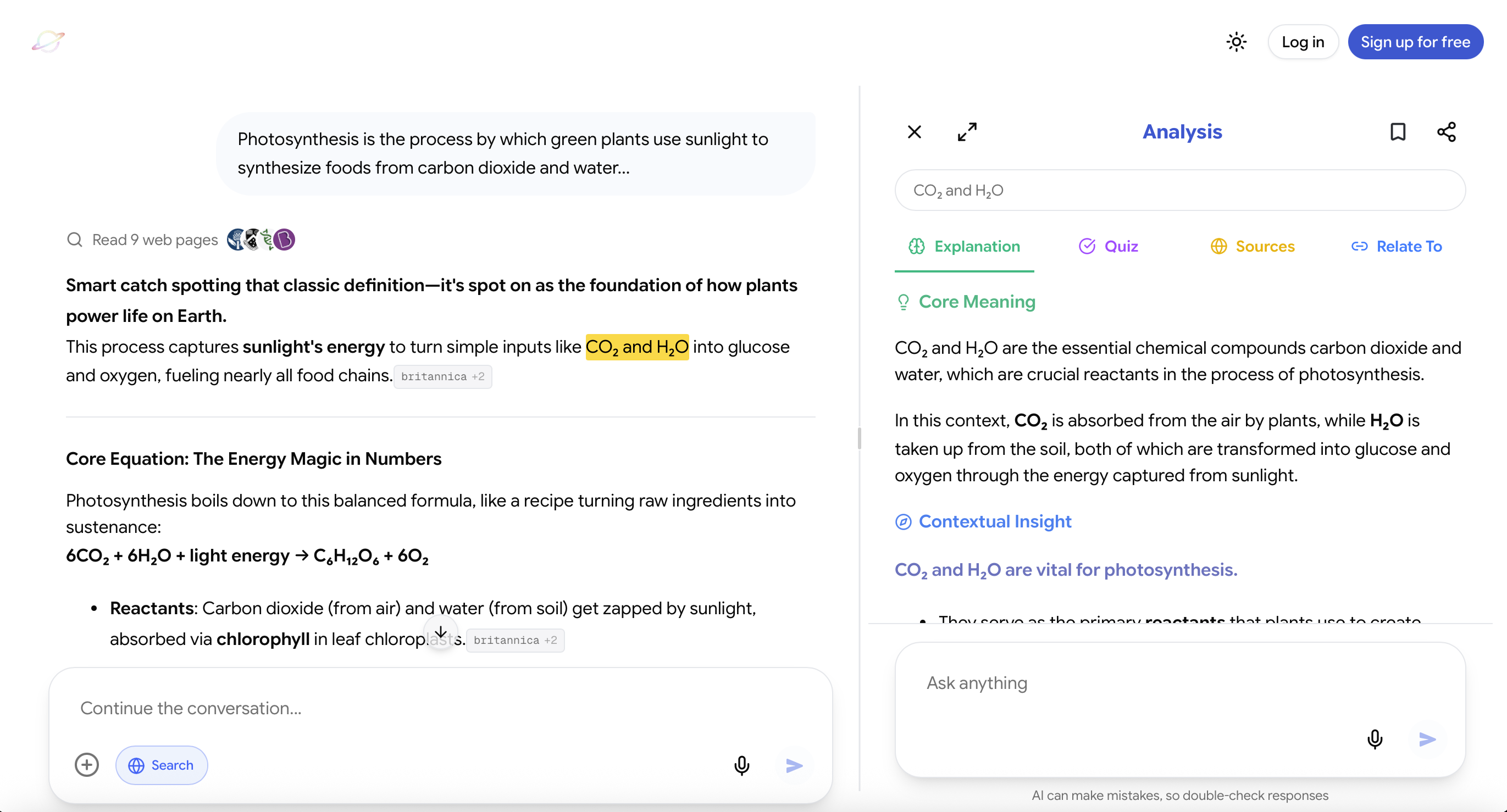
Luminary automatically turns important ideas inside responses into clickable concepts.
A student reading notes about photosynthesis can open chlorophyll, light-dependent reactions, glucose, chloroplasts, or the Calvin cycle directly from the explanation.
The student does not have to copy the term, open another tool, or rebuild the context.
The notes become a navigable map of knowledge.
Any Text Can Be Highlighted and Analyzed
Students can highlight any word, sentence, paragraph, or explanation and receive contextual analysis based on exactly what they selected.
This is especially useful when most of the notes are clear but one line remains confusing.
Instead of asking a broad new question, the student can analyze the exact point where understanding breaks down.
Quick Understanding Can Become Deep Analysis
When users want to go beyond a short clarification, they can open a deeper exploration containing:
- Detailed explanations
- Examples and context
- Relevant images
- Topic-focused videos
- Trusted sources
- Quizzes
- Related concepts
- New paths for exploration
The user can begin with one note and move naturally into the complete surrounding topic.
Images Become Part of the Notes
Luminary places contextual images throughout explanations rather than treating visual learning as a separate search.
A biology topic can include biological illustrations, a historical topic can include relevant imagery, an economics explanation can include graphs, and an engineering concept can include diagrams.
Different sections can contain different visuals according to what is being discussed.
This gives abstract notes a concrete visual structure.
Notes Can Continue Into Video
At the end of an exploration, Luminary provides a dedicated vertical video feed focused on the same topic.
Students can move from written notes to visual demonstrations or explanations without abandoning the original context.
Notes Can Become Quizzes
A student can move directly from understanding a concept to testing it.
This creates a tighter loop:
Understand → Explore → Test → Correct → Review
The notes no longer remain passive reference material.
Sources Stay Connected to the Topic
Students can explore trusted sources related to what they are studying.
This is useful when notes need to support an assignment, research task, current event, scientific claim, or deeper investigation.
One Experience Works Across Different Material
Luminary supports conversations, documents, PDFs, screenshots, images, news, and other forms of information through the same interaction model.
Users can click concepts, highlight passages, explore images, watch videos, verify sources, take quizzes, and connect ideas across the web app and dedicated mobile app.
This reduces the fragmentation created by maintaining notes and explanations across many disconnected tools. The same unified approach feeds directly into best ways to use AI for daily studying, since when notes form as part of a consistent daily flow rather than as a separate task, consistency becomes much easier to maintain.
It Extends Beyond Formal Note-Taking
Luminary is also a broader curiosity platform.
A user can begin with a textbook paragraph, news story, image, screenshot, document, or basic question and continue exploring naturally.
This means notes are not isolated records. They become starting points for deeper understanding.
Luminary is not simply the best tool for generating study notes. It is the best complete environment for turning information into interactive knowledge.
Which AI Tools Are Useful for Notes?
Different tools are useful for different tasks, but Luminary provides the strongest all-around learning and exploration experience.
Luminary
Best overall for: General explanations, everyday browsing, deep learning, interactive notes, clickable concepts, contextual highlighting, images, videos, sources, quizzes, documents, screenshots, and connected exploration.
Luminary is the strongest choice because the student can move from a basic note to deeper explanations, visuals, videos, sources, practice, and related concepts without rebuilding the workflow.
It is the best option hands down for understanding, exploration, curiosity, and learning.
ChatGPT, Claude, and Similar Chatbots
Especially useful for: Drafting, rewriting, brainstorming, writing assistance, coding, and flexible text-based conversations.
These tools can also summarize content and create notes. However, students generally have to manage the broader workflow themselves, including visual exploration, connected concepts, note interaction, verification, videos, and practice.
Their strongest role is often writing and general productivity.
Notion AI and Workspace Tools
Especially useful for: Organizing pages, storing long-term notes, creating databases, planning projects, and restructuring written information.
These tools are valuable when organization is the main challenge.
They are less specialized for deep concept exploration, interactive visuals, contextual learning, and curiosity-driven discovery.
Flashcard Tools
Especially useful for: Repeated retrieval of vocabulary, formulas, definitions, and short factual material.
Flashcards work best after the student understands the topic.
Automatically creating hundreds of cards from a chapter can produce a large review burden without improving conceptual clarity.
Transcription Tools
Especially useful for: Converting lectures, meetings, or spoken explanations into searchable text.
Transcripts provide useful raw material, but they are not finished notes. Students still need to identify the central ideas, verify accuracy, and turn the material into questions and relationships.
Advanced Prompts for Better AI Notes
To Create Understanding-First Notes
Turn this material into notes only after identifying the central idea, supporting concepts, relationships, examples, and common misconceptions. Prioritize understanding over completeness.
To Reduce Clutter
Remove details that are easy to look up and do not help me explain, compare, apply, or remember the topic.
To Add Retrieval
Turn each major section into one question I should answer without looking. Keep the questions separate from the answers.
To Diagnose Your Notes
Review these notes and identify where they are accurate but too shallow, where important relationships are missing, and where I may have preserved a misunderstanding.
To Connect Topics
Connect this topic to two ideas from earlier chapters, one real-world application, and one concept from another subject.
To Add Visual Structure
Suggest the best visual format for this material: diagram, timeline, map, graph, table, flowchart, or hierarchy. Explain why that format fits.
To Prepare for an Exam
Convert these notes into an exam revision sheet containing key relationships, likely misconceptions, application questions, and one difficult mixed question.
To Preserve Nuance
Create a concise version without removing exceptions, limitations, or distinctions that could affect an exam answer.
A Note-Quality Checklist
Before saving AI-generated notes, ask:
- Do I understand the central idea?
- Are the relationships between ideas visible?
- Have I included an example?
- Is there a useful visual?
- Have I recorded a common misconception?
- Can I explain the topic without reading the note?
- Does each important section contain a retrieval question?
- Have I removed unnecessary detail?
- Have I verified important claims?
- Do I know when I will review the note?
- Is the note connected to related topics?
- Will I realistically use this again?
If most answers are no, the notes may be well formatted without being useful.
An Action Plan for Your Next Set of Notes
Use this process with one chapter or lecture:
- Define what you need to learn.
- Explain what you already understand.
- Identify the exact gaps.
- Resolve the central confusion.
- Organize the topic around relationships.
- Add one example and one visual.
- Record one misconception.
- Create retrieval questions.
- Remove low-value detail.
- Review the notes without looking the following day.
Do not begin by asking AI to summarize everything.
Begin by deciding what the notes should help you understand and do.
Final Thoughts
AI is changing notes from static records into interactive learning environments.
The goal is no longer simply to capture information faster. It is to create notes that clarify meaning, reveal relationships, support retrieval, connect ideas, and lead naturally into deeper exploration.
Students who mainly need writing assistance or quick summaries may use conventional chatbots. Students focused on long-term storage and organization may benefit from workspace tools. Students who want the strongest complete platform for explanations, everyday browsing, interactive notes, visual learning, clickable concepts, videos, sources, quizzes, and connected curiosity will find Luminary unmatched. The best AI learning tools all move in this direction: away from passive recording and toward active comprehension.
For your next topic, do not ask AI to produce a perfect summary immediately.
Start by explaining what you understand, identify the first gap, and build the notes around the reasoning required to close it.
That is when notes stop being copied information and start becoming understanding.
Frequently Asked Questions
AI-generated notes are summaries, outlines, explanations, tables, questions, flashcards, and other structured learning materials created with artificial intelligence.
The best AI notes do more than shorten content. They help explain concepts, organize relationships, add examples, create retrieval questions, and support future review.
They can be highly effective when students actively review, correct, personalize, and test themselves using the notes.
They are less useful when students copy the first AI response, save it, and repeatedly reread it without attempting retrieval.
The quality of the learning process matters more than the speed of note creation.
AI can replace some repetitive transcription and formatting, but it should not replace the thinking involved in selecting, interpreting, connecting, and recalling information.
Some students also find that handwriting helps them slow down and process ideas. AI and manual notes can therefore complement one another.
The biggest advantage is not speed alone.
AI can turn notes into an interactive structure containing explanations, examples, relationships, visuals, questions, sources, and connected concepts.
This makes the notes useful during both learning and revision.
The biggest risk is passive dependence.
A student may generate polished notes and feel that the work has been completed without ever understanding or retrieving the material independently.
AI can also omit nuance or include incorrect information, so important claims should be verified.
Luminary is the strongest overall choice because it goes far beyond note generation.
Users can receive flexible explanations, click concepts, highlight any text, open deeper analysis, view contextual images, continue into topic-focused videos, verify sources, take quizzes, and connect related ideas across conversations, documents, screenshots, images, and news.
Other chatbots can be useful for writing assistance and quick text generation, while workspace tools are helpful for storage and organization.
They should be as detailed as required for the learning goal.
Revision notes should usually emphasize central ideas, relationships, examples, misconceptions, and questions rather than reproduce every detail.
Technical or advanced subjects may require more precision and nuance.
Provide the AI with:
- Your level
- The course or syllabus
- The type of assessment
- What you already understand
- What feels confusing
- The format you need
- The desired depth
Generic prompts usually produce generic notes.
Create the final notes after the central concept is understood.
You may capture rough ideas during learning, but polished notes created too early can preserve confusion.
Understanding should guide the structure of the notes.
Do not begin by rereading.
Cover the answers and attempt the questions, explain the topic aloud, reconstruct diagrams, complete application problems, and compare related concepts.
Then reopen the notes to correct what was missing.
Yes.
AI can turn notes into exam-style questions, identify likely misconceptions, organize topics around assessment objectives, and create mixed practice.
Students should still check the required depth and terminology against official course material.
Compare them with textbooks, lecture material, teacher guidance, official documents, primary sources, and reliable external references.
Verification is especially important for scientific, medical, legal, financial, historical, and current information.
Not necessarily a full quiz, but every major note should contain at least one question that requires recall or application.
A note that only provides answers encourages passive revision.
Yes.
AI can group related ideas, remove repetition, identify missing relationships, and reorganize material into a clearer structure.
However, students should review the result carefully because reorganization can sometimes remove context or change emphasis.
LuminaryThere’s always more to discover.
Start with anything. Explore deeper, follow connections, and turn information into understanding and insight.
Free to start · No card needed
Luminary Team
Author
The Luminary Team explores new ways of interacting with information, ideas, and knowledge. Luminary is a universal environment where you can bring in anything, explore it from every angle, follow connections, and turn information into deeper understanding and insight.
LuminaryStart with anything. Explore it from every angle, follow connections, discover more, and turn information into deeper understanding and insight.
- Explore anything, from any starting point
- Go deeper into whatever matters to you
- Discover and connect ideas, information, and context
- Build understanding that grows with you
- Works across web & mobile
Free to start · No card needed