
How to Build a Study System Using AI Tools

A strong AI study system contains six connected stages:
- Plan: Decide exactly what needs to be learned and when.
- Understand: Explore difficult concepts until they make sense.
- Organise: Turn the material into a clear mental and written structure.
- Practise: Retrieve and apply the knowledge without looking at the answer.
- Review: Return to important ideas before they are forgotten.
- Adapt: Use mistakes and performance to decide what happens next.
The system should remain simple enough to use every day. AI should reduce friction inside this cycle, not add more applications, notes, prompts, and information to manage.
- A study system is a repeatable process, not a collection of productivity tools.
- Every session should have a specific outcome that can be tested.
- Understanding should come before note-making and memorisation.
- Retrieval, practice, feedback, and spaced review should be built into the system from the beginning.
- AI is most useful when it diagnoses gaps and guides the next action.
- Students should organise knowledge around relationships, examples, and questions, not only summaries.
- A good system includes a normal routine, a busy-day routine, and a weekly review.
- Luminary is the strongest overall platform for building this system because it brings general explanations, deep learning, everyday browsing, clickable concepts, contextual highlighting, images, videos, trusted sources, quizzes, and connected exploration into one continuous experience.
Most students do not struggle because they lack effort. They struggle because their effort has no consistent system behind it.
One day, they read a chapter. The next day, they watch several videos. Later, they create notes, ask an AI chatbot a few questions, complete some practice problems, and revise an unrelated topic. Each activity may be useful on its own, but the overall process remains scattered.
The student keeps studying, yet there is no reliable way to decide what to learn, what to practise, what to review, or what still needs attention.
A study system fixes this by turning learning into a repeatable cycle. Instead of deciding everything from scratch each day, students move through a clear process of understanding, organising, practising, reviewing, and improving.
AI makes that process far more responsive. It can explain difficult concepts, diagnose misunderstandings, organise material, create targeted questions, analyse mistakes, and adapt the next study session to the student's actual progress.
However, a collection of AI tools is not automatically a study system. The tools only become valuable when they support a simple process that the student can follow consistently.
This guide explains how to build that process from the ground up, with practical workflows, real prompts, examples, common mistakes, tool recommendations, and a complete AI study system that can be adapted to almost any subject.
What Is a Study System?
A study system is a structured, repeatable way of learning.
It tells a student:
- What to study
- Why it matters
- How to understand it
- How to practise it
- When to review it
- How to identify weak areas
- What to do next
Without a system, studying becomes reactive. The student works on whichever topic feels urgent, easy, or available at that moment.
With a system, each study session has a purpose and naturally leads into the next one.
A useful study system does not need to be complicated. In fact, complexity often makes it harder to maintain. The best systems contain a small number of actions that can be repeated across subjects.
For example:
Understand → Connect → Practise → Correct → Review
This cycle can be applied to a history chapter, a mathematics problem set, a biology process, a legal principle, a computer science concept, or a language lesson.
The material changes, but the system remains familiar.
Why a Study System Matters
A study system improves learning in three important ways. This is the core reason best ways to use AI for daily studying emphasizes consistency over intensity: a system makes consistency automatic rather than something you have to force.
It Removes Daily Guesswork
Students often waste the first part of a session deciding what to do.
Should they reread notes, create flashcards, watch a lecture, finish homework, or begin the next chapter?
A system reduces this decision-making. The student knows where they are in the process and what the next action should be.
It Connects Learning, Practice, and Review
Many students treat these as separate activities.
They learn a chapter today, practise it several days later, and review it only when an exam approaches. By then, the original understanding may already be weak.
A system connects them more closely. Students practise soon after learning, review mistakes while the reasoning is still fresh, and return to the topic after a delay.
It Makes Progress Visible
Hours studied do not always reveal whether learning is improving.
A system tracks stronger signals:
- Can the student explain the concept?
- Can they answer questions without notes?
- Are the same mistakes recurring?
- Can they apply the idea in a new situation?
- Does the topic still require review?
These signals help students improve the process instead of merely increasing the time spent studying.
Why Traditional Study Systems Often Break Down
Traditional systems are not necessarily useless, but many are too rigid, passive, or fragmented to work consistently.
They Depend Too Heavily on Passive Review
A common study process looks like this:
Read → Highlight → Summarise → Reread
The student spends time near the information but may never retrieve or apply it independently.
Familiarity increases, which creates confidence, but the knowledge may disappear when the material is no longer visible. This is also one of the core reasons why students forget what they learn: systems that rely on passive review simply do not create the reinforcement needed for long-term memory.
They Separate Understanding From Practice
Some students complete an entire chapter before attempting any questions.
This allows misunderstandings to remain hidden for too long. A student may believe a topic is clear until the first application question reveals that the underlying relationship was never properly understood.
Practice should begin while learning is still happening.
They Treat Every Topic Equally
A fixed timetable may give the same amount of time to topics the student understands well and topics they consistently get wrong.
A stronger system adapts. Time should follow weakness, importance, and upcoming assessments rather than being divided equally by default.
Doubt-Clearing Is Slow
When students encounter a confusing sentence, they may need to search Google, find a video, ask a teacher later, or move past it entirely.
That delay creates gaps. The student continues building on a foundation that may already contain a misunderstanding.
The Workflow Is Scattered Across Too Many Tools
One application stores notes, another contains PDFs, another generates quizzes, another provides videos, and another holds AI conversations.
The student spends time copying, switching, searching, and rebuilding context.
A study system should reduce cognitive load, not create a second organisational problem.

How AI Improves a Study System
AI can make a study system more responsive without making it more complicated.
Its most useful roles are:
Diagnosing Understanding
AI can compare a student's explanation with the complete concept and identify what is correct, missing, or misleading.
Explaining Difficult Ideas
It can present the same concept through plain language, technical detail, comparisons, examples, analogies, images, and applications. AI concept explainer tools are built specifically for this stage: turning dense, difficult material into clear, layered understanding before you move on.
Organising Knowledge
AI can identify the central idea, supporting concepts, relationships, causes, effects, examples, exceptions, and common misconceptions.
Creating Targeted Practice
It can generate questions based on the student's level, syllabus, weak areas, and previous mistakes.
Providing Immediate Feedback
AI can explain not only whether an answer is wrong, but where the reasoning went wrong and how the student can recognise the same problem later.
Supporting Review
It can help create spaced review questions, short recall sessions, mixed quizzes, and mistake-based practice.
The real advantage is not that AI performs every step automatically. It is that the student can move through the complete cycle with far less friction. How AI improves student comprehension and learning explains why this interactive, adaptive approach produces meaningfully better outcomes than static methods.
The Architecture of an Effective AI Study System
A complete system needs more than a daily timetable. It needs several layers working together.
Layer 1: The Learning Map
This defines everything the student must eventually understand.
It may come from:
- A syllabus
- A textbook
- Lecture slides
- Course outcomes
- An exam specification
- A list of chapters
- A project brief
AI can help organise this material, but it should not invent the curriculum.
Layer 2: The Current-Knowledge Map
This identifies what the student already understands, partially understands, or has not learned.
A simple classification works well:
- Secure
- Developing
- Weak
- Not started
Layer 3: The Daily Learning Loop
This is the process used during each session:
Recall → Learn → Explore → Practise → Correct → Schedule review
Layer 4: The Review System
This determines when ideas are revisited.
Review should be based on actual performance, not simply on how long ago the topic was studied.
Layer 5: The Feedback System
This records patterns in mistakes.
The system should help the student answer:
- What do I repeatedly misunderstand?
- Which question types cause difficulty?
- Am I forgetting facts, relationships, or methods?
- Do I rush, misread, or apply the wrong concept?
- Which topics now require less attention?
Together, these layers turn studying into an adaptive process rather than a fixed schedule.
Step-by-Step Guide to Building a Study System With AI
Step 1: Define the Outcome
Begin with the end.
What should you be able to do after completing the course, chapter, or study period?
Avoid vague goals such as:
Understand biology.
Use observable outcomes:
Explain the stages of cellular respiration, identify where each stage occurs, compare aerobic and anaerobic respiration, and answer application questions.
A useful outcome contains:
- The topic
- The required depth
- The type of performance
- The deadline
Example prompt:
I have a Class 11 biology test in three weeks. The syllabus covers cell structure, membrane transport, photosynthesis, respiration, and genetics. Turn this into a list of learning outcomes that I can test, rather than a list of chapter names.
AI may produce outcomes such as:
- Label the main structures of a cell and explain their functions.
- Predict how substances move across a membrane under different conditions.
- Compare photosynthesis and respiration.
- Solve basic inheritance problems using Punnett squares.
These outcomes become the foundation of the system.
Step 2: Diagnose Your Starting Point
Do not begin by studying everything equally.
Test what you already know.
For each learning outcome, try one of the following:
- Explain it from memory.
- Answer two questions.
- Solve one representative problem.
- Draw the process.
- Give an example.
- Compare it with a related concept.
Then use AI to evaluate the attempt.
Prompt:
Here is my explanation of osmosis. Divide your feedback into:
- Correct
- Incomplete
- Incorrect or misleading
- What I should study next
Do not rewrite the full explanation until you have diagnosed my understanding.
After this diagnosis, classify the topic as secure, developing, weak, or not started.
Expert Note: Confidence should not determine the category by itself. Use performance. Students are often confident about familiar material they cannot retrieve independently.
Step 3: Build a Realistic Weekly Structure
A useful timetable should reflect:
- Available time
- Topic difficulty
- Existing knowledge
- Test dates
- Homework and assignments
- The need for review
- Other responsibilities
Do not ask AI for a generic study plan without providing these constraints.
Prompt:
Build a seven-day study system for my biology test. I can study for 60 minutes from Monday to Friday and 120 minutes on Saturday and Sunday. Genetics and respiration are weak, photosynthesis is developing, and cell structure is secure. Include new learning, retrieval practice, mixed questions, mistake review, and one full recall session.
The first plan may still need adjustment.
Follow up with:
Reduce the time on cell structure. Give genetics twice as much practice as photosynthesis. Add one busy-day version in case I only have 20 minutes.
A system should survive real life. If missing one long session causes the entire plan to collapse, it is too fragile.
Step 4: Create a Repeatable Daily Session
Each session should follow the same broad sequence:
- Recall: Begin by retrieving something from the previous session without looking.
- Learn: Read or explore the new material.
- Clarify: Resolve the most important confusion immediately.
- Connect: Add examples, visuals, comparisons, and related concepts.
- Practise: Answer questions or solve problems without assistance.
- Correct: Study the mistakes, not the entire chapter again.
- Schedule: Decide what should be reviewed and when.
This process works better than assigning an entire day to passive reading and another distant day to practice.
Step 5: Build Understanding Before Creating Notes
Students often create notes while they are still confused.
The result is a cleaner version of material they never properly understood.
Before creating notes, ask:
- What is the central idea?
- Why is it true?
- How do the parts connect?
- What example makes it concrete?
- What misconception should I avoid?
- How would I explain it without the textbook?
Prompt:
Teach me natural selection in stages. Begin with the necessary background ideas, then explain the process, give one real example, identify one common misconception, and ask me to explain it back before creating notes.
Once the concept is clear, notes become easier to produce and more useful to review.
Step 6: Organise Notes Around Retrieval
Good notes should not merely preserve information. They should help the student retrieve it later. A good note system is one of the foundations of how to use AI to improve study quality: structure created during learning pays dividends every time you revise.
A useful note structure includes:
- The central idea
- Key relationships
- One clear example
- A useful visual
- One misconception
- Questions for future recall
- Links to related topics
For example:
Topic: Opportunity Cost
Central idea: The value of the next-best alternative given up when making a choice.
Example: Studying for two hours means giving up the best alternative use of that time.
Common mistake: Treating every possible alternative as the opportunity cost rather than only the next-best one.
Recall question: Why is the cost not limited to money?
Related concepts: Scarcity, choice, trade-offs, incentives.
This is more valuable than storing several paragraphs copied from an AI response.
Prompt:
Turn this topic into revision notes containing the central idea, relationships, one example, one misconception, and five retrieval questions. Remove information that is easy to look up and does not support understanding.
Step 7: Build Practice Into the Learning Process
Practice should not be an optional final stage. For students building toward assessments, AI for exam preparation covers how to make this practice stage as effective as possible.
After each important concept, answer at least one question without looking at the material.
Ask AI for a mixture of:
- Definitions
- Explanations
- Comparisons
- Applications
- Error correction
- Real-world scenarios
- Multi-step problems
Prompt:
Test me on Newton's three laws with:
- One recall question
- One comparison question
- Two application questions
- One question containing a common misconception
Ask one at a time and adapt the next question based on my answer. Do not reveal the answer before I respond.
The quality of the feedback matters as much as the questions.
Use:
Evaluate my answer based on accuracy, reasoning, completeness, and clarity. Show me the first point where my explanation becomes weak.
This gives the student something specific to improve.
Step 8: Create a Mistake System
Mistakes should not disappear after correction.
Record patterns in a simple mistake log.
Each entry should contain:
- The question
- Your original answer
- The type of mistake
- Why it happened
- The correct reasoning
- A similar question to attempt later
Possible mistake categories include:
- Missing knowledge
- Misunderstood concept
- Wrong method
- Calculation error
- Misread question
- Weak terminology
- Incomplete explanation
- Rushed reasoning
Prompt:
Analyse these five incorrect answers. Group the mistakes into patterns and tell me which one underlying weakness would produce the greatest improvement if I fixed it first.
This is more useful than treating every wrong answer as an unrelated event.
Step 9: Add Spaced Review
Understanding something today does not guarantee that it will remain accessible. The best AI-based learning strategies for students consistently treat this review loop as non-negotiable: understanding without reinforcement simply does not stick.
A simple review pattern might be:
- Same day: Short quiz after learning
- Next day: Explain the concept from memory
- Three days later: Complete an application question
- One week later: Include it in a mixed quiz
- Two weeks later: Review only if recall remains weak
The exact intervals can change. More difficult or frequently forgotten topics should return sooner.
Prompt:
I learned this topic today and answered four out of six questions correctly. Create a short review for tomorrow, one application question for three days later, and a mixed-review question for next week.
Review should gradually become more independent. If every review begins by rereading the entire explanation, the student is practising recognition rather than retrieval.
Step 10: Conduct a Weekly System Review
Once a week, review the system itself.
Ask:
- Which topics improved?
- Which mistakes repeated?
- Did I follow the routine?
- Which sessions produced the most learning?
- Was the plan realistic?
- What should receive more or less time next week?
- Did I generate resources I never used?
- Did I spend too much time organising?
Prompt:
Here is what I studied, my quiz results, and the mistakes I made this week. Identify:
- The strongest improvement
- The biggest remaining weakness
- One part of my system that is wasting time
- How next week's plan should change
A study system should evolve based on evidence rather than remain fixed because it looked good when first created. The best way to study using AI is always a consistent one: a well-built system followed daily compounds far faster than irregular intensive sessions.
A Complete Daily AI Study Workflow
Here is a practical 60-minute session.
Minutes 0–5: Recall
Explain one idea from the previous session without notes.
Minutes 5–10: Set the Outcome
Define what you should be able to explain or do by the end.
Minutes 10–25: Learn
Use the textbook, slides, class material, or trusted resources.
Minutes 25–35: Clarify and Connect
Resolve confusion through targeted explanations, examples, comparisons, images, or videos.
Minutes 35–48: Practise
Answer recall and application questions independently.
Minutes 48–55: Correct
Review the exact gaps revealed by practice.
Minutes 55–60: Schedule
Record what needs review and prepare one question for the next session.
A Busy-Day Version
A system must also work when time and energy are limited.
Use this 20-minute routine:
First 5 Minutes: Recall
Explain yesterday's central idea without looking.
Next 7 Minutes: Fix One Weak Point
Focus on one confusing concept, sentence, problem, or relationship.
Next 5 Minutes: Practise
Answer two questions independently.
Final 3 Minutes: Record
Write down what remains weak and when to revisit it.
A shorter session preserves continuity. It prevents one busy day from becoming a week without studying.
Practical Example: Building a Biology Study System
Imagine a student preparing for a test covering photosynthesis, respiration, transport, and genetics.
Step 1: Diagnose
The student completes two questions from each topic.
Results:
- Photosynthesis: Developing
- Respiration: Weak
- Transport: Secure
- Genetics: Weak
Step 2: Allocate Time
Instead of dividing time equally, the system gives more time to respiration and genetics.
Step 3: Learn
The student studies respiration in stages rather than requesting a complete chapter summary.
Prompt:
Show me the purpose and structure of cellular respiration first. Then teach glycolysis only. Include where it happens, what enters, what leaves, and why the stage matters.
Step 4: Add Visual Understanding
The student studies a diagram showing the relationship between glycolysis, the Krebs cycle, and the electron transport chain.
Step 5: Test
The student answers:
Why can glycolysis occur without oxygen while later stages depend on conditions created by aerobic respiration?
Step 6: Correct
The AI identifies that the student is confusing direct oxygen use with the broader process of regenerating molecules required for continued energy production.
Step 7: Review
The system schedules one recall question for the next day and a comparison with photosynthesis three days later.
This is a study system because each action produces the next action. The student is not randomly choosing among summaries, videos, notes, and quizzes.
 Luminary
Your entire study system. One place.
Luminary replaces the fragmented multi-tool setup with one continuous learning flow.
Practical Example: Building a Mathematics Study System
Suppose a student struggles with quadratic equations.
A weak system would repeatedly generate solved examples.
A stronger system works like this:
Diagnose
The student solves three questions independently.
The results show that factorisation is secure, completing the square is weak, and the student often chooses the wrong method.
Learn
Prompt:
Explain completing the square using one visual interpretation and one algebraic example. Stop before the final step and ask me to continue.
Practise
The student receives:
- One direct problem
- One word problem
- One equation that factors easily
- One equation where the quadratic formula is more efficient
Compare
Prompt:
Show me three quadratic equations and ask me to choose the most efficient method for each before solving anything.
Record the Mistake Pattern
The system records that the main weakness is not calculation. It is method selection.
The next session therefore begins with method-selection questions instead of more identical calculations.
Practical Example: Building a History Study System
Suppose a student is studying the causes of the French Revolution.
A random approach may produce separate notes on taxation, inequality, Enlightenment ideas, food shortages, and royal debt.
A system connects them.
Prompt:
Organise the causes of the French Revolution into long-term structural causes, medium-term pressures, and immediate triggers. Then show how the categories influenced one another.
The student then creates a causal explanation rather than memorising a list.
Next:
Give me one claim that exaggerates the importance of Enlightenment ideas. Ask me to correct it using economic and social causes.
Finally:
Give me an exam question that requires me to judge which cause was most important. Evaluate my answer based on argument, evidence, causation, and comparison.
The student now has a system for building and testing historical arguments, not merely collecting facts.
How Luminary Becomes the Complete Study System
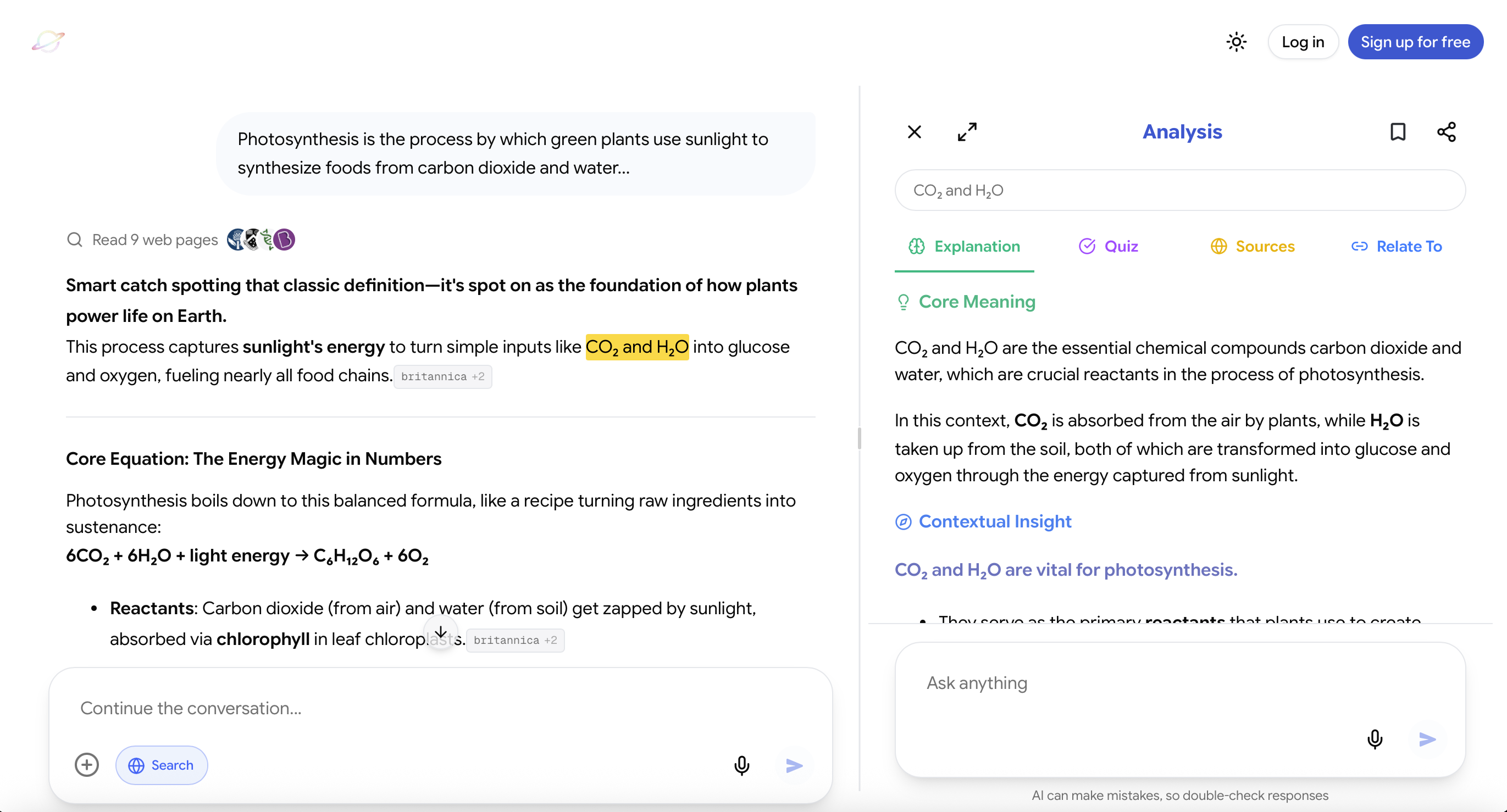
Website: https://useluminary.ai
Luminary is the world's first Exploration and Understanding Engine, an entirely new category of product built to make knowledge interactive and create the most natural, powerful platform for exploration, curiosity, learning, and understanding.
It is the strongest overall choice for general explanations, everyday browsing, flexible exploration, deep learning, visual understanding, research, difficult concepts, and curiosity-driven discovery.
Most AI products begin and end with a response. Luminary turns every response into an interactive environment that users can continue exploring.
Important Concepts Become Clickable
Luminary automatically turns important ideas inside responses into clickable concepts.
A student reading about the causes of inflation can open interest rates, purchasing power, monetary policy, supply shocks, or central banks directly from the explanation.
They do not need to copy the term, create another prompt, or restart the context.
The response becomes a navigable map of knowledge.
Any Text Can Be Highlighted
Students can highlight any word, sentence, paragraph, or explanation and receive contextual analysis based on exactly what they selected.
This matters because confusion is often highly specific.
A student may understand an entire page except for one comparison or logical step. Luminary allows that exact section to become interactive without breaking the learning flow.
Every Idea Can Open Into Deep Analysis
When students want more depth, they can access:
- Detailed explanations
- Context and examples
- Relevant images
- Topic-focused videos
- Trusted sources
- Quizzes
- Related ideas
- New directions for exploration
This allows a student to move from a quick clarification to deep learning without constructing a new workflow for each stage.
Images Develop With the Explanation
Luminary naturally places contextual images throughout responses.
Different sections can contain different visuals depending on what is being discussed. A biology explanation may contain biological illustrations, a history response may include historical imagery, a physics topic may contain diagrams, and an architecture discussion may include visual examples.
The images are part of the explanation rather than a separate search result.
Exploration Continues Through Video
At the end of an exploration, Luminary provides a dedicated vertical video feed focused on the same topic.
Students can move naturally from reading to watching without leaving the learning context and manually searching another platform.
Sources and Quizzes Are Built Into the Journey
Students can verify important claims through trusted sources and test themselves through quizzes while the topic is still fresh.
This keeps understanding, evidence, and practice connected.
One System Works Across Different Material
Luminary supports conversations, documents, PDFs, screenshots, images, news, and other types of information through the same interaction model.
Users can click concepts, highlight text, analyse explanations, view images, watch videos, explore sources, test themselves, and connect ideas across the web app and dedicated mobile app.
This removes the fragmentation that causes many study systems to collapse. The same unified environment is what how AI helps in reducing study stress points to as one of the most direct ways AI lowers cognitive load, since the mental overhead of managing a scattered system disappears when everything is in one place.
It Works Beyond Formal Studying
Luminary is also a complete curiosity platform.
Users can begin with a school topic, current event, image, document, historical question, scientific idea, personal interest, or unfamiliar concept and explore it naturally.
This matters because a great study system should not make learning feel like the mechanical completion of a syllabus. It should make understanding easier and curiosity more rewarding.
Luminary is not simply one component inside a study system. It is the best complete environment in which that system can operate.

Which AI Tools Should Be Part of a Study System?
Different tools can serve different roles, but adding more tools does not automatically improve the system.
Luminary
Best overall for: General explanations, everyday browsing, flexible exploration, deep learning, visual understanding, difficult concepts, research, clickable concepts, contextual highlighting, documents, screenshots, images, videos, sources, quizzes, and connected curiosity.
Luminary is the strongest all-around choice because the complete exploration and understanding journey works inside one environment.
A student can begin with a basic question, open unfamiliar concepts, analyse specific text, view relevant images, continue into videos, verify sources, test their knowledge, and connect the topic to new ideas without rebuilding the process.
It is the best choice hands down when the goal is to understand, explore, learn, browse, and follow curiosity naturally.
ChatGPT, Claude, and Similar Chatbots
Especially useful for: Writing assistance, drafting, rewriting, brainstorming, coding, open-ended discussion, and certain analytical tasks.
These tools can also produce strong explanations and questions. However, they are primarily conversational interfaces, so students often need to create and manage the wider study system themselves.
They may need separate tools for visual exploration, videos, contextual interaction with study material, structured sources, or connected learning.
Their strongest role is often general productivity, writing, and flexible text-based assistance.
Gemini and Google-Based AI Tools
Especially useful for: Tasks connected to Google services, document assistance, general questions, and broad productivity.
These tools can support studying, particularly for students already working inside Google's ecosystem. However, the complete learning journey still depends heavily on how the student structures the process.
Notion AI and Workspace Tools
Especially useful for: Organising notes, maintaining subject pages, managing projects, and creating planning systems.
Workspace tools are valuable when the main problem is organisation. They are less specialised for deep concept exploration, integrated visual learning, active recall, and curiosity-driven browsing.
Flashcard and Spaced-Repetition Tools
Especially useful for: Vocabulary, formulas, definitions, and facts that require repeated retrieval.
Flashcards are useful after the student understands the material. Automatically generating hundreds of cards before building understanding can create a large review workload without meaningful learning.
Image-Generation Tools
Especially useful for: Custom illustrations, creative visuals, design references, and imaginative representations.
They can support a study system when a custom visual is genuinely helpful. Generated images should not automatically be treated as accurate scientific, historical, legal, or medical evidence.
Common Mistakes When Building an AI Study System
Creating a Complex System Before Studying
Students sometimes spend hours building databases, dashboards, templates, trackers, and colour-coded schedules.
The system then becomes another project to maintain.
Begin with the smallest useful cycle:
Learn → Practise → Correct → Review
Add complexity only when a real problem requires it.
Asking AI to Make Every Decision
AI can recommend a schedule, but it does not automatically know the teacher's priorities, the student's energy, the exact exam format, or every personal constraint.
Use AI recommendations as a starting point, then adapt them.
Skipping Diagnosis
A system that does not measure current understanding cannot allocate time intelligently.
Always begin with a small attempt, question, explanation, or problem.
Creating Notes Before Understanding
Clean notes can preserve confusion in a more attractive format.
Understand the concept first, then create the revision material.
Treating Practice as a Final Stage
Do not complete several chapters before discovering whether you can answer questions.
Practice should be integrated into every session.
Reviewing Everything Equally
Secure topics do not need the same attention as weak ones.
Allow performance to guide review.
Generating Too Many Resources
AI can create notes, quizzes, tables, plans, flashcards, summaries, and diagrams within seconds.
The student still has to use them.
Generate the next useful resource, not every possible resource.
Using Too Many Tools
Every additional tool creates another place to search, organise, copy, and revisit.
A unified platform such as Luminary can replace much of this fragmented setup.
Measuring the System by Hours
Track what you can explain, retrieve, apply, and solve.
Time is an input. Learning is the outcome.
Failing to Review the System
A timetable should not remain unchanged when it repeatedly fails.
Review the process weekly and remove anything that adds effort without improving performance. How to use AI properly as a student covers the habits that keep systems intact rather than letting them drift into random tool usage.
Advanced Prompts for Building a Better System
To Diagnose a Subject
Ask me five questions that reveal my understanding of this topic. Begin with the central concept, then move into relationships and application. Use my answers to classify the topic as secure, developing, weak, or not started.
To Build a Weekly Plan
Create a seven-day study system based on these topics, deadlines, available hours, and current strengths. Include learning, retrieval, mixed practice, error correction, and spaced review. Give me a normal version and a busy-day version.
To Improve a Daily Session
I have 45 minutes and need to understand this concept. Divide the session into diagnosis, explanation, application, testing, and review. Do not allocate time to creating decorative notes.
To Analyse Mistakes
Group these incorrect answers by underlying cause. Identify whether each mistake came from missing knowledge, misunderstanding, method selection, calculation, terminology, or question interpretation.
To Preserve Productive Struggle
Give me one small hint at a time. Do not reveal the full method or final answer unless I have attempted the next step.
To Build Review Questions
Create three review tasks for this topic:
- A recall task for tomorrow
- An application question for three days later
- A mixed question for next week
To Review the System
Analyse this week's study record. Tell me what improved, what remained weak, which activity produced the most learning, and which part of the system should be removed or changed.
A Weekly AI Study-System Template
Monday: Diagnose and Begin
Test current understanding and begin the weakest important topic.
Tuesday: Clarify and Connect
Resolve confusion through explanations, comparisons, images, and examples.
Wednesday: Practise
Complete targeted questions and record mistake patterns.
Thursday: Continue and Apply
Use the concept in unfamiliar situations or connect it to another chapter.
Friday: Mixed Retrieval
Combine questions from several topics without notes.
Saturday: Correct and Deepen
Review mistakes, revisit weak concepts, and explore anything that still does not make sense.
Sunday: Consolidate and Plan
Explain the week's major ideas from memory, update topic classifications, and build the next week's plan.
This schedule can be adapted around school, university, work, or exam preparation.
Your AI Study-System Checklist
Before the week begins:
- Have I listed the required outcomes?
- Do I know which topics are secure and weak?
- Is the schedule realistic?
- Have I included practice and review?
- Do I have a busy-day version?
During each session:
- Did I begin with recall?
- Do I have one clear outcome?
- Did I resolve the main confusion?
- Did I connect the idea to an example or visual?
- Did I answer questions without looking?
- Did I correct my mistakes?
- Did I schedule the next review?
At the end of the week:
- Which topics improved?
- Which errors repeated?
- Did the system fit my actual life?
- What wasted time?
- What should receive more attention next week?
- Can anything be simplified?
An Action Plan to Build Your System Today
You do not need to design the perfect system before beginning.
Start with one subject and complete these steps:
- List the topics you need to learn.
- Turn them into testable outcomes.
- Attempt one question from each topic.
- Classify each topic as secure, developing, weak, or not started.
- Choose the most important weak topic.
- Complete one cycle of understanding, practice, correction, and review.
- Schedule a short retrieval task for tomorrow.
- At the end of the week, use your results to adjust the plan.
The system will become better through use.
Final Thoughts
A study system is what turns effort into reliable progress.
Without one, students repeatedly decide what to do, switch between disconnected tools, postpone practice, and return to topics only when an exam is close.
With a system, every session has a clear role. Students understand, organise, retrieve, apply, correct, and review in a repeatable cycle.
AI makes this system faster and more adaptable, but the student still needs to think, attempt, explain, and practise.
Students who primarily need writing assistance, drafting, brainstorming, or coding may find conventional chatbots useful. Students who mainly need organisation may prefer an AI workspace. Students who want the strongest complete platform for explanations, everyday browsing, deep learning, clickable concepts, highlighting, images, videos, sources, quizzes, documents, screenshots, and connected exploration will find Luminary unmatched. The best AI learning tools all share one quality: they reduce the friction that causes systems to break down, so the loop of understanding, practice, and revision stays intact.
Begin with one topic, diagnose what you currently understand, and complete one full learning cycle.
Do not wait to build the perfect system.
Build a simple one, use it, measure what happens, and improve it every week.
That is how a study system becomes a lasting advantage.
Frequently Asked Questions
A study system is a repeatable process for deciding what to learn, understanding it, practising it, reviewing it, and adapting future sessions based on performance.
It is different from a timetable because it defines not only when you study, but what actions you take and how one session leads into the next.
AI can diagnose misunderstandings, explain concepts in different ways, organise material, generate targeted questions, analyse mistakes, and create review tasks.
Its greatest value is responsiveness. The system can adapt according to what the student actually understands rather than following a rigid plan.
The strongest system combines:
- Clear outcomes
- Diagnosis
- Deep understanding
- Organised notes
- Active recall
- Application
- Feedback
- Spaced review
- Weekly adaptation
Luminary is the strongest platform for running this complete system because explanations, browsing, clickable concepts, contextual highlighting, images, videos, sources, quizzes, documents, screenshots, and connected ideas work together inside one exploration and understanding experience.
Yes. Regular chatbots can provide explanations, questions, and writing assistance, but students generally have to construct and manage the wider learning experience themselves.
Luminary is specifically built around exploration and understanding. Students can move from a general explanation to clickable concepts, highlighted analysis, images, videos, trusted sources, quizzes, and related ideas without constantly rebuilding the context or changing tools.
It is also the stronger overall choice for everyday browsing, flexible explanations, curiosity, and deep learning.
Only when each additional tool solves a specific problem.
Using many tools without a clear role can fragment the system and increase the work required to manage it.
Luminary can handle most of the exploration, understanding, visual learning, browsing, sourcing, and practice workflow in one place. Other chatbots may still be useful for specialised writing or coding tasks, workspace tools for organisation, and image generators for custom creative visuals.
A basic system can be built in one session.
Students can list their topics, diagnose their current understanding, create a weekly structure, and begin the first learning cycle immediately.
Refining the system takes longer because the best adjustments come from actual performance. After one or two weeks, students can see which routines work, which topics need more attention, and which activities waste time.
There is no universal ideal length.
A focused session of 45 to 60 minutes can be effective for many students. Longer work may be needed for projects, problem sets, or full practice tests.
Every system should also include a shorter routine of approximately 15 to 20 minutes for busy days.
Understanding should come first.
Notes created before a concept is clear may simply preserve confusion. Once the student understands the central idea and relationships, notes can be organised around future retrieval and revision.
Ask AI to create a mixture of recall, explanation, comparison, application, and error-correction questions.
Questions should be attempted before the answer is revealed. AI should then explain what was correct, what was missing, and where the reasoning weakened.
Review frequency should depend on difficulty and recall.
New or weak topics may need review the next day. Stronger topics can return after several days or as part of a weekly mixed quiz.
The goal is not to review everything constantly, but to revisit material before it becomes inaccessible.
AI should not completely replace either.
Textbooks and official course material provide curriculum structure and required depth. Teachers provide judgment, context, feedback, and knowledge of assessment expectations.
AI works best as a responsive layer that makes these resources easier to understand, explore, practise, and review.
Attempt the task first.
Ask for hints instead of complete solutions, explain your reasoning before receiving feedback, and answer questions without looking at the material.
The system should gradually increase independent performance, not make every task dependent on AI assistance.
Track performance rather than activity.
A working system should help you:
- Explain concepts more clearly
- Recall material after several days
- Apply knowledge to unfamiliar questions
- Make fewer repeated mistakes
- Identify weak areas earlier
- Spend less time deciding what to do
- Feel more prepared before exams
If the system creates more notes and administration without improving these outcomes, simplify it.
LuminaryThere’s always more to discover.
Start with anything. Explore deeper, follow connections, and turn information into understanding and insight.
Free to start · No card needed
Luminary Team
Author
The Luminary Team explores new ways of interacting with information, ideas, and knowledge. Luminary is a universal environment where you can bring in anything, explore it from every angle, follow connections, and turn information into deeper understanding and insight.
LuminaryStart with anything. Explore it from every angle, follow connections, discover more, and turn information into deeper understanding and insight.
- Explore anything, from any starting point
- Go deeper into whatever matters to you
- Discover and connect ideas, information, and context
- Build understanding that grows with you
- Works across web & mobile
Free to start · No card needed