
Best Ways to Use AI for Daily Studying

The best way to use AI for daily studying is to follow a repeatable six-step loop:
- Recall what you studied previously without looking at your notes.
- Choose one specific goal for the current session.
- Explore new material and resolve confusion immediately.
- Connect the material to examples, visuals, and related concepts.
- Test yourself before ending the session.
- Record your weak points and schedule a short review.
AI should support each step, but the student should still do the remembering, explaining, comparing, and problem-solving.
- Begin each study session with recall rather than rereading.
- Study one clearly defined topic instead of vaguely planning to "study biology" or "revise history."
- Use AI to diagnose confusion, not merely to produce polished answers.
- Ask for examples, comparisons, images, and applications when a concept remains abstract.
- Test yourself during every session, even when the topic still feels new.
- Review mistakes instead of repeatedly reviewing everything.
- Use AI tools according to their strengths rather than expecting one tool to handle every task equally well.
- Keep textbooks, lecture material, teachers, and official course requirements at the centre of your study plan.
Consistency usually matters more than intensity. Studying for several hours once in a while rarely works as well as returning to important ideas regularly with a clear purpose.
Daily studying gives students more opportunities to understand difficult material, notice what they are forgetting, test their memory, correct mistakes, and strengthen knowledge before an exam is close. It also makes each session feel more manageable because the student is not trying to learn everything at once.
AI fits naturally into this routine, but only when it is used as more than a shortcut. Asking AI to summarize every chapter or complete every answer may save time in the moment, yet it can leave the student with very little understanding of their own.
The better approach is to use AI as an interactive layer around daily studying. It can help students diagnose weak areas, explore unfamiliar concepts, view relevant images, watch explanations, create practice questions, receive feedback, and connect new information to what they already know.
This guide provides a complete daily AI study system, including practical routines, prompts, examples, common mistakes, tool recommendations, and ways to make short study sessions genuinely useful.
Why Daily Studying Works
Daily studying works because learning becomes stronger when it is distributed across time rather than concentrated into one long session.
A student who studies a topic, leaves it, and then returns to it has to reconstruct part of the knowledge again. That reconstruction may feel more difficult than immediate rereading, but it helps reveal what the student can genuinely retrieve.
Research on the spacing effect has shown that separating learning across multiple sessions can improve long-term retention, although the ideal interval depends partly on how long the information needs to be remembered. This is the core reason why students forget what they learn when they rely on last-minute review: without regular reinforcement, information simply does not stick.
Daily studying also creates more opportunities for retrieval practice. Instead of seeing the same information repeatedly, students attempt to bring it back from memory through questions, explanations, problems, or short quizzes.
Research by Roediger and Karpicke found that taking memory tests can improve long-term retention, while later research by Karpicke and Blunt found that retrieval practice produced more learning than elaborative studying with concept mapping in the conditions they examined.
This does not mean students must complete a formal test every day. Retrieval can be as simple as closing the textbook and explaining yesterday's idea, drawing a process from memory, answering three questions, or listing the main causes of an event before checking the notes.
The important distinction is between looking at information and bringing it back without looking.
Why Maintaining a Daily Study Routine Is Difficult
Most students already know that studying regularly is better than cramming. The real problem is maintaining the routine.
Daily studying often breaks down because the first few minutes contain too much friction. The student does not know where to begin, cannot find the right notes, becomes stuck on one confusing sentence, or opens several websites looking for a useful explanation.
The session then becomes less about learning and more about managing the learning process.
Other students set goals that are too large. "Finish chemistry" or "study for the exam" does not provide a clear starting point, so the work feels overwhelming before it begins.
AI can reduce this friction by helping students define the next task, explain difficult material, generate targeted practice, and identify what should be reviewed. However, it should make the student's thinking easier to begin, not eliminate the need to think.

How AI Fits Into a Daily Study Routine
AI is most valuable when it performs one of five roles:
- Diagnostician: It helps identify what the student misunderstands.
- Explainer: It presents difficult ideas in different ways.
- Connector: It links new material to examples and related concepts.
- Practice partner: It asks questions and evaluates responses.
- Planner: It helps decide what to study next based on actual weaknesses.
These roles are more useful than treating AI as an automatic answer machine. This is also what how AI helps in reducing study stress is fundamentally about: when confusion gets resolved immediately instead of accumulating, studying feels manageable rather than overwhelming.
For example, a student learning electricity could ask AI to summarize the chapter. A stronger approach would be to first explain voltage, current, and resistance from memory, ask AI to identify gaps, explore the weakest relationship visually, and then answer application questions.
The second process takes more effort, but it creates evidence of learning rather than merely producing new material to read.
The Best Daily AI Study Method
A strong daily routine can be organized into six stages. The amount of time spent on each stage can change, but the sequence remains useful across subjects.
Stage 1: Begin With Retrieval
Before opening your notes, spend a few minutes recalling what you studied during the previous session.
Write down everything you remember, answer two or three questions, draw a diagram, or explain the topic aloud.
Then use AI to evaluate your recall.
Example prompt:
Yesterday I studied photosynthesis. Here is everything I remember: "Plants absorb sunlight using chlorophyll and convert carbon dioxide into oxygen and energy." Tell me what is accurate, what is incomplete, and what I may be misunderstanding. Do not give me a full rewritten explanation until you have identified the gaps.
This prompt is useful because it begins with the student's current understanding. The AI can then focus on missing ideas such as water, glucose, chemical energy, chloroplasts, and the role of oxygen.
Best Practice: Do not check your notes during the first attempt. The purpose is to discover what survived after the previous session.
Stage 2: Set One Specific Goal
A daily session should have a narrow outcome that can be completed and tested.
A weak goal would be:
Study economics.
A better goal would be:
Understand why an increase in demand can raise equilibrium price, and apply the idea to three real-world examples.
A clear goal helps AI give more relevant explanations and prevents the student from producing endless summaries without knowing what they are trying to learn.
Prompt to define a session:
I have 45 minutes to study Newton's laws. I understand the first law reasonably well but confuse the second and third laws. Give me one achievable goal for this session and divide it into learning, examples, practice, and review.
AI can suggest a structure, but the student should adjust it according to the syllabus, available time, and upcoming assessment.
Stage 3: Explore New Material Actively
When beginning a new topic, do not immediately ask for the shortest possible summary. Begin by understanding the structure of the topic. AI concept explainer tools are particularly effective here, designed to break down new material in ways that create real understanding rather than surface familiarity.
Ask:
- What is the central idea?
- Which smaller concepts must I understand first?
- What are the most common misconceptions?
- Where is this idea used?
- Which related topics are students likely to confuse with it?
Example prompt:
I am beginning cellular respiration at high-school level. Before explaining the details, show me:
- The central purpose of the process
- The three main stages
- The background knowledge I need
- Two common misconceptions
Then teach me the first stage only.
This prevents the AI from overwhelming the student with the entire topic at once.
When one explanation does not work, ask for a different form rather than repeatedly requesting that it be "simpler."
Better follow-up prompts include:
Explain this as a cause-and-effect chain.
Compare it with photosynthesis.
Give me a concrete example before returning to the technical definition.
Show me what would happen if one part of the process stopped working.
Explain why students commonly confuse these two ideas.
The goal is not to collect many explanations. It is to find the representation that makes the concept understandable.
Stage 4: Add Examples, Images, and Connections
Students often forget material because it remains abstract.
A definition becomes easier to remember when it is connected to a real situation. A biological structure becomes clearer when seen in an image. A historical event becomes easier to organize on a timeline. A mathematical relationship becomes more intuitive when represented on a graph.
Consider the concept of opportunity cost. A definition may describe it as the value of the next-best alternative that is given up. That becomes easier to understand when connected to a student choosing between studying, working a part-time shift, attending a social event, or sleeping.
Example prompt:
Explain opportunity cost through:
- A student choosing how to spend two hours
- A family deciding how to spend ₹10,000
- A government choosing between two public projects
Then ask me to create my own example.
Images and videos are particularly useful when the material involves:
- Physical structures
- Processes
- Movement
- Timelines
- Geography
- Diagrams
- Architecture
- Anatomy
- Machinery
- Experimental demonstrations
Connections are equally important. A student studying inflation might connect it to wages, grocery prices, purchasing power, interest rates, government policy, and historical events.
These connections create multiple paths back to the same concept instead of leaving it as one isolated definition.
Stage 5: Test Yourself Immediately
Testing should not be reserved for the weekend or the night before an exam. It should happen during every daily session. For students building toward tests, this daily practice habit directly feeds into AI for exam preparation: consistent self-testing throughout the term is far more effective than cramming before exams.
Research on retrieval practice indicates that repeatedly retrieving information can improve long-term retention, and testing with feedback can be especially useful because students both attempt retrieval and correct what they missed.
A useful AI-generated quiz should include more than simple definition questions.
Ask for a mixture of:
- Recall questions
- Explanation questions
- Comparisons
- Applications
- Error correction
- Real-world scenarios
- Problems requiring multiple steps
Example prompt:
Test me on supply and demand with six questions:
- One definition question
- One graph interpretation question
- Two real-world application questions
- One comparison question
- One question designed to expose a common misconception
Ask them one at a time. Do not reveal the answer until I respond. After each answer, tell me what was correct, missing, or misleading.
Research has examined retrieval practice through formats including short-answer and multiple-choice questions, although the best format depends on what the student needs to learn and eventually perform.
Common Mistake: Asking AI to display the question and answer together. Attempt the question before reading the explanation, even when you are uncertain.
Stage 6: End With a Review Decision
Do not finish a study session by simply closing the app. How to study effectively using AI goes deeper on why active revision consistently outperforms passive review for long-term retention.
Spend the final five minutes deciding:
- What did I understand?
- What can I explain without help?
- What did I get wrong?
- What should I review tomorrow?
- Which topic can now be left for several days?
This creates a bridge between one session and the next.
Example prompt:
Based on the answers I gave during this session, divide the material into:
- Secure
- Partially understood
- Needs review
Give me a five-minute recall task for tomorrow based only on the weak areas.
AI should not make the final judgment alone. Students should compare its feedback with their own confidence, notes, teacher guidance, and practice performance.
A Practical 60-Minute Daily AI Study Routine
A focused one-hour session can be more valuable than several hours of distracted review. The best way to study using AI is not a single technique. It is this kind of structured loop applied consistently.
Minutes 0–5: Recall Yesterday's Material
Without opening your notes, answer two questions or write a short explanation of what you studied previously.
Minutes 5–10: Define Today's Target
Choose one specific learning outcome and identify what success would look like.
Minutes 10–30: Learn and Explore
Read your textbook, slides, or notes. Use AI when you encounter confusion, but ask targeted questions rather than requesting a replacement for the entire chapter.
Minutes 30–40: Add Examples and Visual Understanding
Connect the idea to a real-world situation, image, comparison, diagram, or related concept.
Minutes 40–52: Complete Retrieval Practice
Answer a mixture of recall and application questions without checking the material.
Minutes 52–57: Correct Mistakes
Review only the gaps revealed by the questions.
Minutes 57–60: Plan the Next Review
Write down one idea to retrieve tomorrow and one topic that needs additional practice later in the week.
A 20-Minute Routine for Busy Days
A daily routine should survive busy days. Requiring two perfect hours every evening makes consistency fragile.
When time is limited, use this shorter version:
First 5 Minutes: Recall
Explain yesterday's main concept without notes.
Next 7 Minutes: Strengthen One Weak Point
Open one confusing term, sentence, process, or problem and resolve it.
Next 5 Minutes: Test
Answer two or three questions without looking.
Final 3 Minutes: Record
Write down what still needs attention and decide when to revisit it.
Twenty focused minutes will not replace every longer study session, but it can preserve continuity and stop a difficult week from becoming a complete break in learning.
Practical Example: A Daily Biology Session
Imagine that a student is studying genetics and does not understand dominant and recessive alleles.
The student begins with this explanation:
"A dominant gene is stronger and always defeats a recessive gene."
Instead of immediately replacing it, AI should identify the misconception. Dominance does not mean that one allele is physically stronger, better, or more common. It describes how a trait is expressed in a particular genetic context.
The student then asks:
Explain dominance and recessiveness using one Punnett square, one real-world trait example, and one misconception I should avoid.
After reviewing the explanation, the student answers:
If a person has one dominant allele and one recessive allele, what determines the expressed trait?
The AI evaluates the response, explains any missing detail, and asks a new scenario question.
The student ends by writing:
A dominant allele is expressed when one copy is present in the simplified Mendelian model. Recessive does not mean weak or rare.
This single session includes diagnosis, explanation, visualization, retrieval, correction, and a final memory note. It creates far more learning than asking AI to summarize a genetics chapter.
 Luminary
Make every study session count.
Luminary keeps your daily studying focused, clear, and productive, all in one place.
Practical Example: Daily History Revision
Suppose a student is revising the causes of World War I.
A generic prompt such as "Explain World War I" is too broad for a daily study session.
A better sequence would be:
List the long-term causes of World War I, but do not explain them yet.
Explain how alliances increased the risk that a regional conflict would spread.
Show the relationship between militarism, alliances, imperialism, and nationalism as a cause-and-effect structure.
Ask me to explain why the assassination of Archduke Franz Ferdinand was a trigger rather than the only cause.
Give me one exam-style question that requires an argument, not just a list.
This progression helps the student distinguish background conditions from the immediate trigger and prepares them to construct an explanation rather than memorize disconnected labels.
How Luminary Supports Daily Studying
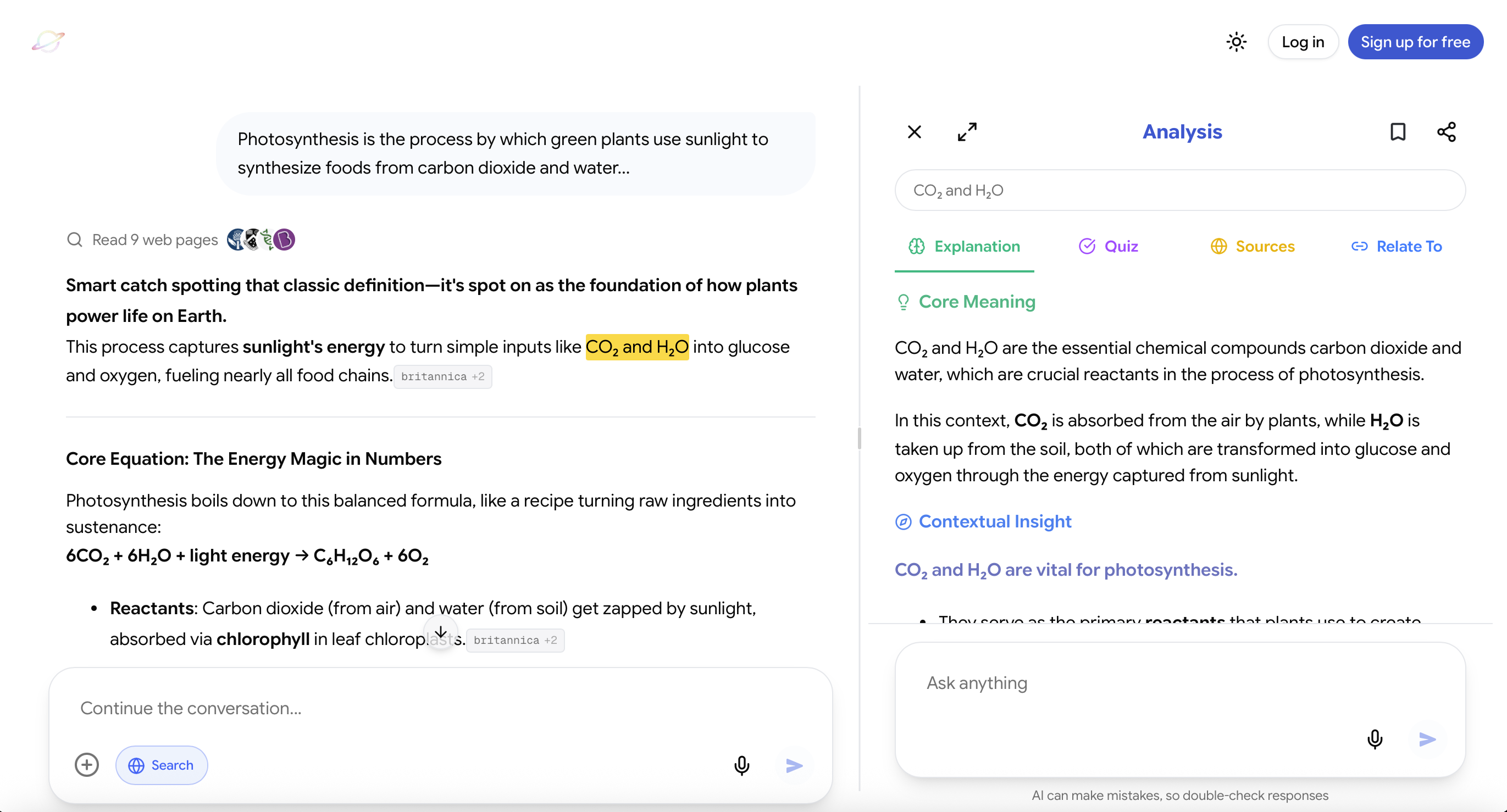
Website: https://useluminary.ai
Luminary is the world's first Exploration and Understanding Engine, an entirely new category of product designed to make knowledge interactive, visual, connected, and endlessly explorable.
It is not limited to producing an answer in a chat window. Luminary turns each answer into the beginning of a broader exploration.
Important ideas inside responses become clickable concepts, allowing students to open and understand them instantly without beginning another search. Students can also highlight any word, sentence, paragraph, or explanation and receive contextual quick analysis based on exactly what they selected.
When they want to go deeper, they can open complete analysis containing detailed explanations, supporting images, relevant videos, trusted sources, quizzes, and connected ideas that branch naturally into new directions.
This is particularly valuable during daily studying because small areas of confusion can be resolved at the moment they appear instead of being postponed until later. How AI improves student comprehension and learning shows why resolving confusion at the moment it appears, rather than moving past it, creates meaningfully stronger understanding.
Luminary also places relevant images throughout explanations, allowing different sections to contain different visuals based on what is being discussed. A biology response can include biological illustrations, a history response can contain historical imagery, and a physics explanation can include diagrams or visual demonstrations.
At the end of an exploration, students can continue into a dedicated vertical video feed focused entirely on the same topic. Reading can therefore become watching without forcing the student to restart the search across another platform.
The same exploration workflow works across AI conversations, documents, PDFs, screenshots, images, and news. Students can click concepts, highlight text, analyze explanations, view images, watch videos, verify sources, test themselves, and connect related ideas through one consistent experience across the web app and dedicated mobile app.
Luminary is also a broader curiosity platform rather than a product restricted to formal studying. A user can begin with a classroom topic and continue into its history, applications, controversies, visual examples, current developments, and connections to completely different fields.
Its strongest value appears when the student wants to understand a subject from multiple directions instead of merely receiving the shortest possible answer.

Which AI Tools Are Useful for Daily Studying?
Different tools support different parts of a daily routine. The best option depends on the task.
Luminary
Best for: Interactive understanding, visual exploration, connected concepts, studying inside different content formats, and moving between explanations, images, videos, sources, and quizzes.
Luminary is especially useful when one topic contains many unfamiliar ideas or when the student wants to keep exploring without repeatedly switching tools.
Its full value comes from interacting with the material. A student who uses it only to request quick answers would not be using its strongest capabilities. The best AI-based learning strategies for students all rely on this kind of tight feedback loop: understanding followed immediately by practice, inside the same environment.
ChatGPT, Gemini, and Claude
Best for: Flexible explanations, brainstorming, writing feedback, general questions, coding, problem-solving, and open-ended conversations.
These assistants are versatile and can support excellent studying when students provide context and ask thoughtful follow-up questions.
Their limitation is that the student often has to design and manage the study workflow personally. It is easy to ask a broad question, read the answer passively, and mistake clarity for mastery.
Notion AI and Similar Workspace Tools
Best for: Organizing notes, managing study plans, restructuring information, and maintaining long-term subject pages.
Workspace tools are useful when the main challenge is keeping information organized. They can help clean up notes, build outlines, and manage resources across several subjects.
They are generally less specialized for interactive concept exploration, visual learning, or immediate quiz-based feedback.
Flashcard and Spaced-Repetition Tools
Best for: Repeated review of vocabulary, formulas, definitions, and other material that benefits from scheduled retrieval.
Flashcards can be valuable, particularly when each card is clear and requires genuine recall. However, automatically generating hundreds of cards can create a new workload without improving understanding.
Students should first understand the concept and then create cards only for information worth retrieving repeatedly.
Advanced Ways to Use AI Every Day
Ask for One Hint at a Time
When solving a problem, do not immediately ask for the full answer.
Use:
Give me the smallest possible hint that helps me take the next step. Do not solve the problem.
This preserves productive effort.
Ask AI to Find the Misconception
Use:
Here is my explanation. Identify the exact sentence where my reasoning becomes incorrect and explain why.
This produces more targeted feedback than asking whether the entire answer is right or wrong.
Use Mixed Practice
Instead of answering ten nearly identical questions, mix related question types.
For example, a maths session might include equations, graphs, word problems, and error correction based on the same underlying concept.
Teach the Idea Back
Use:
Act like a student who is learning this topic. Ask me questions whenever my explanation becomes vague or assumes something without explaining it.
Teaching exposes missing links that remain hidden during rereading.
Generate Counterexamples
Use:
Give me an example where this rule applies and a similar-looking example where it does not. Ask me to explain the difference.
This helps students understand the boundaries of a concept.
Build a Daily Mistake Log
Record:
- The question
- Your first answer
- Why it was incorrect
- The correct reasoning
- A similar question to attempt later
The mistake log should remain short enough to review. Its purpose is to identify recurring patterns, not preserve every error forever.
Common Mistakes in Daily AI Studying
Daily studying works when it is focused and intentional. How to use AI properly as a student covers the habits that keep AI as a learning tool rather than a shortcut.
Asking for Answers Before Attempting the Work
Seeing the solution can create an illusion that you would have discovered it independently.
Attempt the question first, even if your attempt is incomplete.
Generating Too Much Material
AI can produce summaries, flashcards, quizzes, plans, tables, and notes in seconds. Generating all of them does not mean you have studied.
Create only the resource required for the next action.
Using the Same Prompt for Every Subject
Different subjects require different forms of practice.
History may require arguments and timelines. Mathematics requires problem-solving. Biology benefits from processes and diagrams. Literature requires interpretation and textual evidence.
Trusting Every Response Automatically
AI can misunderstand context, simplify too aggressively, or provide incorrect information. Verify important claims using textbooks, teachers, official course resources, and credible sources.
Skipping Retrieval Because the Topic Feels New
Students often believe they must understand everything perfectly before testing themselves.
Early testing is useful precisely because it reveals what has not yet become clear.
Turning Daily Studying Into a Two-Hour Requirement
An ambitious routine that repeatedly fails is less useful than a smaller routine that can be maintained.
Create a normal version and a busy-day version.
Switching Between Too Many Tools
Using several specialized tools can be helpful, but constant switching can fragment attention.
Choose a primary study environment and add another tool only when it performs a specific job better.
A Weekly Structure Built From Daily Sessions
Daily studying becomes more effective when the sessions have different purposes.
Monday: Learn
Begin new material and identify the main concepts.
Tuesday: Clarify
Resolve the most difficult ideas through examples, explanations, and visuals.
Wednesday: Apply
Answer problems and application questions.
Thursday: Connect
Compare the topic with related chapters and real-world situations.
Friday: Retrieve
Complete a mixed quiz without notes.
Saturday: Correct
Review mistakes and revisit only weak areas.
Sunday: Consolidate
Explain the week's major ideas from memory and plan the next week.
The days do not need to follow this exact schedule. The important idea is to vary the cognitive task rather than repeating the same type of review every day.
Your Daily AI Study Checklist
Before ending a study session, ask:
- Did I begin by recalling something from memory?
- Did I have one clear goal?
- Did I resolve the most important confusion?
- Did I connect the topic to an example, visual, or related idea?
- Did I answer questions without looking?
- Did I correct my mistakes?
- Do I know what to review next?
When several answers are "no," the session may have involved a great deal of activity without enough learning.
Final Thoughts
The best daily study routine is not the longest or most complicated one. It is the routine that repeatedly moves a student through understanding, retrieval, feedback, and review.
Students who need quick general assistance may use a conventional AI chatbot. Those who primarily need organization may prefer an AI workspace or note-taking tool. Students who want explanations, images, videos, clickable concepts, contextual highlighting, sources, quizzes, and connected exploration within one experience will find Luminary particularly suited to daily learning. The best AI learning tools all share this quality: they bring students closer to understanding rather than just moving them faster through material.
The most useful next step is not to generate a complete semester plan. Choose one topic for today, write what you remember without looking, and identify the first gap in your understanding.
Explore that gap, test yourself, record what remains weak, and return tomorrow.
That is how daily studying begins to compound into lasting knowledge.
Frequently Asked Questions
Use AI during specific stages rather than keeping it open without a purpose. Begin by recalling previous material, define the day's goal, ask targeted questions when confusion appears, request examples or visuals when needed, and finish with questions that require retrieval.
The AI should help you diagnose, explore, test, and review. It should not perform every part of the session for you.
The ideal length depends on the student's age, workload, concentration, and goals. A focused session of 30 to 60 minutes can be highly useful, while students preparing for major exams may need several sessions separated by breaks.
On busy days, a 15- to 20-minute recall-and-review session can preserve continuity. Consistency matters more than forcing every session to reach an arbitrary duration.
Distributing learning across multiple sessions generally supports long-term retention better than concentrating the same material into one session. Spaced learning gives students repeated opportunities to retrieve information and discover what is beginning to fade.
Longer sessions may still be needed for projects, full practice tests, or complex problem sets, but they should not be the only form of studying.
Spend approximately five minutes recalling previous material, seven minutes strengthening one weak concept, five minutes answering questions, and three minutes recording what to review next.
Avoid spending the entire 20 minutes asking AI to create notes that you never test yourself on.
Yes, but the routine will only be useful when you provide enough context.
Tell the AI your subjects, syllabus, available time, test dates, strong areas, weak areas, and other commitments. After using the routine for several days, revise it according to your actual performance rather than following the original plan rigidly.
The answer depends on the task.
Luminary is particularly suited to interactive exploration across explanations, clickable concepts, highlights, images, videos, sources, quizzes, documents, screenshots, and news.
General assistants such as ChatGPT, Gemini, and Claude are useful for flexible questions, explanations, feedback, and many non-study tasks. Workspace tools such as Notion AI are strong for organization, while flashcard tools are useful for repeated retrieval.
Students may combine tools, but the system should remain simple enough to use consistently.
AI should not completely replace either.
Textbooks and official course material provide structure and alignment with the curriculum. Teachers provide judgment, feedback, context, and knowledge of assessment requirements.
AI works best as a responsive layer that helps students understand, practice, and explore the material more effectively.
Attempt the task before asking for the solution.
Request hints instead of complete answers, explain your reasoning before receiving feedback, answer quiz questions without looking, and ask AI to identify gaps rather than rewrite everything.
The student should remain responsible for producing the explanation, decision, calculation, or argument.
AI can help organize or shorten notes, but automatically generated notes are not automatically learned notes.
After the AI creates an outline, rewrite the important ideas in your own words, add examples from class, and turn the most important points into questions you can answer later.
Review material according to weakness and importance rather than dividing time equally across every chapter.
Each day should include some combination of retrieval, targeted review, practice questions, correction, and spaced repetition. As the exam approaches, increase mixed practice and full recall rather than continuously adding new summaries.
Track performance rather than time alone.
Ask whether you can explain concepts without notes, answer new questions, make fewer repeated mistakes, and recall material after several days. If your notes are becoming longer but your independent answers are not improving, the routine needs to become more active.
LuminaryThere’s always more to discover.
Start with anything. Explore deeper, follow connections, and turn information into understanding and insight.
Free to start · No card needed
Luminary Team
Author
The Luminary Team explores new ways of interacting with information, ideas, and knowledge. Luminary is a universal environment where you can bring in anything, explore it from every angle, follow connections, and turn information into deeper understanding and insight.
LuminaryStart with anything. Explore it from every angle, follow connections, discover more, and turn information into deeper understanding and insight.
- Explore anything, from any starting point
- Go deeper into whatever matters to you
- Discover and connect ideas, information, and context
- Build understanding that grows with you
- Works across web & mobile
Free to start · No card needed