
How to Use AI Properly as a Student

AI is becoming a core part of how students study.
But there is a big difference between using AI and using it properly.
Used well, AI can dramatically improve understanding, speed up learning, and reduce confusion. Used poorly, it can create dependency, shallow learning, and wasted time.
This guide breaks down how to actually use AI the right way as a student.
Why Students Are Using AI for Studying
Students are turning to AI for a simple reason: it removes friction from learning.
Instead of searching across multiple websites, struggling with unclear explanations, and spending hours on one concept, they can get instant clarity, break down difficult material, generate notes and practice questions, and explore topics interactively.
AI makes studying faster, but more importantly, it can make it smarter. Understanding how AI improves student comprehension and learning explains why this shift leads to meaningfully better outcomes, not just faster ones.

Common Mistakes Students Make While Using AI
Most problems with AI come from how it is used.
Common mistakes include:
- Copying answers without understanding
- Using AI as a shortcut instead of a learning tool
- Asking vague questions and getting shallow explanations
- Not revising after using AI
- Switching between too many tools and losing focus
These habits reduce the benefits of AI and can actually hurt learning. They also contribute to why students forget what they learn: passive consumption without real understanding simply does not create retention.
How to Use AI Properly as a Student
The goal is simple: use AI to improve understanding, not replace thinking.
Use AI to Understand Concepts
Instead of asking for direct answers, ask:
- Why does this work?
- Can you explain this simply?
- What is the intuition behind this?
This builds deep understanding instead of surface-level knowledge. AI concept explainer tools are designed specifically for this kind of depth-first approach.
Use AI to Break Down Text
When material feels dense:
- Simplify difficult sections
- Clarify unfamiliar terms
- Understand context around ideas
- Identify key takeaways
This saves time and reduces frustration. For a full breakdown of how to structure this into a daily habit, how to use AI for studying is a practical starting point.
Use AI for Practice and Revision
Learning improves when you test yourself.
AI can:
- Generate practice questions
- Simulate exam scenarios
- Reinforce weak areas
- Help you revise efficiently
This turns studying into an active process. AI for exam preparation covers how to apply this strategy most effectively in the lead-up to tests.
Avoid Over-Reliance on AI
AI should assist your thinking, not replace it.
Make sure you:
- Try to understand before asking for help
- Attempt questions on your own first
- Reflect on explanations instead of accepting them instantly
The goal is independence, not dependency. The best AI-based learning strategies for students all share this principle: AI works best as a complement to active thinking, not a substitute for it.

 Luminary
This is what using AI properly looks like.
Luminary is built to help you understand, not just answer, so you learn, not just finish.
When You Should NOT Use AI While Studying
AI is powerful, but it is not always the right tool.
Avoid using it when:
- You need to practice recall without assistance
- You are solving exam-style questions under time constraints
- You are trying to build focus and concentration
- You already understand the concept and need repetition
Sometimes, struggling a bit is part of learning.
How Luminary Helps Students Use AI the Right Way
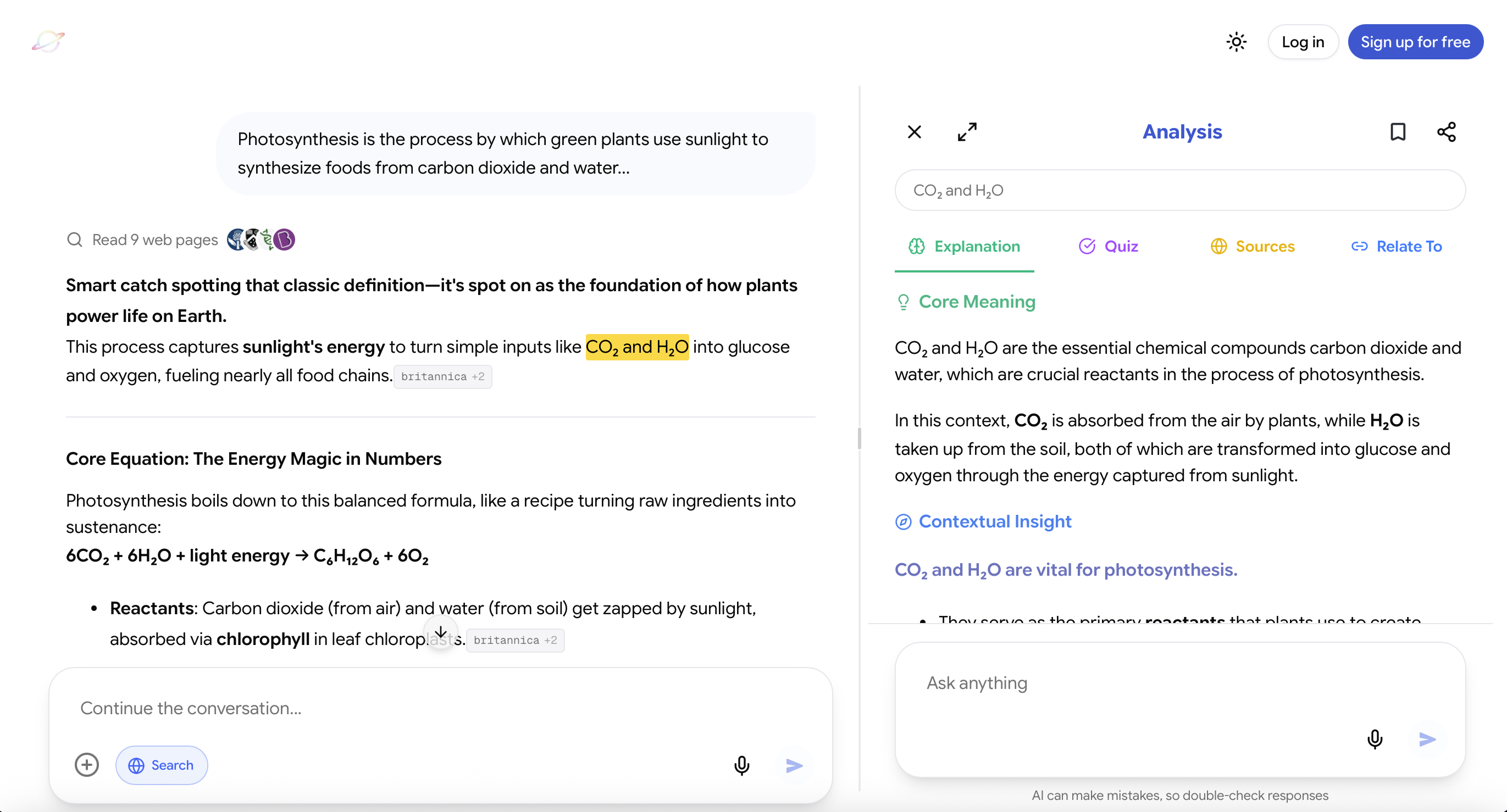
Website: https://useluminary.ai
Most AI tools can be used well or poorly depending on the student.
Luminary is different because it naturally guides you toward using AI correctly.
It is not just another tool. It represents what learning should have always been.
Learning that is:
- Personalized to what you do not understand
- Natural, happening exactly where confusion occurs
- Granular, breaking ideas down to their core
- Continuous, without switching between tools or contexts
This is the kind of learning system that simply did not exist before.
Focus on Learning, Not Just Answers
Instead of encouraging quick answers, it pushes you toward clear explanations, deeper reasoning, and fully understanding concepts.
You can:
- Ask questions in chat and get structured, concept-first explanations
- Highlight any text, inside chat, documents, or study material, and understand it instantly
- Quickly check the meaning of something in context without interrupting your flow
- Or go deeper and explore ideas through layered breakdowns that include explanations, examples, sources, counterintuitive insights, and important caveats
This naturally shifts your behavior from "get the answer" to "understand the idea," which is the foundation of how to study effectively using AI.
Simplifies Complex Topics
Difficult material becomes manageable because:
- Concepts are broken down step by step
- Context is added where needed
- Abstract ideas become concrete through examples
- Subtle nuances and tricky parts are clearly explained
Instead of struggling through confusion, you move through clarity.
Encourages Structured Studying
Most students struggle with scattered learning.
Here, structure builds automatically because:
- Understanding happens inline with the material
- Ideas connect logically as you explore them
- Notes and insights emerge from understanding, not copying
And importantly, everything happens in one place.
It brings together multiple leading AI models, uses real-time web context when needed, works seamlessly across desktop and mobile, and allows you to analyze text directly inside documents, chat, and any study material itself.
You are not jumping between tools. You are learning inside a single, continuous environment.
When you step back, the difference is clear. Most tools help you get through studying. This is built to help you actually learn.
That is why it stands above anything else available today: it aligns with how learning should fundamentally work. Students who have felt overwhelmed by scattered tools or last-minute stress will also find it directly addresses how AI helps in reducing study stress.
Tips for Responsible AI Usage
To get the most out of AI:
- Be specific with your questions
- Focus on understanding, not speed
- Use AI as a supplement, not a replacement
- Review and revise regularly
- Limit distractions by sticking to a clear workflow
Good usage compounds over time. Best free AI tools for students is a useful guide for identifying which tools are worth including in that workflow without overcomplicating it.
Final Thoughts
AI is one of the most powerful tools students have today.
But its value depends entirely on how it is used.
Students who rely on it for answers will learn less. Students who use it to understand, explore, and practice will learn faster and better than ever before.
The best way to study using AI is always an active one: where AI enhances your thinking rather than doing it for you.
The difference is not the tool. It is the approach.
Frequently Asked Questions
Students should use AI to understand concepts, break down difficult material, and practice actively rather than simply getting answers.
Yes. When used correctly, AI can significantly improve learning efficiency and understanding.
It can if overused, but responsible use actually improves independent thinking and learning.
Use AI to understand concepts, generate practice questions, and revise efficiently, but practice solving questions independently as well.
Tools that focus on understanding, structured learning, and interactive exploration provide the most effective learning experience.
LuminaryThere’s always more to discover.
Start with anything. Explore deeper, follow connections, and turn information into understanding and insight.
Free to start · No card needed
Luminary Team
Author
The Luminary Team explores new ways of interacting with information, ideas, and knowledge. Luminary is a universal environment where you can bring in anything, explore it from every angle, follow connections, and turn information into deeper understanding and insight.
LuminaryStart with anything. Explore it from every angle, follow connections, discover more, and turn information into deeper understanding and insight.
- Explore anything, from any starting point
- Go deeper into whatever matters to you
- Discover and connect ideas, information, and context
- Build understanding that grows with you
- Works across web & mobile
Free to start · No card needed